How to Make an Instruction Manual from Video (Step-by-Step Guide)


Most teams already record how work is done. This guide shows how to turn existing videos into clear instruction manuals and SOPs using a repeatable workflow.
30-second summary
If your company already records training or process videos, you already have the raw material for an instruction manual.
The problem is structure.
This guide shows how to convert video into clear, searchable work instructions without rewriting everything from scratch.
Why most instruction manuals fail
Traditional instruction manuals fail for predictable reasons:
- written long after the process changed
- based on memory instead of reality
- missing critical steps
- too long to read during real work
- too long to create, in the end no one writes them anymore
According to a Canvas GFX study, 69% of companies reported negative impacts on projects due to inaccurate or unclear documentation. And research from 1factory shows that defect rates drop by 25–40% when teams switch to clear digital work instructions.
Video captures the real process.
But raw video is not documentation.
No operator wants to scrub through a 12-minute video just to find one step.
An instruction manual must be:
- structured
- scannable
- searchable
- consistent across teams
Video is the source.
Structure is the product.
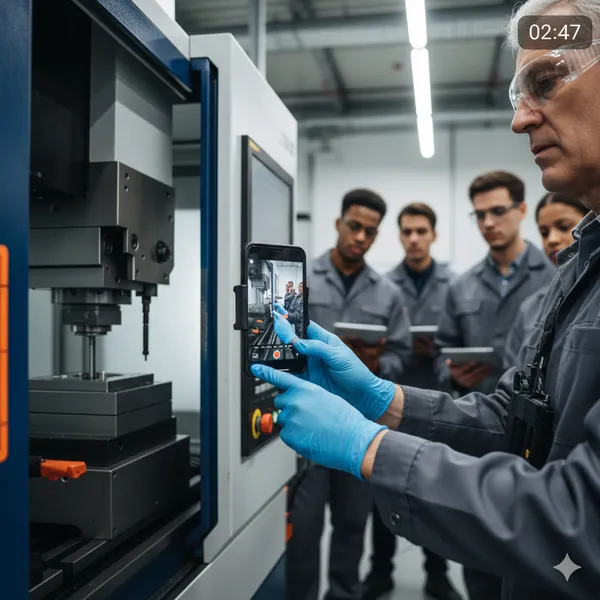
Step 1: Start with a real process video
You do not need studio-quality footage.
Good enough video:
- phone recording
- helmet camera
- GoPro
- screen recording
- Teams or Zoom training session
What matters:
- hands visible
- tools visible
- key actions visible
- spoken explanation if possible
If one video contains multiple procedures, split it first.
Short manuals are used. Long ones are ignored.
Step 2: Identify natural step boundaries
Watch the video once without writing.
Look for:
- tool changes
- machine state changes
- safety-critical actions
- inspection points
- decision moments
Each of these becomes a step.
A good instruction manual usually contains:
- 5–15 steps per procedure
- one action per step
- one clear outcome per step
If a step contains “and”, it is probably two steps.
Step 3: Convert actions into operator language
Bad step:
Prepare the machine appropriately
Good step:
Insert the blue fixture into slot B until it clicks
Instruction manuals fail when they use management language instead of operator language.
Rules:
- describe what hands do
- reference visible objects
- avoid abstract verbs
- assume the reader is tired
If a step is unclear after one read, rewrite it.
Step 4: Add visual anchors
Every step should answer:
How do I know I did this correctly?
Examples:
- green light turns on
- gauge reads 3 bar
- part sits flush with housing
- warning sound stops
These anchors reduce training time and errors.
Video is valuable because it shows these signals.
The manual must name them explicitly.
Step 5: Add safety and failure notes
Real work includes mistakes.
Good manuals include:
- what can go wrong
- what not to force
- when to stop
- who to call
These notes should appear directly under the relevant step.
Not in a separate safety chapter nobody reads.
Step 6: Use AI to accelerate structuring
This is where modern tools help.
Instead of typing everything manually:
- upload the process video
- specify audience and detail level
- generate a draft SOP
- review and correct
AI does not replace validation.
It removes the blank page and saves you hours of manual work.
Teams still own accuracy.
Tools like SOPX are designed specifically for:
- video → structured SOP
- multilingual instructions
- consistent formatting
- quick updates when processes change
- versioning → your Instruction manuals are always up to date
The result is faster documentation, not automated documentation.
Step 7: Test the manual with a new operator
The real test:
Give the manual to someone who never did the task.
Do not explain anything.
Observe:
- where they hesitate
- where they guess
- where they ask questions
Those points reveal missing clarity.
If one person struggles, many will.
Documentation is finished only when a beginner can execute it safely. For more on making manuals people actually follow, see our guide on how to make instruction manuals that people actually use.
When video-based manuals work best
This workflow is especially effective for:
- manufacturing operations
- machine setup
- maintenance procedures
- inspections
- onboarding training
- field service workflows
- employee training
- upskilling your team members
Anywhere physical action matters more than theory.
Frequently Asked Questions
Can I make an instruction manual without writing skills?
Yes. Clear manuals depend more on observation than writing talent. If you can describe what hands are doing, you can write usable steps.
Do I need professional filming equipment?
No. Modern phone cameras are sufficient. Stability and visibility matter more than resolution.
How long should one instruction manual be?
Ideally under 10 minutes of execution time. If longer, split into separate procedures.
What’s the fastest way to convert video to SOP?
It’s 2026 - use AI tools like SOPX. This way your SOPs will be finished in minutes instead of weeks. And workers love this short form training format too.
How to present the idea of AI digital work instructions and SOPs from video to my boss?
Business owners and managers think in terms of return on investment (ROI). We prepared a simple FREE calculator where you can quickly see how adoption of tools like SOPX would help your business. Check out Video to SOP ROI Calculator.
Final takeaway
Most companies do not lack knowledge.
They lack structured capture.
If work is already being recorded, you are one step away from usable documentation.
If not, start recording it - use your phone or screen recording tools. It’s good enough.
Video shows reality.
A good instruction manual makes reality repeatable.
Start free with SOPX
If you want to write training manuals faster in 2026, start with real work.
A short video of the task is often the best source.
If you are building or rebuilding your training system, you can start using SOPX for free: