Knowledge lives in people, not in systems
Critical know-how is spread across chats, memory, and outdated files. New hires depend on shadowing instead of clear instructions.


SOPX is an SOP platform: turn any process into a structured, step-by-step SOP with AI, then keep every procedure in one searchable SOP library.
Capture any process and get a structured SOP fast. Organize by workspace and team. Share with the floor by link or QR code. Update any step as the work changes.
14-day free trial. No credit card. 5 SOPs included.
SOP software that solves the core problems slowing training, onboarding, and process consistency.
Critical know-how is spread across chats, memory, and outdated files. New hires depend on shadowing instead of clear instructions.
Processes change constantly, but manuals stay stale because updates take too much effort and ownership is unclear.
Different teams follow different versions of the same process, causing errors, delays, and rework.
Capture any process, structure it into a clean SOP, organize it by team, share it with the floor, and keep every step current as the work changes.
Use physical process videos, software walkthroughs, import existing PDF documents, or create SOPs manually when no source material exists.
AI converts content into clear steps, while your team can edit wording, reorder steps, and add new clips any time.
Distribute the latest approved SOP via public links and QR codes. Anyone can view without an account, combined with role-based access and traceable history.
Watch how teams create, organize, share, and maintain SOPs in SOPX.
Refine AI-generated SOPs by editing wording, reordering steps, or adding new details. Every SOP stays accurate as your process evolves.

SOPX saved us weeks of work creating SOPs from our production videos. Now we share standardized procedures with our customers around the world in minutes instead of days.
Klemen Zupančič
Founder & CEO, Ampleafy Life Sciences
One platform, every SOP need
Capture any process and get a structured SOP fast. Organize by workspace. Share by link or QR. Update any step as work changes. One platform for the full SOP lifecycle.
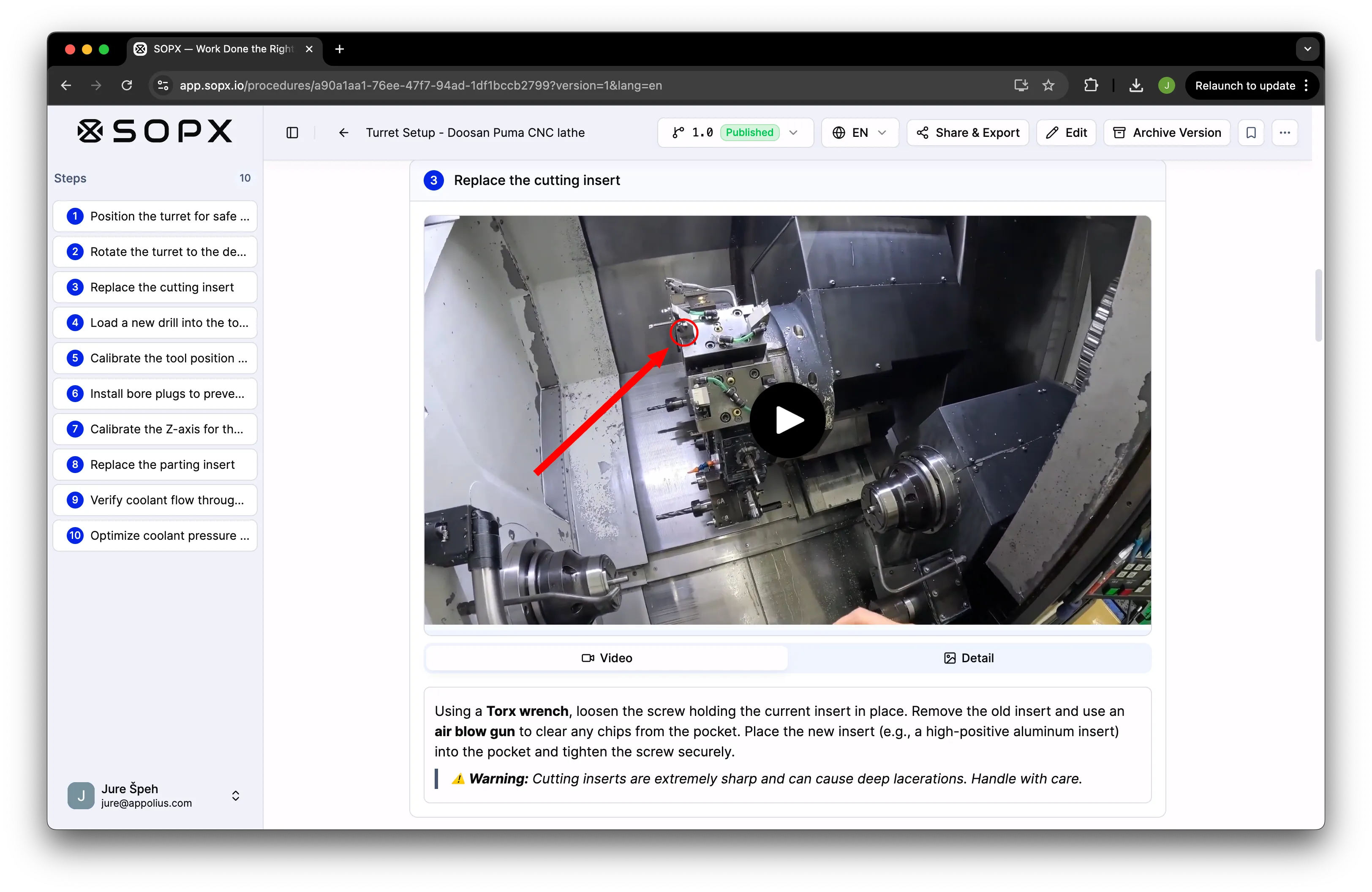
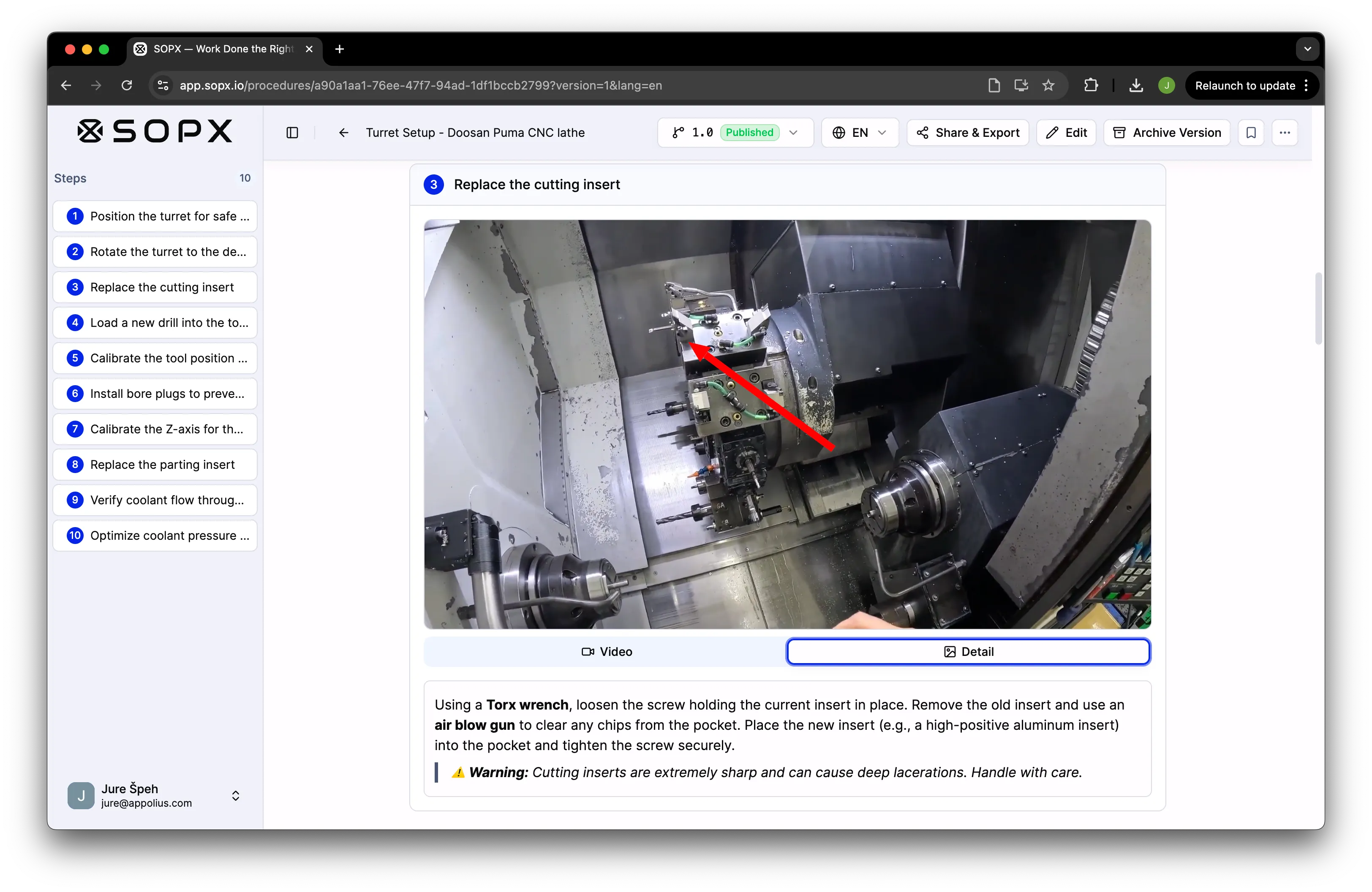
01 / Author from video
Upload a phone recording, screen capture, or existing process video. SOPX splits it into steps, trims clips, and drafts titles and descriptions. You review the result, not a blank page.
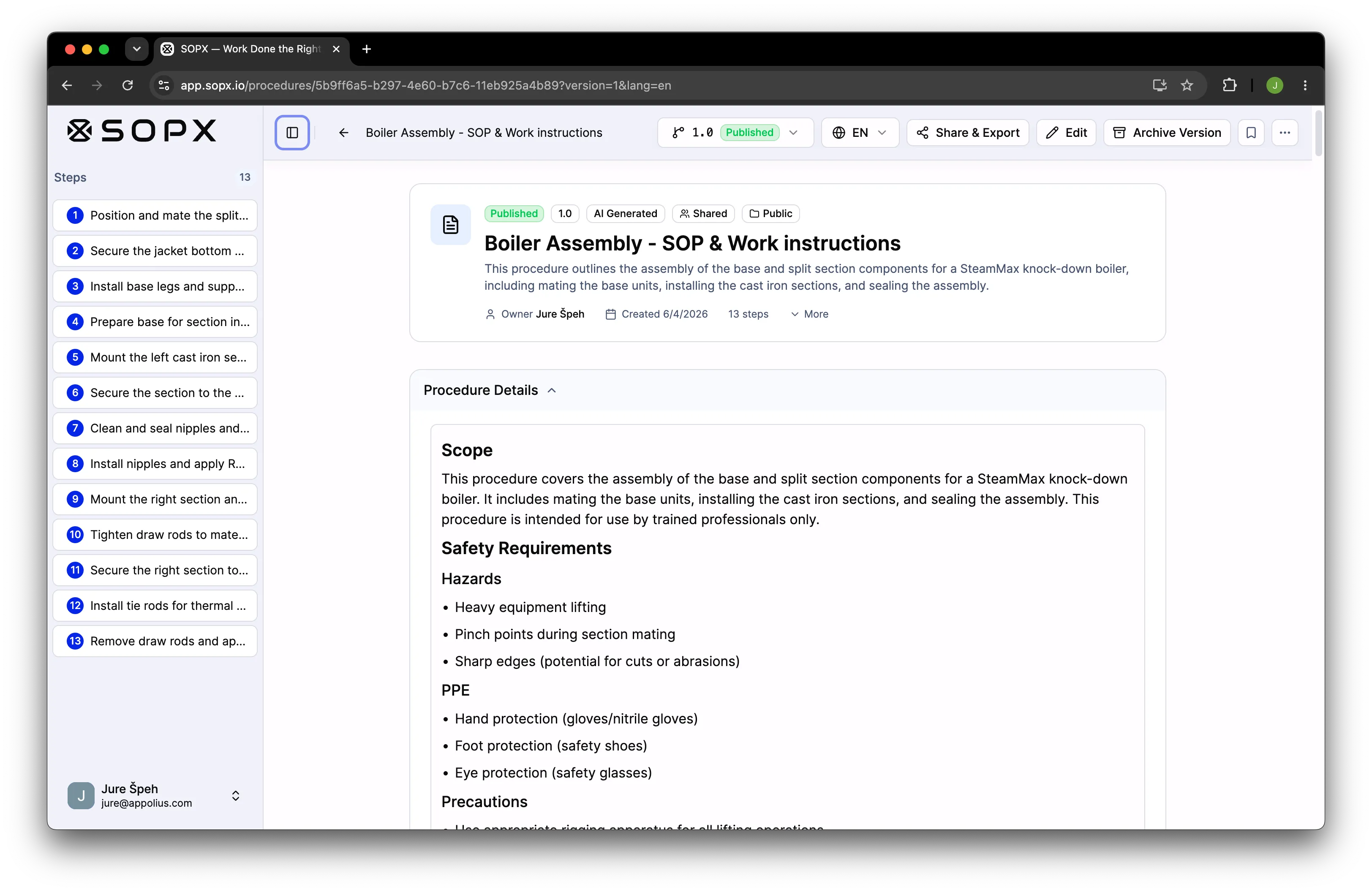
02 / Complete, audit-ready SOPs
Most tools stop at the step list. SOPX also builds the Procedure Details header every real SOP needs: purpose, scope, responsibilities, safety, references. Define your template once and the AI fills each section from the same video or PDF. It ships in your PDF and Word export.
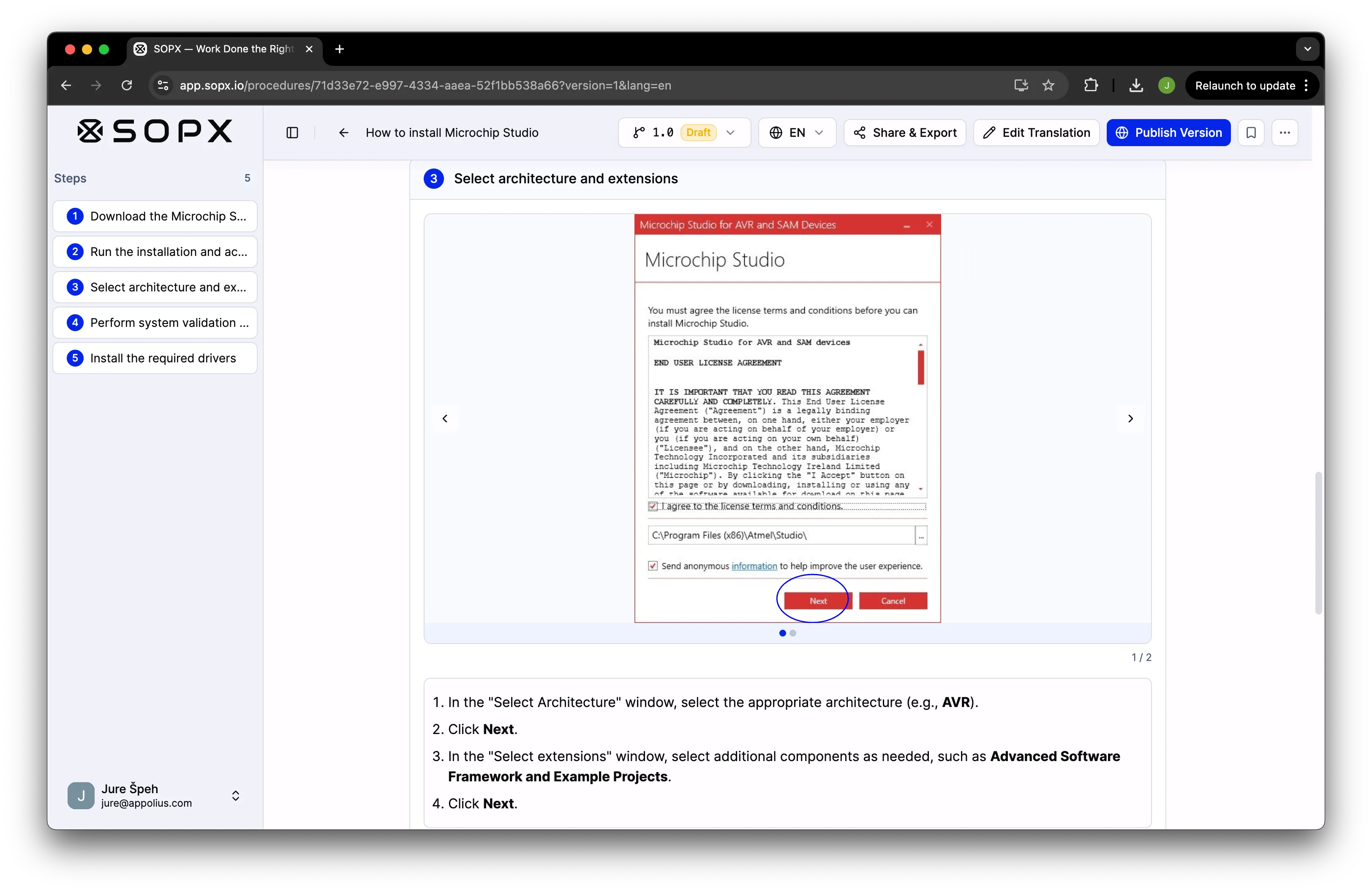
03 / Migrate your library
Drop in legacy PDF instructions and SOPX rebuilds them as editable, multilingual, versioned SOPs. The original images, screenshots, and figures are preserved and re-mapped to the right steps.
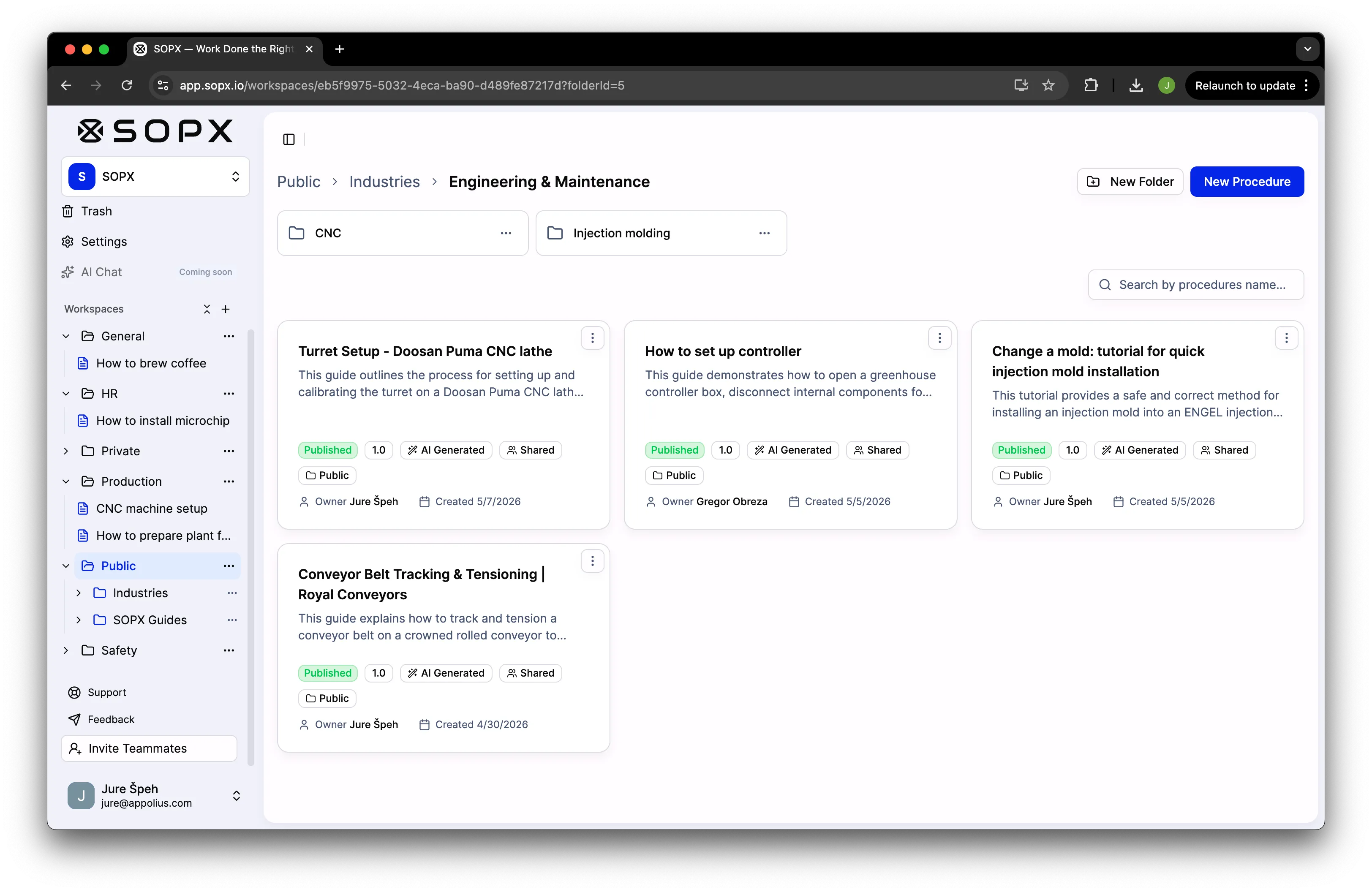
04 / Organize
Group SOPs into workspaces by department, line, or location. Set who can view, edit, or publish per workspace. New hires see only what they need; admins keep one source of truth.
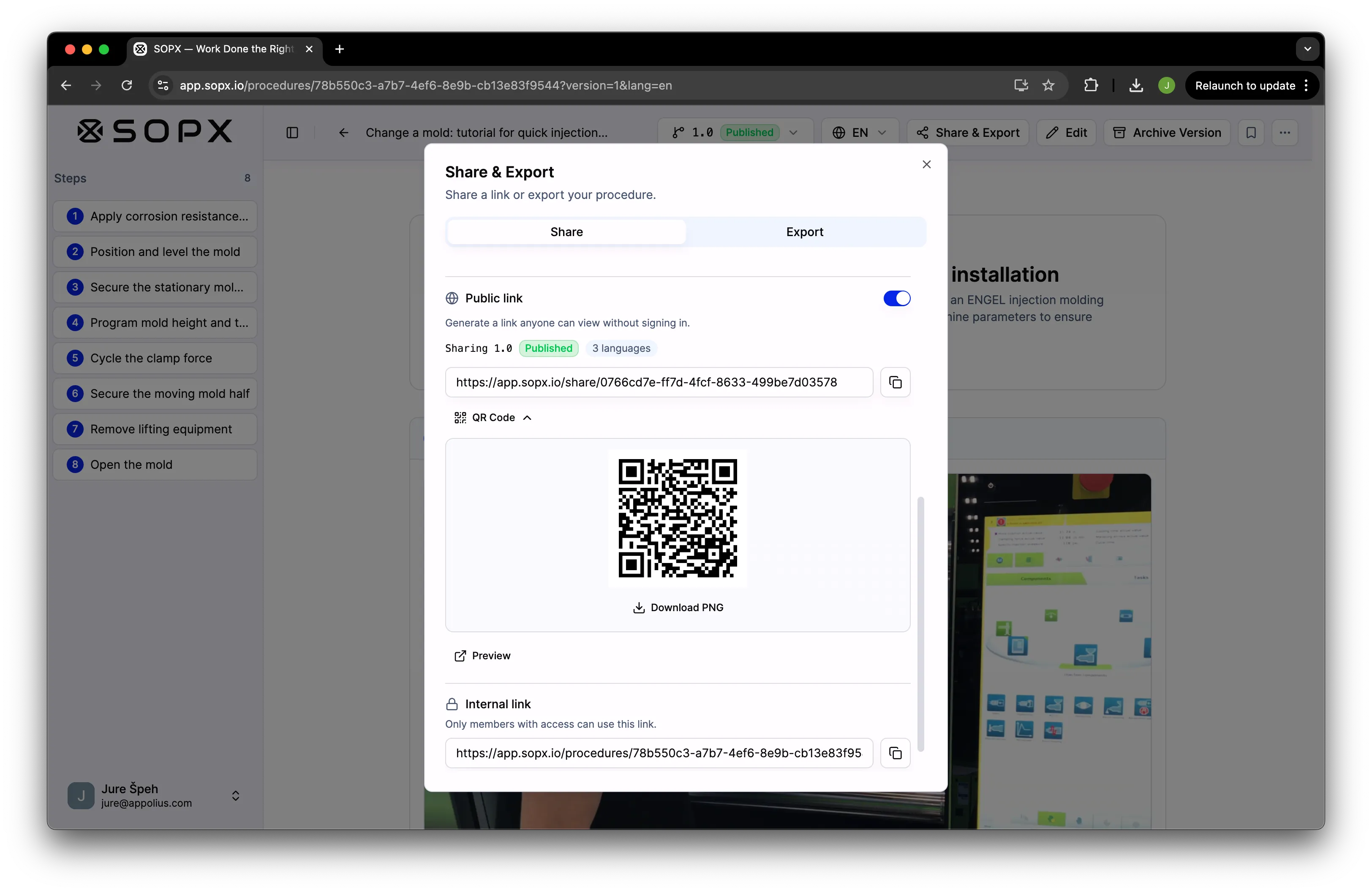
05 / Share
Publish an SOP and share it with your team. For non-sensitive procedures, send a public link or QR code that partners or customers can open on any phone, no app to install. Update the SOP and the link keeps working.
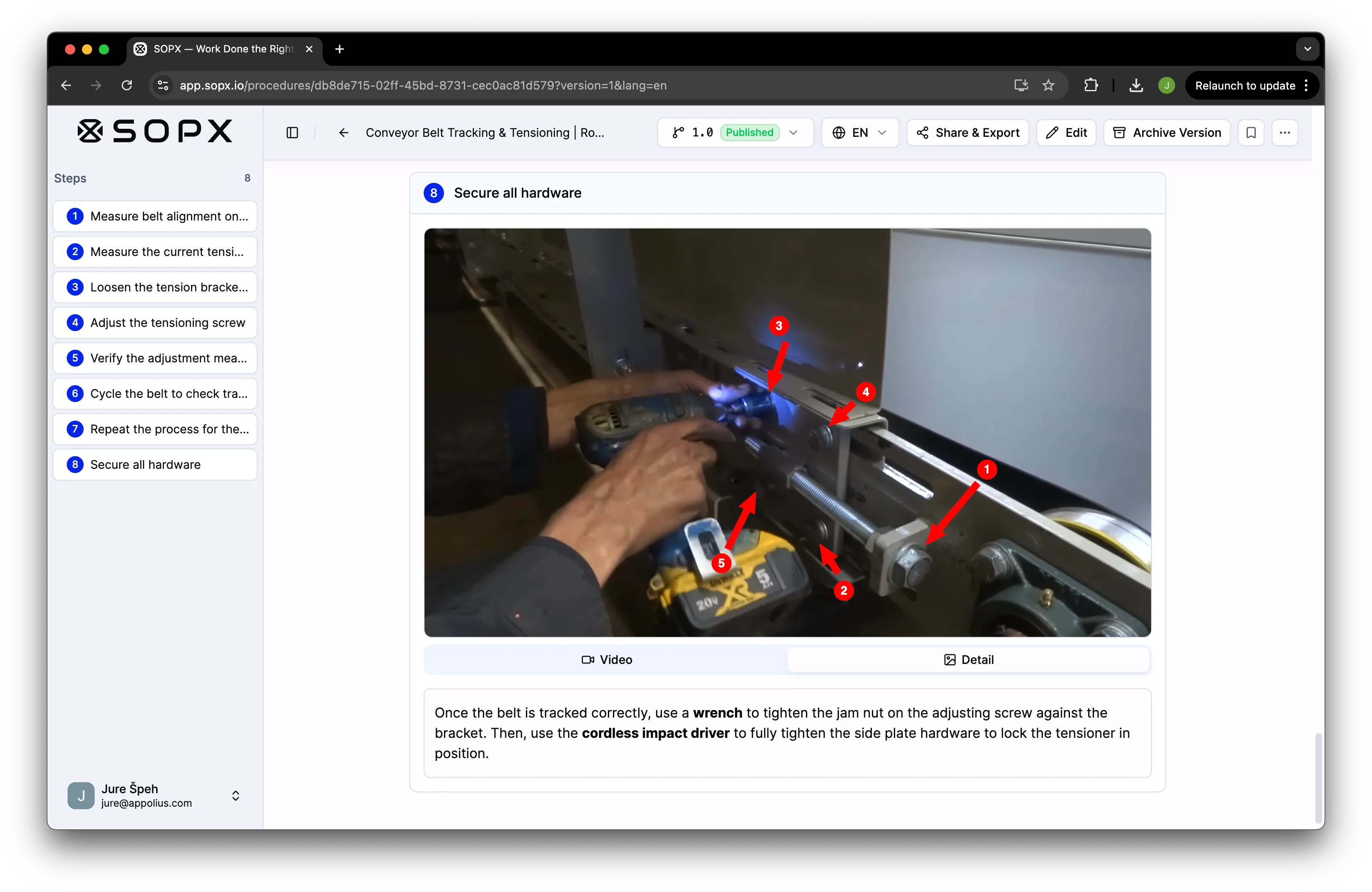
06 / Refine
Add arrows, shapes, text, and callouts to any step frame. Operators see exactly what to focus on before they press the button. Edits are non-destructive and travel with translations.
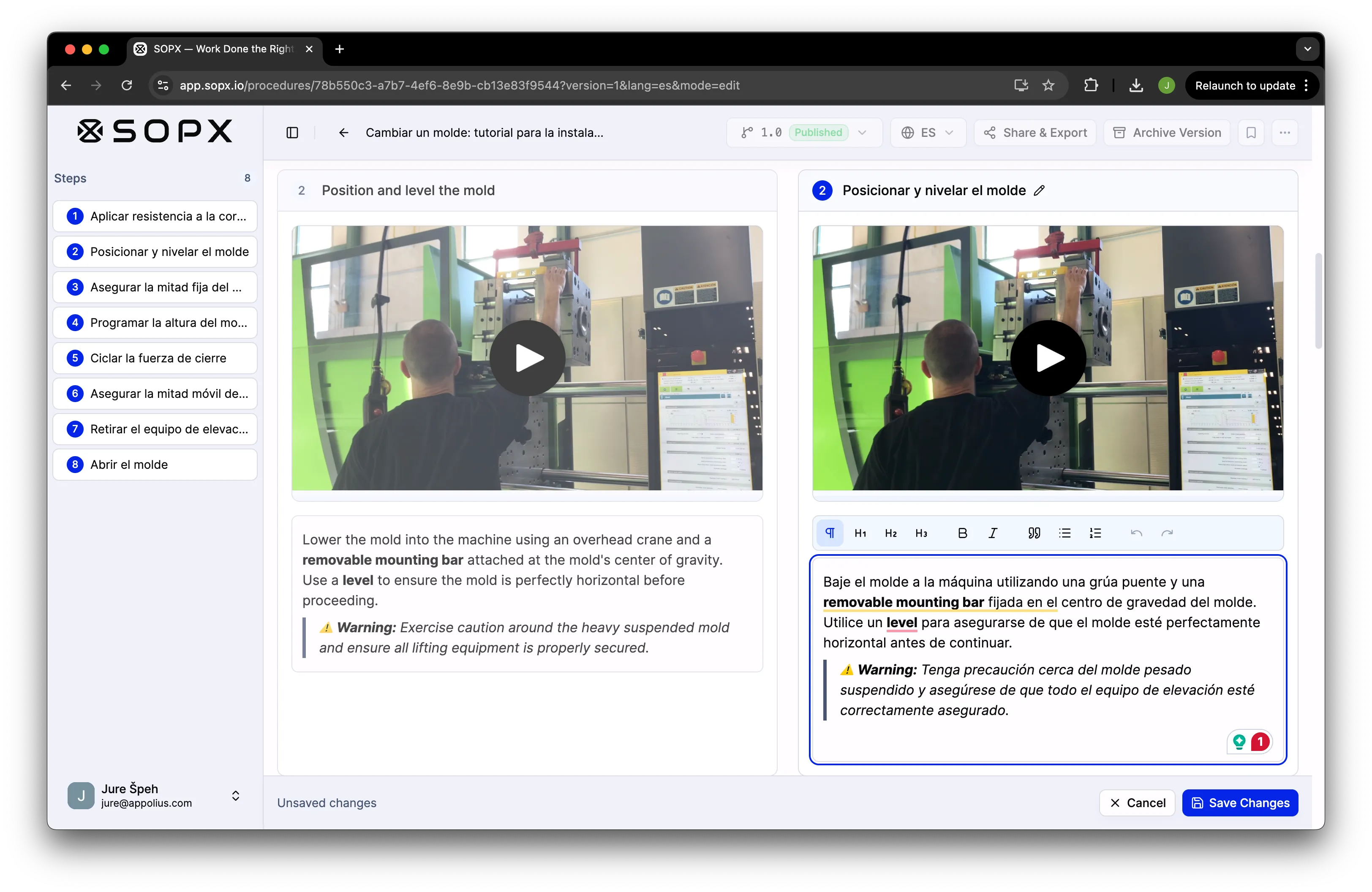
07 / Localize
AI translates SOPs while preserving operational terminology. Edit any sentence in any language without re-translating the whole document. Learners read in their language; you maintain in yours.
Want to try SOPX yourself?
14-day free trial. No credit card. See your first SOP in 10 minutes.
Everything SOPX does
Professional structure, clear ownership, and practical tools for teams that need consistency at scale.
Upload a phone recording or a screen capture and AI returns a structured SOP with steps, descriptions, and an auto-trimmed video clip on every step.
Upload an existing PDF procedure and AI parses it into a structured, editable SOP. Embedded images and carousels come across and land on the right steps.
Combine up to 5 videos and 5 PDFs for the same procedure into one SOP. Each PDF is either a Procedure file that steps are built from, or Additional info that the AI reads for context rather than for steps. Included on Enterprise.
Templates carry the header a real SOP needs: purpose, scope, responsibilities, safety. AI fills each section from the same video or PDF that produced your steps.
Translate any SOP in seconds, step forms included. The output stays fully editable, so a supervisor can correct terminology your floor actually uses.
Every AI-generated SOP is fully editable. Rewrite wording, reorder or delete steps, and insert custom steps with a single image or an image carousel.
Trim the clip on any step to the exact moment, replace it with a better take, or attach a new clip without regenerating the whole SOP.
Add arrows, rectangles, ellipses, text, and callouts to a step's video frame or image. Detail view shows the annotated key frame for a quick visual reference.
Comment on a whole procedure or a single step, reply in threads, and resolve when handled. Operators can flag an outdated step without being able to edit it.
Organize SOPs by department, site, or production line. Workspaces hold related procedures together and folders nest inside for finer structure.
Group people into teams that match your org chart. Roles and access levels decide who can view, comment, edit, or manage, per workspace or per SOP.
Type a part name, a setting, or a piece of shop-floor jargon and SOPX returns the matching procedures plus the exact steps where the term appears.
Create a new version when a process changes. Previous versions stay accessible and restorable, so the floor never follows an outdated sheet.
Turn on approvals and nothing publishes until an approver signs off. Draft, submit for review, then publish or request changes with a reason attached.
Every procedure keeps an automatic, read-only timeline of what changed and who changed it. Created, submitted, approved, published, restored, each with a timestamp.
Give any procedure a unique Document ID such as SOP-PROD-014 using your own numbering convention. It follows the procedure across every version and language.
Assign who documents which job, with a due date and a status. The assignee is notified, links the procedure to the task, and closes it. Link an existing SOP instead and a completed task confirms they read it.
Attach forms and checklists to specific steps so workers confirm each one. Ten field types, from yes/no/na to image and signature, plus a closing note and signature.
Open any procedure in a distraction-free, presentation-style view that shows one step at a time, built for operators following along on the floor.
See who viewed and ran what and when, your most popular procedures, and public view counts. Review run results in one place to confirm steps were completed.
Share a single SOP, or a whole workspace or folder, behind one link or QR code. Viewers open it instantly with no login. Print the QR next to the equipment.
Export any SOP as a PDF or Word document, Procedure Details header included, for auditors, printed binders, and customers who need a file.
Export a procedure as a PowerPoint deck with the step video clips embedded, so a training session or a toolbox talk runs straight from the SOP. Included on Enterprise, available as a paid add-on on Pro.
Export a procedure as a zip holding a Markdown file and the step images, ready to drop into a wiki, a docs site, a knowledge base, or a repo. Included on Enterprise, available as a paid add-on on Pro.
Package a procedure as a SCORM 1.2 training zip with the step videos included, then upload it to your LMS as a course that tracks who completed it. SCORM 1.2, not 2004. Included on Enterprise, available as a paid add-on on Pro.
Every original video, PDF, and image you uploaded stays downloadable from the version media menu, including images extracted from a PDF.
Sign in with your existing identity provider, and let SCIM 2.0 create, update, and deactivate users automatically as people join and leave. Group provisioning is not supported.
Put your logo and brand colors across the platform and onto every public SOP you share with contractors and customers.
Imports handle videos up to 20 minutes and PDFs up to 100 pages by default. Enterprise customers can request longer and larger sources, up to 40-minute videos and PDFs up to 500 pages or 200 MB, configured per organization.
SOPX works for physical operations and software workflows, from frontline execution to internal enablement.
New to the terminology? See SOP vs work instructions →
Standardize assembly, setup, quality checks, and shift handovers.
Train staff quickly on store operations, merchandising, and service routines.
Document receiving, picking, packing, and safety workflows across sites.
Support repeatable clinical and administrative procedures with clear steps.
Maintain controlled SOP execution and updates for regulated operations.
Standardize hygiene, prep, line operations, and quality compliance tasks.
Capture specialized machine and process know-how before experts retire.
Train teams consistently on prep, service, hygiene, and opening/closing routines.
Scale onboarding for seasonal teams with multilingual SOPs and guides.
Turn product walkthroughs into repeatable playbooks for support, onboarding, and internal tools.
Compare common manual documentation workflows with a structured SOPX workflow.
Weeks to produce or update one SOP
Manual documentation bottlenecks delay rollout.
Inconsistent training between teams
Different trainers explain the same process differently.
Outdated instructions on the floor
Teams cannot trust whether a document is current.
Hard to scale across languages and sites
Translation and distribution add friction.
Generate SOPs in minutes from video, PDF, or from scratch
Fast documentation for physical and software tasks, or convert existing documents instantly.
Maintain one reliable source of truth
Versioning and approvals keep standards consistent.
Deliver multilingual guidance at speed
AI translation preserves operational meaning, not just words.
Give teams instant access where work happens
Share via public links and QR codes. Viewers access SOPs instantly without creating an account.
Scalable pricing that fits every organization, from a free trial to per-user Pro and custom Enterprise.
Free trial
$0
14-day trial. No credit card.
Pro
$9
per user / month, billed annually
Enterprise
Custom
For 100+ users or multiple sites. SSO and SCIM, custom branding, PowerPoint, Markdown and SCORM 1.2 export, multi-file AI generation, dedicated onboarding, volume pricing, and priority support.
Clear answers about how SOPX supports fast, accurate, multilingual SOP operations.
Author, organize, share, and maintain SOPs in one place. 14-day free trial, no credit card.