Multi-Step SOP Approval Workflow: Approval Chains and ISO 9001


Multi-step approval sends an SOP version through ordered review stages, like Technical review, QA, and HSE. How approval chains work in SOPX, and what ISO 9001 clause 7.5.2 actually requires from SOP approval.
TL;DR
Multi-step approval lets a new SOP version pass several reviews in a fixed order before it goes live. An admin builds approval chains in Settings, for example Technical review, then QA, then HSE. Each stage has a name and one or more approvers. If a stage has several approvers, one approval is enough. When the author submits for review, they pick a single approver or a chain. The last approver publishes the version. Every approval then shows on the published procedure and on exported documents. Multi-step approval is part of the Enterprise plan.
- Approval chains live in Settings > Approval flow. Create as many as you need, one per department or process type.
- Stages run in order. Stage 2 only starts after stage 1 is approved.
- Any approver in the chain can request changes and send the version back to the author.
- Access is automatic. Each stage’s approvers get comment access when the review reaches them.
- The record stays with the procedure. Stage names, approvers, and dates appear on the published SOP and its exports.
- ISO 9001 does not require several approvers. Clause 7.5.2 asks for appropriate review and approval and lets you decide who approves. If your procedure names more than one function, an approval chain makes sure every one of them signs.
Why one approver is sometimes not enough
The approval flow gives every SOP a sign-off step before it publishes. One person reviews the version, then approves it or asks for changes. For many teams that is the right amount of control.
Larger operations often need more. A machine setup procedure touches several areas at once. The process engineer checks the technical steps. Quality checks the inspection points. Health and safety checks the hazards and the PPE. Each of them is responsible for a different part, and each wants their name on the approval.
Without a chain, this happens by email. The author sends a draft to the engineer, waits, forwards it to QA, waits again, then chases HSE. Nobody knows where the document is. Sometimes a version goes live after only one of the three reviews. Multi-step approval makes that route part of the procedure itself.
Set up approval chains in Settings
Admins open Settings > Approval flow and find the new Approval chains section. Click New chain, give it a name, and add stages.
Each stage has:
- A name that says what the stage checks, such as Technical review, QA, or IT security review.
- One or more approvers. If you add several people to one stage, any one of them can approve it. This keeps a review moving when someone is on leave or on another shift.
You can build as many chains as you need. Most teams create one per department or per type of document. For example:
- Production SOPs approval flow: 1. Technical review, 2. QA, 3. HSE
- Office process approval flow: 1. Technical review, 2. IT security review
Chains can be edited or deleted at any time from the same screen.
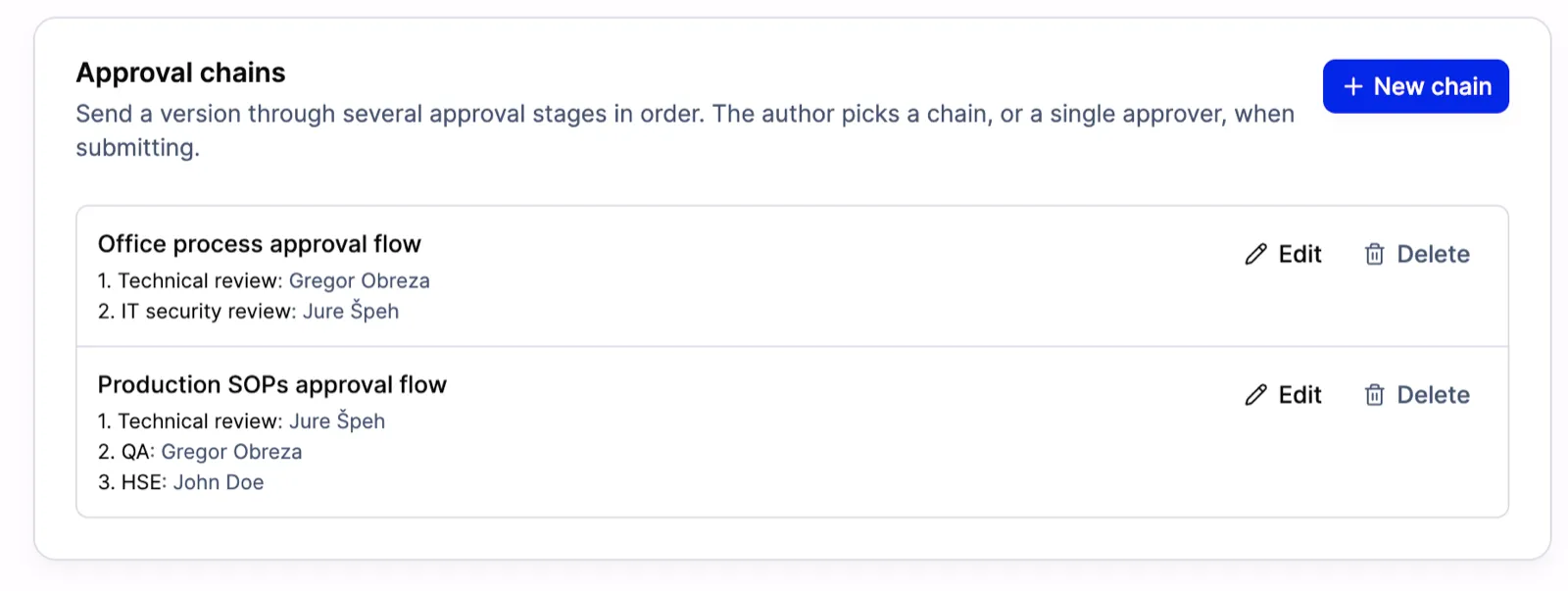
Two approval chains in Settings. Production SOPs pass three stages: Technical review, QA, and HSE. Office processes pass two: Technical review and IT security review.
Submit a version through a chain
When a draft is ready, the author clicks Submit for review as before. The dialog now has a Route choice:
- Single approver. The version goes to one person, like it does in the standard approval flow.
- Approval chain. The author picks a chain from the list, for example Production SOPs approval flow · 3 stages. The dialog shows each stage and its approvers, so the author sees the full route before submitting.
The author also writes a short note under What changed in this version? Every reviewer sees this note, so nobody has to guess what to look at.
Each stage’s approvers get comment access when the review reaches them. They do not need access to the procedure in advance.
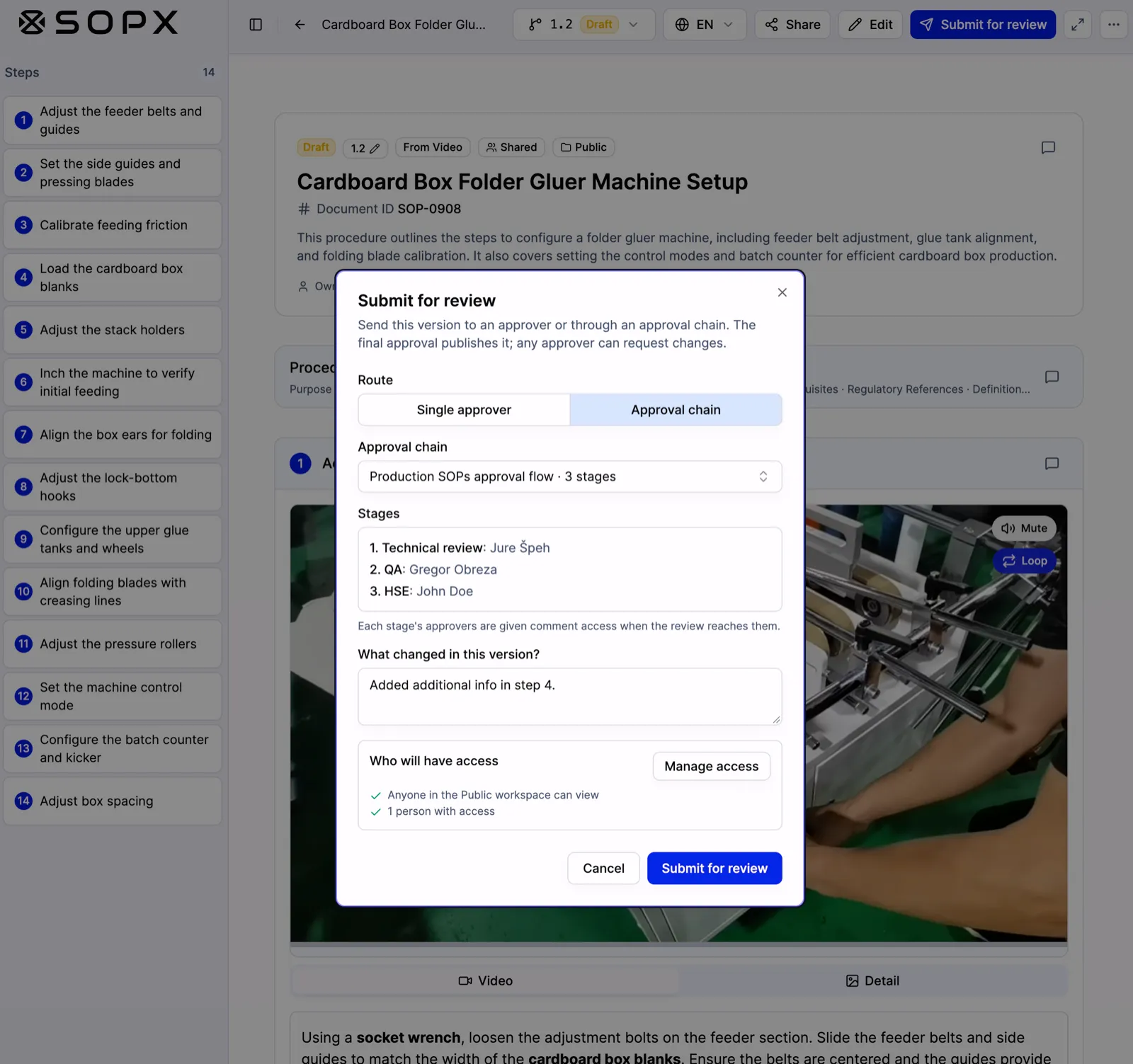
The author switches the route to Approval chain and picks the production chain. The dialog lists all three stages and their approvers before anything is sent.
Follow the review stage by stage
While a version is in review, the procedure header shows the chain and the status of every stage:
- A green check for approved stages, with the approver’s name and the date.
- An active marker on the current stage, with the name of the person it is waiting on.
- An empty circle for stages that have not started yet.
The version stays read-only during the whole review. Every reviewer signs off on the same content. The author can still withdraw the submission to make more edits.
Each stage needs its own approver. If you approved an earlier stage, SOPX tells you that another approver must approve the current one. You can still request changes if you spot a problem.
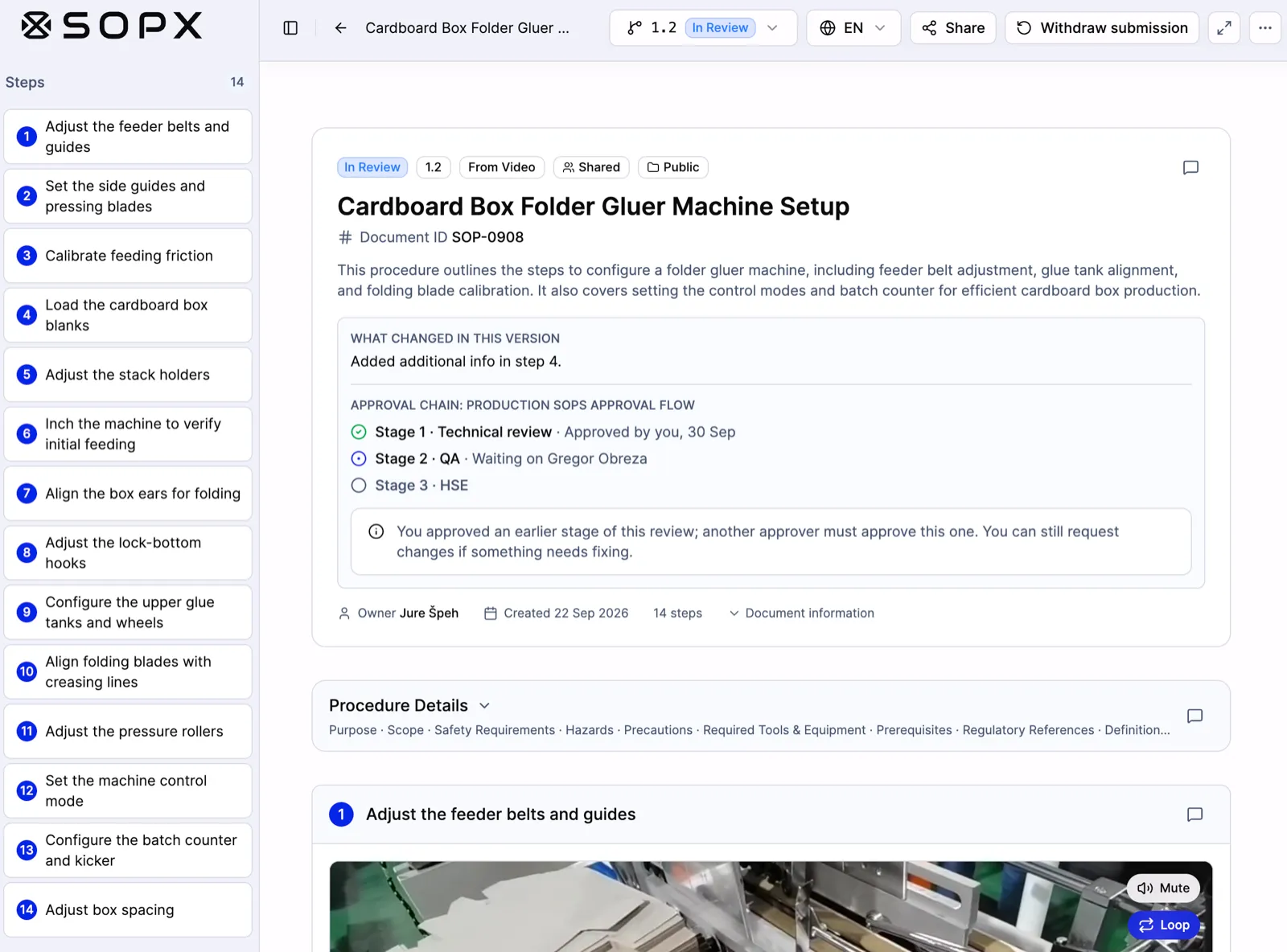
Stage 1 is approved, stage 2 is waiting on the QA approver, and stage 3 has not started. The note above the chain tells reviewers what changed in this version.
When the last stage approves
The approval on the final stage publishes the new version. The previous published version is archived automatically, the same as in the standard flow.
The approvals stay visible after publishing. Anyone who opens the procedure can see which stages it passed, who approved each one, and when. The same approvals are included on exported documents. A printed or exported copy carries its own sign-off record, which is useful when an auditor asks for proof on paper.
When someone requests changes
Any approver in the chain can request changes. The version goes back to the author with the reason attached, and the author fixes it and submits again.
A concrete example
Mia updates the setup procedure for a folder gluer machine. She adds more detail to step 4 and submits it through the Production SOPs approval flow.
- Technical review. The process engineer checks the machine settings and approves.
- QA. The quality lead gets comment access and sees the review waiting. She checks the inspection points and approves.
- HSE. The safety officer confirms the guarding and PPE notes and approves.
The HSE approval publishes version 1.2. Operators on the line now see the new version. The header shows all three approvals with names and dates. When Mia exports the procedure for the audit binder, the export includes the same three approvals.
Where multi-step approval helps most
- Manufacturing. Machine setups and changeovers that need engineering, quality, and safety sign-off.
- Food production. HACCP-related procedures that need both QA and food safety review.
- Laboratories and healthcare. Methods that need a technical reviewer and a quality manager.
- Multi-site operations. One chain per site, so each site’s own reviewers sign off on their procedures.
Does ISO 9001 require multi-step approval?
No. ISO 9001 requires approval, but it does not set the number of approvers.
Clause 7.5.2 says that documented information, which includes SOPs and work instructions, needs “appropriate review and approval for suitability and adequacy” when you create or update it. The wording is the same in ISO 9001:2015 and in ISO 9001:2026, which was published on 16 September 2026. The standard does not say how many people approve, or in what order. Your organization decides that.
What ISO 9001 does expect is simple:
- You define who approves. Most quality systems write this down in a document control procedure. For example: “Production SOPs are approved by the process engineer, QA, and HSE.”
- You follow that rule every time. Auditors check that each released document went through the approvals your own procedure asks for. A missing approval is a common audit finding.
- You can show the evidence. Who approved the current version, and when.
So the question is not “does ISO 9001 need a chain?” It is “what did we promise in our own procedure, and can we prove we did it?”
When one approver is not enough
Many teams choose more than one approval for some documents, even though the standard does not force them to:
- The procedure touches several functions. A machine setup has technical steps, quality checks, and safety risks. Each function owner wants to review their part.
- Safety-critical work. ISO 45001 uses the same clause 7.5.2 wording as ISO 9001. Many sites add an HSE stage to any procedure that covers hazards, guarding, or PPE.
- Regulated industries. ISO 13485 for medical devices asks you to review and approve documents for adequacy before issue. EU GMP Chapter 4 says documents with instructions must be “approved, signed and dated by appropriate and authorised persons.” In practice, many GMP sites ask for an author, a technical reviewer, and a QA approver.
How approval chains map to clause 7.5
| What ISO 9001 expects | How SOPX handles it |
|---|---|
| 7.5.2 Appropriate review and approval | Each stage is named after the function that reviews it, such as QA or HSE, with its approvers set in advance |
| Follow your own approval rule | Admins define the chains. Stages run in order, and only the last approval publishes |
| Evidence of approval | Stage names, approvers, and dates show on the published procedure and on exported documents |
| 7.5.3.2 Control of changes | The version is read-only in review, the author notes what changed, and the old version is archived when the new one publishes |
| 7.5.2 Identification | A Document ID and a version number on every procedure |
A tip for your next audit: write your approval chains into your document control procedure with the same stage names you use in SOPX. Then the procedure and the system say the same thing.
For the full picture of clause 7.5, see ISO 9001 SOPs and work instructions.
Good to know
- Plan. Multi-step approval is part of the Enterprise plan. The standard approval flow with a single approver stays on Pro and Enterprise. See pricing.
- Single approver is still an option. Authors on Enterprise choose a single approver or a chain for each submission.
- Admins manage chains. Chains are created, edited, and deleted in Settings > Approval flow.
- One approval per stage. If a stage has several approvers, the first approval completes that stage.
- Stages run in order. A later stage cannot approve before an earlier one.
Getting started
- Turn on the approval flow in Settings > Approval flow.
- Create your first approval chain under Approval chains. Start with the one procedure type that needs the most reviews.
- Ask your authors to pick that chain the next time they submit.
Multi-step approval is available now on the Enterprise plan. Book a meeting and we will help you set up your first chains.