


Train New Hires on Work Instructions They Can Follow Alone
Film the job once on a phone. SOPX turns it into a visual work instruction. Put instructions in a training path, and new starters work through it at their own pace, in their own language. Each trainee signs off, and you see who is trained.
The problem
The Problem
Training drags on for weeks
New hires on the line need weeks of shadowing because the work instructions are missing, outdated, or too dense to use at the machine. A senior operator stops working to train each one.
No record of who is trained
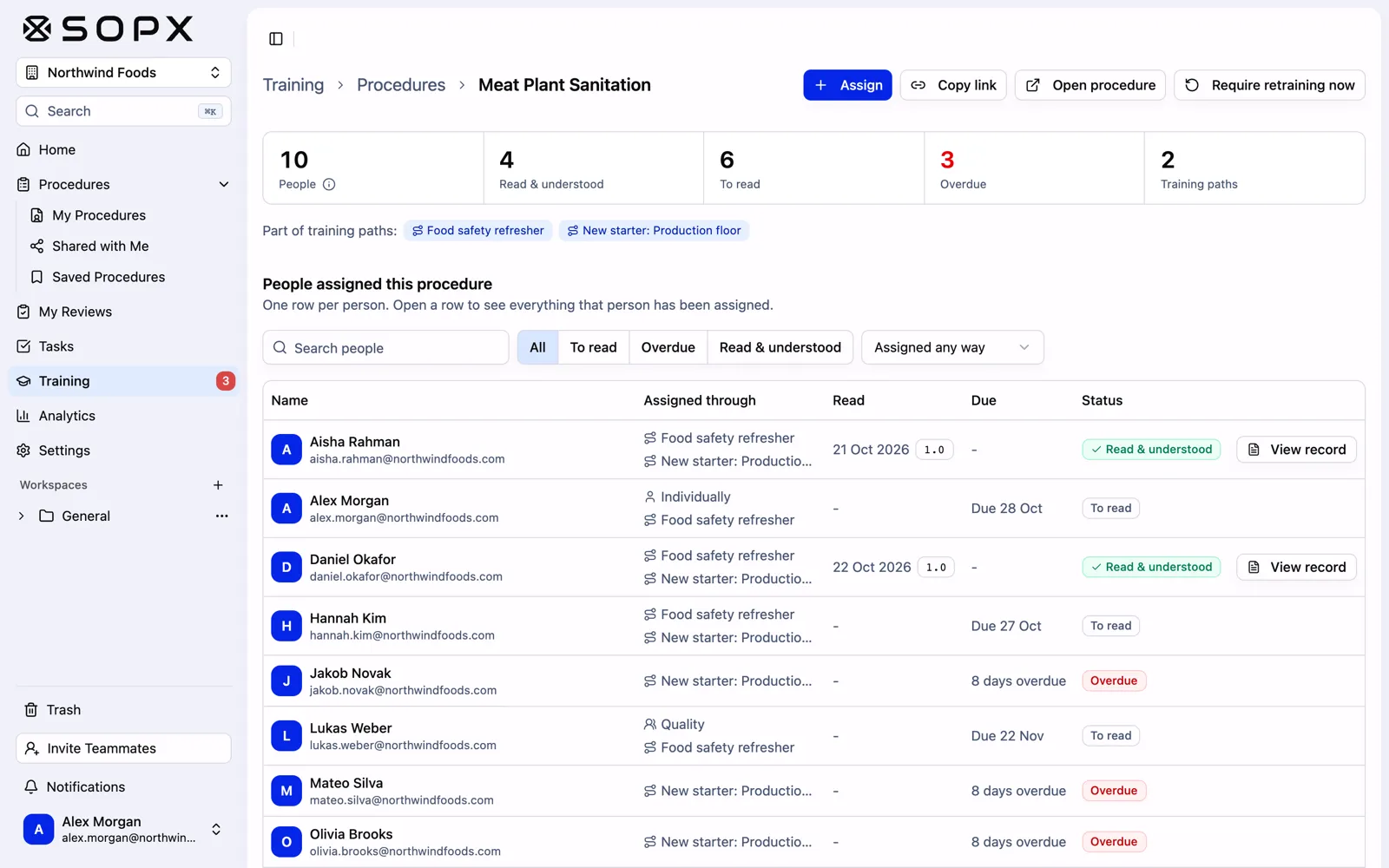
A changeover procedure changes, and nobody can say which operators have seen the new version. The training record lives in a spreadsheet, a paper sign-off sheet, or one person's memory.
Creating instructions takes too long
Writing detailed work instructions from scratch takes hours per procedure. Most teams never finish documenting everything they need.
What changes
How SOPX Helps
10min
per work instruction
Video to work instruction in 10 minutes
AI converts process videos into step-by-step instructions, with a trimmed clip and a description on every step. Visual, scannable, and easy to follow on the job from any device.
1
place to see who is trained
Training paths with sign-off
Put work instructions in a set order and assign the path, or a single instruction, to a person or a team. Trainees sign off with a click or a digital signature. You see progress and due dates per person and download reports.
50+
languages supported
Retrain when the process changes
Edit a step and publish a new version. Workers always open the current version, and you can require retraining so each person signs off on the change. AI translation into 50+ languages keeps a mixed-language floor on the same page.
How it works
How It Works
01
Record the procedure or import existing docs
Film the task being performed with any phone camera, or record software tasks with the built-in screen recorder. Or import existing PDF documents to convert into digital work instructions.
02
AI builds the work instruction
Upload the video. SOPX AI extracts each step with a trimmed clip, a title, and a clear description of the key actions. Review the draft, publish it, and translate it for the languages on your floor.
03
Assign it as training
Add instructions to a training path and assign it to new hires or a team, with a due date. Trainees get an email, work through it on a phone, tablet, or station screen, and sign off. You track progress per person and download a report.
Compare
How SOPX compares
Teams evaluating SOPX for work instructions for training usually weigh it against DeepHow , SwipeGuide , and Dozuki . The side-by-side breakdowns show where each tool fits and where SOPX pulls ahead.
Explore
Industries Using This
Manufacturing
Film a changeover, machine setup, or cleaning task on your phone. AI writes the step-by-step work instruction in minutes. Translate it for every language on the floor, train new hires with training paths, and approve each change before it reaches the line.
Learn more →Food Production
Film line cleaning, allergen changeovers, end-of-line packing, and each station's tasks on a phone. AI writes the step-by-step SOP in minutes, or import your existing food safety PDFs. Translate for every worker, train new hires with training paths, and let quality approve each change before it goes live.
Learn more →Logistics & Warehousing
Film picking, packing, receiving, and forklift checks on a phone. AI writes the step-by-step SOP in minutes. Translate it for temp and agency workers, assign a training path for each role, and put a QR code at every station so each shift works the same way.
Learn more →Related Use Cases
Training & Onboarding
Upload a process video and get a step-by-step SOP in minutes. Assign the SOPs as a training path. New hires work through it on their own, in their own language, and sign off when they are done.
Learn more →Process Standardization
Process variation drives quality issues, waste, and errors. Standardize every task with visual SOPs generated from your best methods, accessible at every workstation.
Learn more →Built for These Roles
Training & L&D Manager
Your best people do not have hours to write training docs. Film the expert doing the task, and AI drafts a step-by-step SOP in under 10 minutes. Put SOPs in a training path, assign it to new hires, and see who has signed off.
Learn more →Production Supervisor / Team Lead
You answer the same questions every shift, and your best operators lose time to it too. Film the job once, let AI draft a step-by-step visual work instruction, and point your team to one link they open right at the workstation.
Learn more →Field Service Manager
Your field team works far from the bench and far from each other. Film a repair once, let AI draft the service guide, and every tech follows the same steps on any device, step by step.
Learn more →Key terms
Annotation (in SOPs and Work Instructions)
A visual marker (arrow, shape, text, or callout) added on top of an image or video frame in an SOP to point operators at the exact thing that matters.
Cross-training
Training employees to perform tasks outside their primary role so the team can cover absences, balance load, and keep operations running.
Digital Work Instructions
Step-by-step task instructions that operators open on a screen at the workstation, with one action, photo or video per step, instead of on paper.
Job Instruction
A four-step training method from the Training Within Industry program, used to teach a job correctly the first time. Supported by a one-page Job Breakdown Sheet (JBS).
FAQ
Frequently Asked Questions
How is SOPX different from an LMS or training platform?
Can we convert existing training videos into work instructions?
How do workers access work instructions on the floor?
Can work instructions include both physical and software steps?
How many work instructions can we create with SOPX?
Start today