


Which Version Are They Actually Following?
The procedures exist. They are on a shared drive, in three formats and four revisions, and nobody can say which one is current. SOP management software is what closes that gap.
- 1 Import what you already have
- 2 Approve and version it
- 3 Search it from anywhere
What is SOP management software?
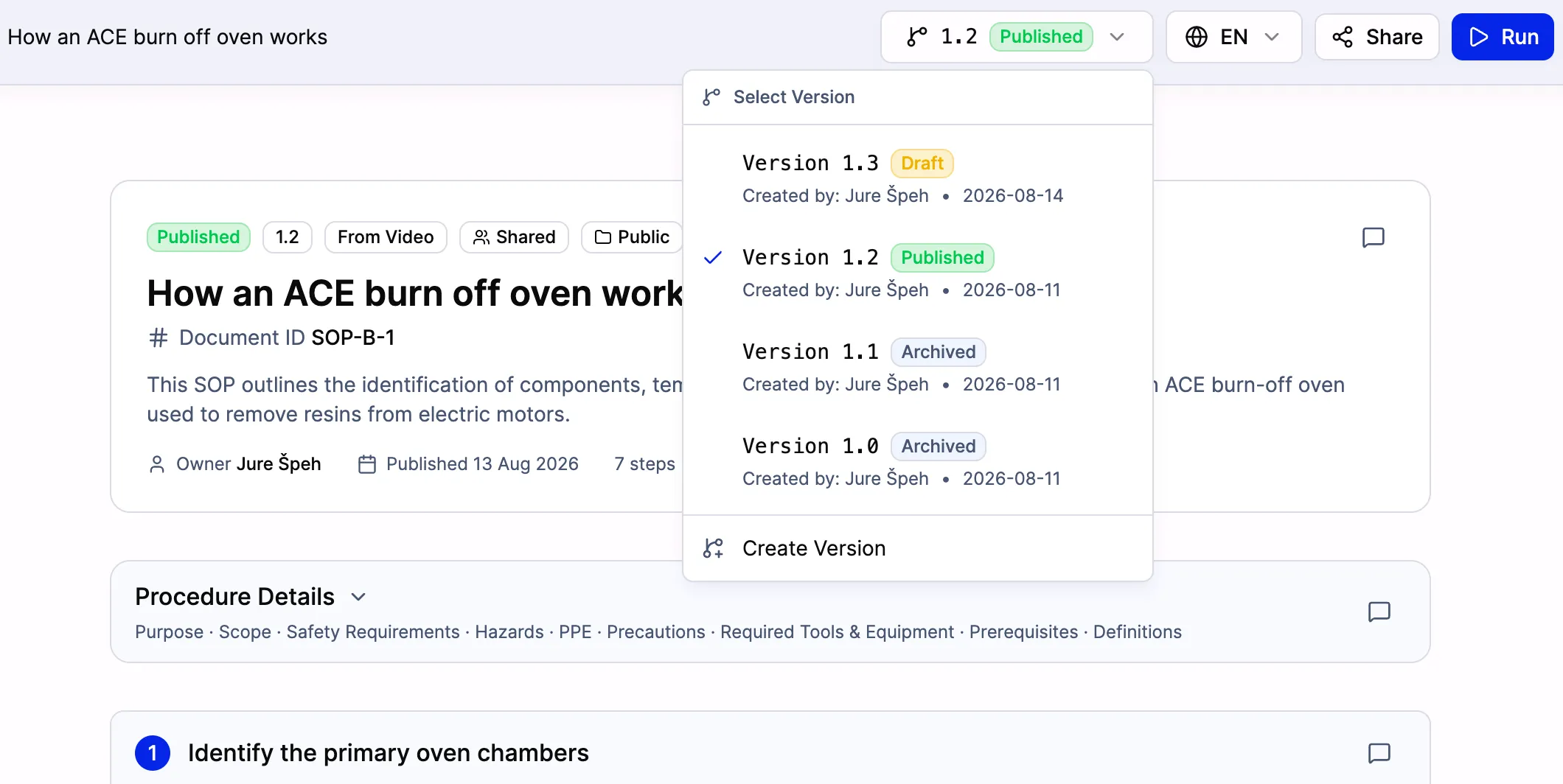
SOP management software is the system of record for standard operating procedures. It stores every procedure in one place, controls who can view and edit each one, routes changes through an approval step, keeps a history of what changed and when, and guarantees the version a worker opens is the current approved one.
The functional core is document control: versioning with restore, a named approver who signs off before publication, an audit trail, stable document identifiers you can cite in an ISO 9001 audit, and search that covers every procedure rather than every folder. Most teams reach for this category only after the documents already exist and have become ungovernable.
SOPX does that, and adds the part most document management systems skip: it also creates the procedures, from a video or an existing PDF, so importing a legacy library and governing it happen in one place. It is not a full QMS, does not manage CAPAs or nonconformances, and a link to an external QMS is a scoped integration rather than a prebuilt connector.
The Problem
Finding it takes longer than reading it
The procedure is in SharePoint, or a shared drive, or somebody's folder, under a filename only its author would guess. Every minute spent hunting is a minute the job runs on memory instead.
Some are nothing, some are 50 pages
Procedures written by different people at different times in different tools have no shared standard, which means there is no reliable way to tell whether one is finished.
No record of who approved what
An auditor asks who signed off on this revision and when. If the only way to answer is to open file properties and guess, that missing record is itself the audit finding.
Updates never reach the floor
The controlled copy gets updated. The printed one at the station does not, and the team keeps working from the version they were trained on two years ago.
How SOPX Helps
source of truth
One searchable library
Every procedure in workspaces by department, with role-based permissions controlling who can view and who can edit, and organization-wide search that reaches individual steps rather than just document titles.
revisions accounted for
Approval and audit trail
Changes route to a named reviewer before publication. Procedure history records what changed and when, Document IDs give each procedure a stable identifier for ISO 9001 document control, and version restore brings back an earlier revision.
stale copies in circulation
The floor gets the current one
Publish once and every existing link and QR code resolves to the approved current version. Analytics show who actually opened it, so adoption stops being an assumption.
How It Works
Bring the existing library in
Import PDF procedures and AI parses each into structured, editable steps with the images extracted. What was a flat file becomes something you can revise one step at a time.
Put controls around it
Organize into workspaces, set who can view and who can edit, assign Document IDs, and route changes through approval so nothing publishes without a named sign-off.
Keep it current and prove it
Edit a step, publish a new version, and the audit trail records it. Assign a procedure as a task to confirm someone has read it, and use Run mode when you need evidence it was executed.
SOP management software vs the alternatives
What teams typically compare when the procedures already exist.
| Shared drive or SharePoint | Full QMS | SOPX | |
|---|---|---|---|
| Version control | Filename conventions | Yes, formal | Yes, with version restore |
| Approval before publish | Email and trust | Yes, workflow-based | Yes, named approver |
| Audit trail | File properties | Yes, full | Yes, procedure history |
| Creates the procedure too | No | Rarely | Yes, from video or PDF |
| Reaches the floor | Printed copies | Terminal or portal | Link, QR, full screen mode |
| CAPA and nonconformance | No | Yes | Not available |
| Time to first controlled SOP | Immediate, uncontrolled | Months of implementation | Same day, self-serve |
How SOPX compares
Teams evaluating SOPX for sop management software usually weigh it against Dozuki , SweetProcess , and VKS . The side-by-side breakdowns show where each tool fits and where SOPX pulls ahead.
Keep Reading
Best SOP software in 2026
Six tools ranked by the use case each one is genuinely strongest at.
Learn more →ISO 9001 SOPs and work instructions
What the standard actually requires of documented information, and what it does not.
Learn more →Approval flow and procedure history
How document control works in SOPX, step by step.
Learn more →SOP software, explained
The wider category, and how creating procedures differs from managing them.
Learn more →Industries Using This
Manufacturing
Film any shop floor process with your phone. AI creates a structured work instruction in under 10 minutes. Organize by production line or department. Operators open the right work instruction at the workstation with a QR code, in their language.
Learn more →Pharmaceuticals
Film procedures or import existing GMP documentation as PDFs. AI creates structured, versioned SOPs. Organize by process area. Control access for regulatory compliance. Built-in version history.
Learn more →Food Production
Film sanitation, production, and quality procedures. Upload existing HACCP documentation as PDFs. AI creates structured, versioned SOPs. Organize by area. Every worker reads procedures in their language.
Learn more →Healthcare
Film bedside, lab, or front-desk procedures with a phone. AI generates a structured SOP in minutes. Each clinician sees the procedure for their unit, in their language, accessible at the point of care.
Learn more →Logistics & Warehousing
Film picking, packing, receiving, and shipping procedures. AI creates structured SOPs in minutes. Organize by warehouse zone or facility. Seasonal hires access procedures from shift one with a QR code.
Learn more →Engineering & Maintenance
Film maintenance procedures, equipment setup, and technical workflows. AI creates structured SOPs in minutes. Organize by equipment type or maintenance category. Control who can edit technical procedures.
Learn more →Related Use Cases
Quality & Compliance
Generate the procedure from a process video. Save a new version every time it changes. Translate it to 50+ languages with a side-by-side review editor. Share it at the workstation by QR code. Export to PDF or Word for an audit binder.
Learn more →Document Import
Import PDF documents into SOPX. AI extracts the text, pulls the images, translates if needed, and builds a structured digital SOP. Shareable, translatable, and versioned.
Learn more →Process Standardization
Process variation drives quality issues, waste, and errors. Standardize every task with visual SOPs generated from your best methods, accessible at every workstation.
Learn more →Reference SOPs
Build reference SOPs with AI in minutes and put a QR code on the machine, the asset, or the workstation. When someone is out sick, on PTO, or has not done a task in months, the team scans and follows the steps. No one has to track down the person who knows.
Learn more →Built for These Roles
Quality Manager
Defects and variation come from work done a different way every time. Have your best operator film the correct method, let AI draft the procedure, and control which version the floor runs.
Learn more →Compliance / QA Officer
When an inspector asks for a procedure, you need the current version of record and proof of what came before. Capture the work, let AI structure it, and keep every version accessible so inspection prep stops being a fire drill.
Learn more →Documentation / SOP Coordinator
You keep the SOP library built, current, and in everyone's hands. Stop staring at a blank page and chasing SMEs. Film the expert once or import the PDFs you have, let AI draft the SOP, and run document control from one searchable place.
Learn more →