


Create SOPs from video in minutes. Onboard your team, train faster, and standardize the work.
SOPX is the AI SOP and work-instruction platform for operations teams. Film a task on your phone, AI builds the structured steps, then run it as a checklist that captures evidence and shows who followed it on the floor.
Free trial: 5 AI-generated SOPs. No credit card required.
- Encrypted
- Daily backups
- No AI training

SOPX saved us weeks of work creating SOPs from our production videos. Now we share standardized procedures with our customers around the world in minutes instead of days.
Klemen Zupančič
Founder & CEO, Ampleafy Life Sciences

Film the process. Train the team.
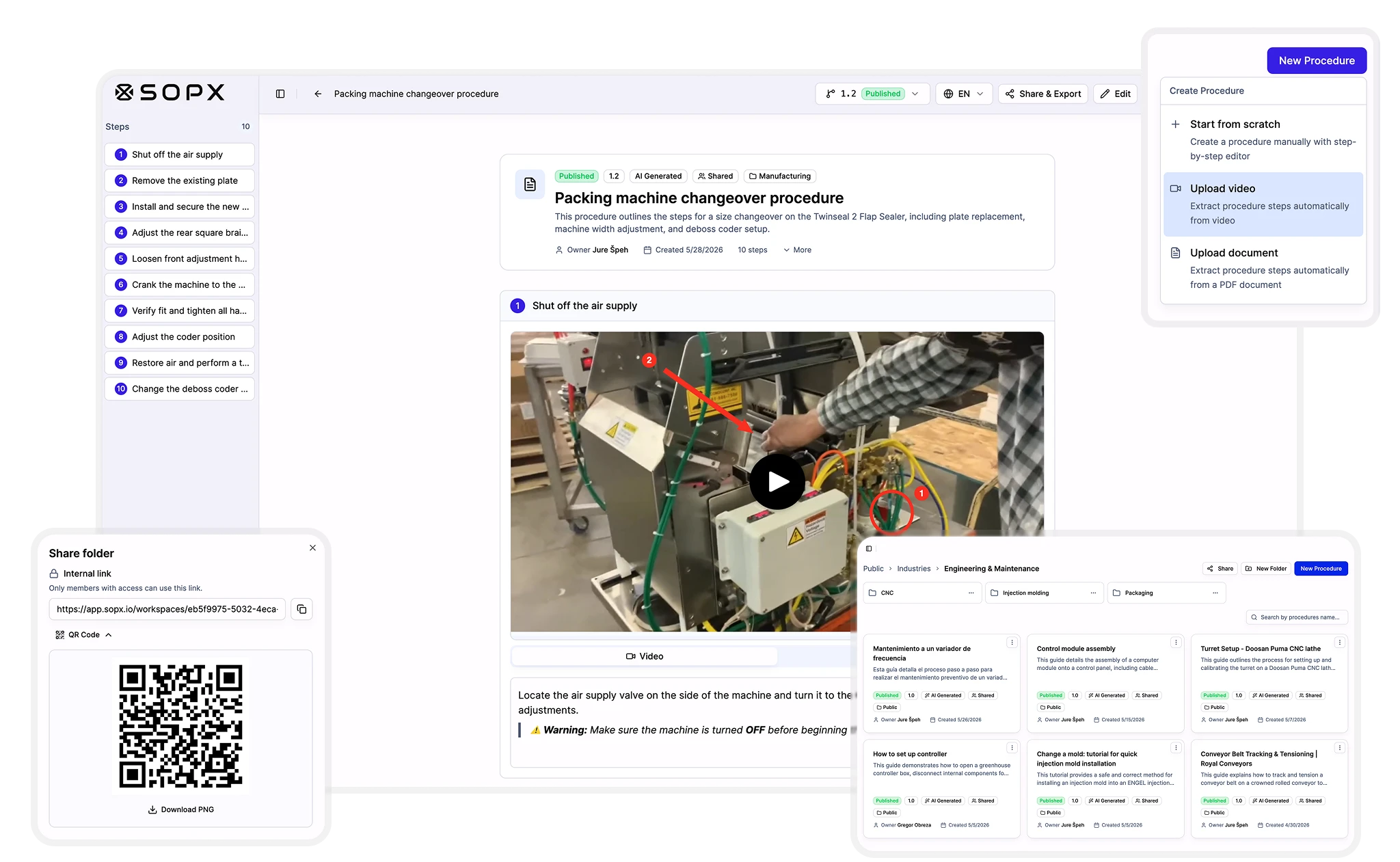
A finished SOP with clear steps, video clips, and screenshots, built from one recording. Your team follows it on the floor in their own language.
A real SOP your team can follow, built from one process video.
Why operations teams switch to SOPX
- See tribal knowledge capture →
Capture expert knowledge before it walks out
Senior people leave. Their know-how walks out with them. Film their work once and SOPX writes the SOP your team can follow.
- Cut new-hire onboarding time →
Onboard new hires in days, not weeks
New hires shadow your best operator for weeks before they're productive. Give them step-by-step SOPs with video clips and they're working on their own from day one.
- Turn process videos into SOPs →
Let AI write your SOPs
Record any process on your phone. AI pulls out the steps, grabs the screenshots, and drafts the descriptions. You review and publish. No blank page, no formatting.
- Standardize processes across teams →
Standardize work and share with one link
Every team works from the same SOP. Organized in workspaces by department. Share it to the floor with a link or QR code.
How SOPX generates SOPs from video
Film how work is done. SOPX creates step-by-step SOPs with video clips, descriptions, and safety callouts. Then organize them by department and share with a QR code.
Record any task on your phone or upload an existing video. Training recordings, screen captures, and PDF documents all work.
SOPX identifies key actions, extracts screenshots, and writes clear step-by-step instructions. You review and publish.
Edit any step. Add safety callouts. Then organize the SOP into the right workspace. Set who can view and edit. Share it to the workstation with a QR code or a link.
How SOPX generates SOPs from video
Film how work is done. SOPX creates step-by-step SOPs with video clips, descriptions, and safety callouts. Then organize them by department and share with a QR code.
Works for both physical processes and software workflows
Record any task on your phone or upload an existing video. Training recordings, screen captures, and PDF documents all work.
Why not just use Word or SharePoint?
Writing the doc is the easy part. Files go stale and scatter across drives. A platform keeps every SOP current, findable, and in one place.
Writing it
Type every step. Take your own screenshots. Format the page yourself.
Record the process once. AI extracts steps, screenshots, and descriptions.
Keeping it current
Versions scattered across SharePoint, Drive, and email attachments.
Update the step that changed and everyone sees it instantly. No email and folder hunt.
Frontline access
English-only PDF buried in a folder.
QR code at the workstation. Translate to 50+ languages in one click.
The platform behind your SOPs
SOPX is where your SOPs live after they're made. Organized by team, searchable, shareable, and always up to date.
One organized place
Keep every SOP in workspaces by department, not scattered across drives and email.
Roles and access
Give people roles and control who can view and who can edit each procedure.
Always the latest version
Edit once and everyone sees the current version. Every change is tracked.
Search across everything
Find any procedure across the whole company in seconds.
Annotate any step
Mark up any frame with arrows, shapes, and callouts so operators see exactly what to do.
Every worker's language
Translate any SOP into 50+ languages in one click.
Run it, not just read it
Run mode turns an SOP into a guided run with step checklists, forms, and sign-offs, so you can see who completed what and what they answered.
See what's actually used
Analytics show who viewed and ran each SOP, your most-used procedures, and run results, for adoption, evidence, and process improvement.
Built for your role, industry, and use case
Browse by your role, your industry, or the job you need to document.
Roles we support
See all roles →- Compliance / QA Officer
- Continuous Improvement / Lean Manager
- COO / VP of Operations
- Documentation / SOP Coordinator
- Field Service Manager
- HR Manager
- Operations Manager
- Owner / Founder / CEO
- Plant / Site Manager
- Production Supervisor / Team Lead
- Quality Manager
- Safety & EHS Manager
- Training & L&D Manager
Industries we serve
See all industries →- Agriculture
- Automotive
- Cannabis Cultivation
- Construction
- Electronics & PCB
- Engineering & Maintenance
- Field Service
- Food Production
- Footwear & Apparel
- Greenhouses & Farms
- Healthcare
- HVAC & Heating
- Logistics & Warehousing
- Manufacturing
- Metal Fabrication
- Pharmaceuticals
- Retail & Hospitality
- Robotics & Automation
- Tourism
- Windows & Doors
- Wood Production
Workflows we cover
See all use cases →Calculate what undocumented processes cost your team.
Estimate the hours lost each month to repeated training, missed steps, and tribal knowledge that never gets written down.
Open the ROI calculator →$25,667
annual savings · team of 25
733 hrs reclaimed per year
Conservative estimate. 20 min/day saved finding instructions at $35/hr blended rate. Adjust your team's numbers in the calculator.
Start free. Scale as you grow.
Scalable pricing that fits every organization, from a free trial to per-user Pro and custom Enterprise.
Free trial
$0
14-day trial. No credit card.
Pro
$9
per user / month, billed annually
Enterprise
Custom
For 100+ users or multiple sites. SSO and SCIM, custom branding, PowerPoint, Markdown and SCORM 1.2 export, multi-file AI generation, dedicated onboarding, volume pricing, and priority support.
Frequently Asked Questions
Find answers to common questions about SOPX.
What is SOPX?
Is SOPX just a video-to-SOP converter?
What is a standard operating procedure (SOP)?
How is SOPX different from writing SOPs in Word or Google Docs?
How do I create an SOP?
Why are SOPs important for operations teams?
What happens after the free trial?
How does SOPX handle sensitive process videos?
Does SOPX work for ISO 9001, HACCP, or GMP documentation?
How long does it take to generate SOPs from a video?
Can I edit the generated SOPs?
Is my data secure?
Does it work for physical videos or only screen recordings?
How can I start using SOPX?
Can I create SOPs from existing documents instead of video?
How do I organize SOPs in SOPX?
Can I control which employees see which SOPs?
The SOPs you never had time to write. Done in 10 minutes.
Film the process. AI writes the SOP. Organize in workspaces. Share with a QR code. Start free, no credit card.
Free to start. No credit card required.
- Encrypted
- Daily backups
- No AI training