


Work Instructions for the Floor, Not the Browser
Most documentation tools record a screen. Yours has to record a person at a machine. SOPX turns a phone recording of the real job into a visual work instruction, with a trimmed clip and a written step on every action.
- 1 Film the task on a phone
- 2 AI writes the steps
- 3 Publish to the station by QR
What is work instruction software?
Work instruction software creates, publishes, and revises the step-by-step instructions that tell an operator how to perform one specific task at one specific station. Unlike general document management, the output is built to be followed during the work: visual steps, one action each, revision control, and delivery to the point of use by screen, tablet, or QR code.
What separates the products is what they can capture. Screen-capture tools build instructions by recording browser clicks, which cannot help with a changeover or a machine setup. Anything aimed at physical work has to start from video of a person doing the job.
SOPX starts there. Film the task on a phone, AI returns a structured instruction with a trimmed clip and a written description on every step, and you publish to the floor in under 10 minutes. MES and ERP integrations are scoped on request rather than available out of the box, and it will not produce CAD-drawn exploded views.
The Problem
One revision, every station reprinted by hand
The real cost of paper work instructions is not printing, it is revisions. Change one step and somebody walks the floor swapping the sheet at every station, and misses one.
The authoring tool is dying
Instructions built in Publisher, or in a Word version old enough that the file will not open cleanly anymore, are trapped in software that is going away. The content is fine. The format is the problem.
Writing one takes an engineer half a day
Someone goes to the line, photographs the task, watches it, types what they saw into a document, then pastes the photos in. It is slow enough that most of the backlog never gets written at all.
Nobody on the line reads a document
On a station that cycles in a minute, an operator will not page through a PDF. The instruction has to be a glance, not a document, and it has to be in a language they actually read.
Getting a price means booking a demo
Most work instruction platforms publish no rate at all. You book a call, get scoped, and receive a quote with a seat minimum and an implementation fee attached. Budgeting for something you cannot price is how this project gets pushed to next year.
There is no IT project available for this
A 60 person plant has one quality manager and no spare IT capacity. Platforms built for multi-site global rollouts assume an implementation team you do not have, so the tool that fits the problem does not fit the company.
How SOPX Helps
video to published instruction
Film it once, publish the same day
Record the operator doing the job on any phone. The AI extracts each step with its own trimmed clip, a title, and a written description of the action, so the draft is a real instruction rather than a blank page.
sheets to reprint
One revision, every station updated
Edit the step, publish a new version, and every QR code and link on the floor now opens the current revision. Previous versions stay in history, and version restore brings one back if you need it.
languages
Readable by the whole floor
AI translates a finished instruction into 50+ languages, so a mixed-language line reads the same procedure in the language each person actually works in.
How It Works
Record the job as it is really done
Film the operator performing the task on a phone, or import the PDF and Word instructions you already have. Both routes end in the same structured, editable instruction.
AI drafts the steps, you correct them
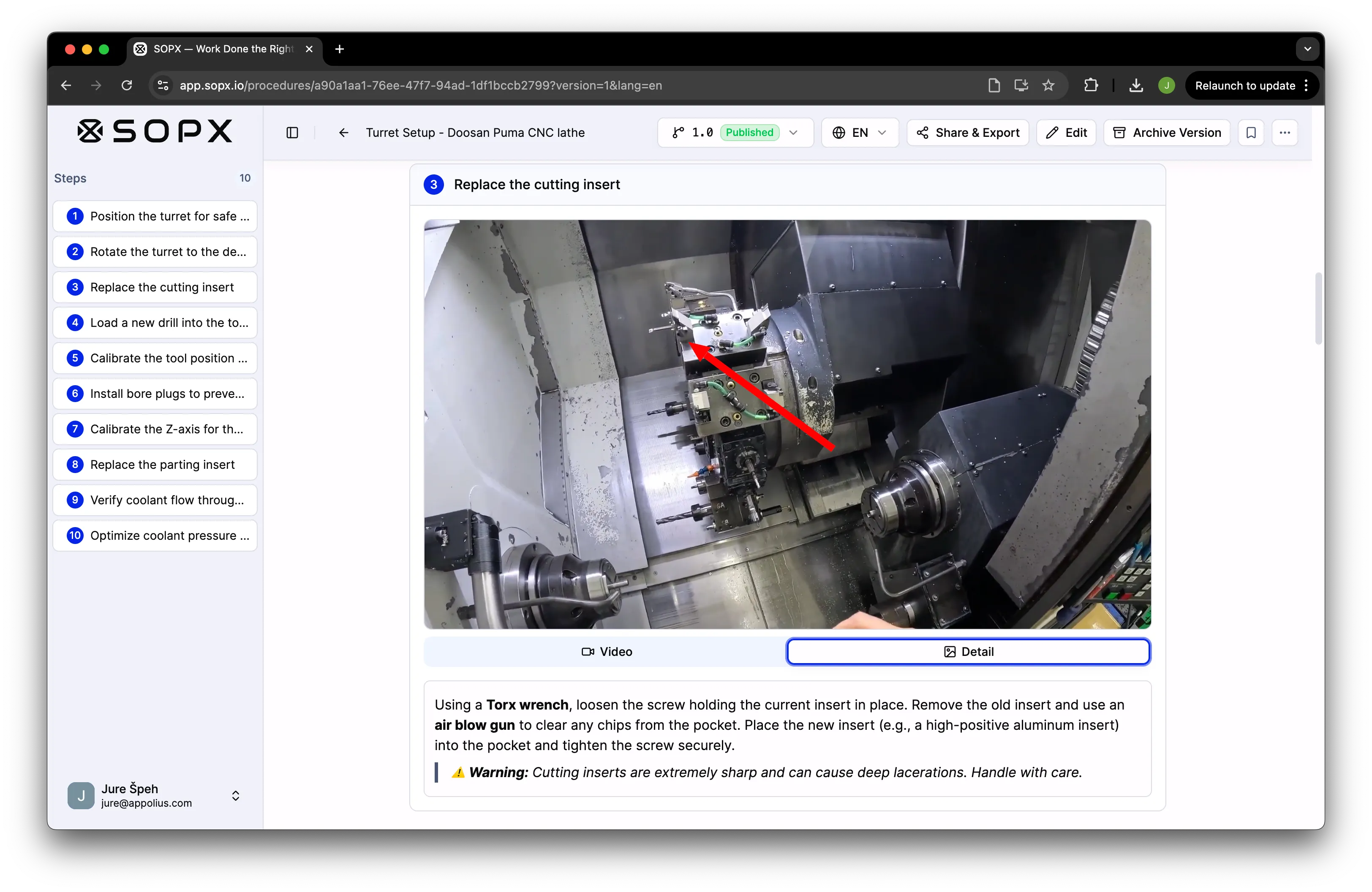
The AI splits the recording into steps, trims a clip to each one, and writes the description. You edit wording, reorder steps, and annotate frames with arrows and callouts to point at the exact part.
Publish to the station
Send an approved instruction to the floor by link or QR code, with no account needed to view it. Full screen mode shows one step at a time for an operator working at the machine.
How work instruction tools differ
The three approaches teams actually choose between when the work is physical.
| Printed sheets and Word | Screen capture tools | SOPX | |
|---|---|---|---|
| Captures work at a machine | Yes, by hand | No, browser only | Yes, from phone video |
| Time to write one instruction | Hours | Minutes, if on screen | Under 10 minutes |
| Revising every station | Reprint and walk the floor | Reshare the link | Publish once, QR codes follow |
| Multilingual floor | Translate and reprint each | Usually English only | AI translation, 50+ languages |
| Proof the operator followed it | Paper signature sheet | None | Run mode forms and sign-offs |
| MES or ERP integration | None | Limited | Scoped on request |
| What it costs to start | Licence you already own | Free tier, paid per seat | Published rate, free trial |
| Time to the first published instruction | Half a day of engineer time | Same day, screen work only | Under 10 minutes from a phone video |
Keep Reading
SOP vs work instruction vs SOI vs SWI
Which term means what, and why the distinction changes how you write the document.
Learn more →SOP software, explained
The wider category: what SOP software covers and which type fits your work.
Learn more →Managing a library of procedures
Once the instructions exist, versioning, approvals, and document control become the problem.
Learn more →How manufacturers standardize with AI
What changes on the floor when instruction writing stops being a bottleneck.
Learn more →Industries Using This
Manufacturing
Film any shop floor process with your phone. AI creates a structured work instruction in under 10 minutes. Organize by production line or department. Operators open the right work instruction at the workstation with a QR code, in their language.
Learn more →Logistics & Warehousing
Film picking, packing, receiving, and shipping procedures. AI creates structured SOPs in minutes. Organize by warehouse zone or facility. Seasonal hires access procedures from shift one with a QR code.
Learn more →Food Production
Film sanitation, production, and quality procedures. Upload existing HACCP documentation as PDFs. AI creates structured, versioned SOPs. Organize by area. Every worker reads procedures in their language.
Learn more →Automotive
Film an assembly, changeover, or diagnostic procedure on your phone. AI builds a structured work instruction in under 10 minutes. Organize by line, station, or model. Operators and technicians open the right work instruction at the workstation, in their language.
Learn more →Electronics & PCB
Electronics and PCB assembly teams run hundreds of build, inspection, and test procedures in mismatched formats. Import existing PDFs or film the line on a phone, AI turns each one into a structured work instruction, annotate the exact component and orientation, and keep one versioned format across every plant.
Learn more →Metal Fabrication
Film a machine setup, weld procedure, or finishing step on your phone. AI builds a structured work instruction in under 10 minutes. Organize by machine or job type. Operators open the right procedure at the machine, in their language.
Learn more →Related Use Cases
Work Instructions for Training
Turn a process video into a visual, step-by-step instruction a new starter works through at their own pace. Any device, any language, no shadowing required.
Learn more →Process Standardization
Process variation drives quality issues, waste, and errors. Standardize every task with visual SOPs generated from your best methods, accessible at every workstation.
Learn more →Multilingual SOPs
Every operator reads the SOP in the language they speak. AI handles the first translation pass. A side-by-side review editor lets a bilingual reviewer correct each step before publishing, so safety-critical procedures stay accurate.
Learn more →Quality & Compliance
Generate the procedure from a process video. Save a new version every time it changes. Translate it to 50+ languages with a side-by-side review editor. Share it at the workstation by QR code. Export to PDF or Word for an audit binder.
Learn more →Built for These Roles
Production Supervisor / Team Lead
You answer the same questions every shift, and your best operators lose time to it too. Film the job once, let AI draft a step-by-step visual work instruction, and point your team to one link they open right at the workstation.
Learn more →Plant / Site Manager
Quality slips when every operator runs the process their own way. Film a machine setup once, let AI draft a step-by-step work instruction in minutes, and publish it so the line runs the same on every shift.
Learn more →Continuous Improvement / Lean Manager
Your best operator should not lose an afternoon writing work instructions. Film the current best method, let AI draft structured steps in under 10 minutes, and when you improve the standard the update reaches every shift at once.
Learn more →Operations Manager
You do not have hours to write procedures, and your best operators should not either. They film the job on a phone, AI drafts a clear step-by-step SOP, and you review it in minutes. The line keeps running when someone is out.
Learn more →Quality Manager
Defects and variation come from work done a different way every time. Have your best operator film the correct method, let AI draft the procedure, and control which version the floor runs.
Learn more →Training & L&D Manager
Your best people do not have hours to write training docs, and they should not have to. Film the expert doing the task, let AI draft a step-by-step guide in under 10 minutes, and give new hires the real method to study before they start.
Learn more →