
Free resources

Free SOP and work instruction infographics

One-page visuals on SOPs, work instructions, compliance and software. Download the PNG for your slides, or embed it on your site. Free to use with credit.

21 infographics CC BY 4.0

Compliance and safety

ISO 9001, ISO 7010 and the EU Machinery Regulation, one picture each.

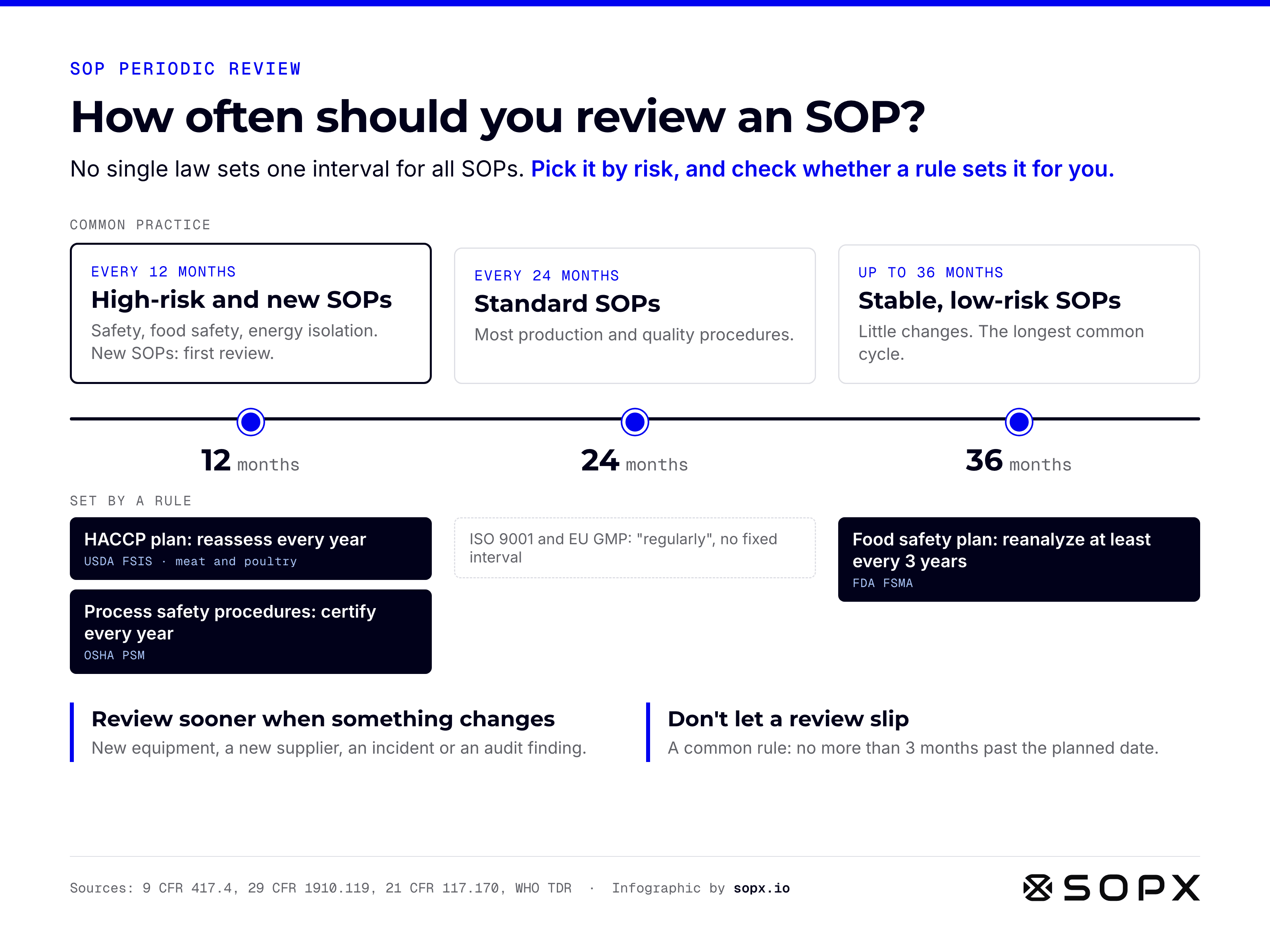
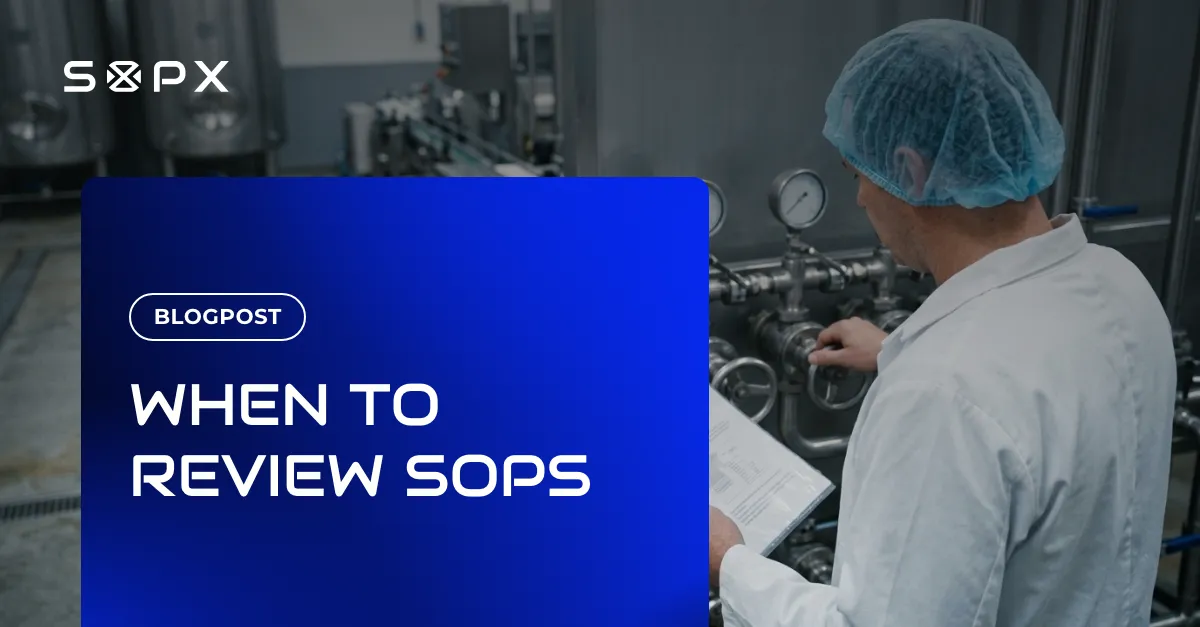
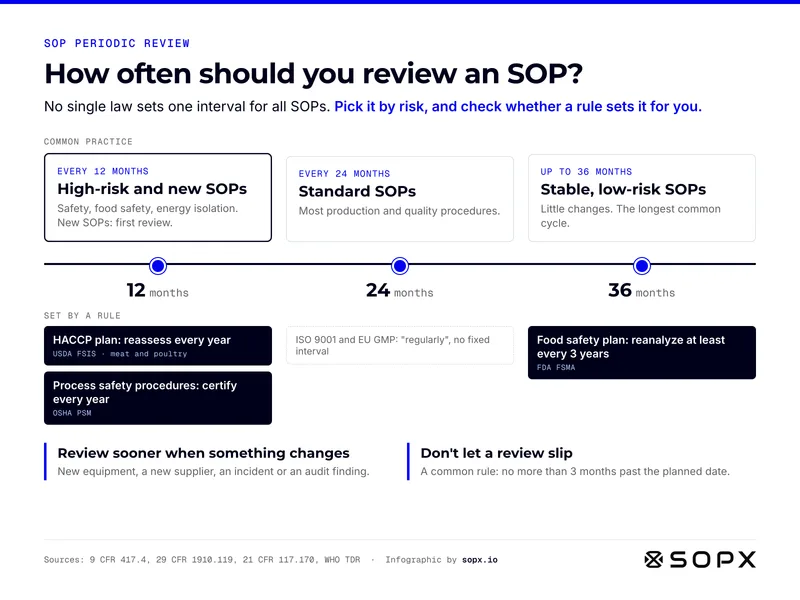
SOP review intervals infographic. Common practice on a 12, 24 and 36 month timeline: high-risk and new SOPs every 12 months, standard SOPs every 24, stable low-risk SOPs up to 36. Set by a rule: HACCP plan reassessed yearly (USDA FSIS), process safety procedures certified yearly (OSHA PSM), food safety plan reanalyzed at least every 3 years (FDA FSMA). Review sooner when something changes.

How often should you review an SOP? Review intervals by risk and by rule

SOP review intervals at a glance: pick the interval by risk, and check whether a rule sets it for you.

Full guide: SOP Periodic Review: How Often and What to Check
Embed code
                        <figure><a href="https://sopx.io/insights/sop-periodic-review/"><img src="https://sopx.io/infographics/sop-review-intervals-infographic.png" alt="SOP review intervals infographic. Common practice on a 12, 24 and 36 month timeline: high-risk and new SOPs every 12 months, standard SOPs every 24, stable low-risk SOPs up to 36. Set by a rule: HACCP plan reassessed yearly (USDA FSIS), process safety procedures certified yearly (OSHA PSM), food safety plan reanalyzed at least every 3 years (FDA FSMA). Review sooner when something changes." width="1600" height="1200" loading="lazy" style="max-width:100%;height:auto"></a><figcaption><a href="https://sopx.io/insights/sop-periodic-review/">How often should you review an SOP? Review intervals by risk and by rule</a>. Infographic by <a href="https://sopx.io/">SOPX</a> (CC BY 4.0).</figcaption></figure>
                      
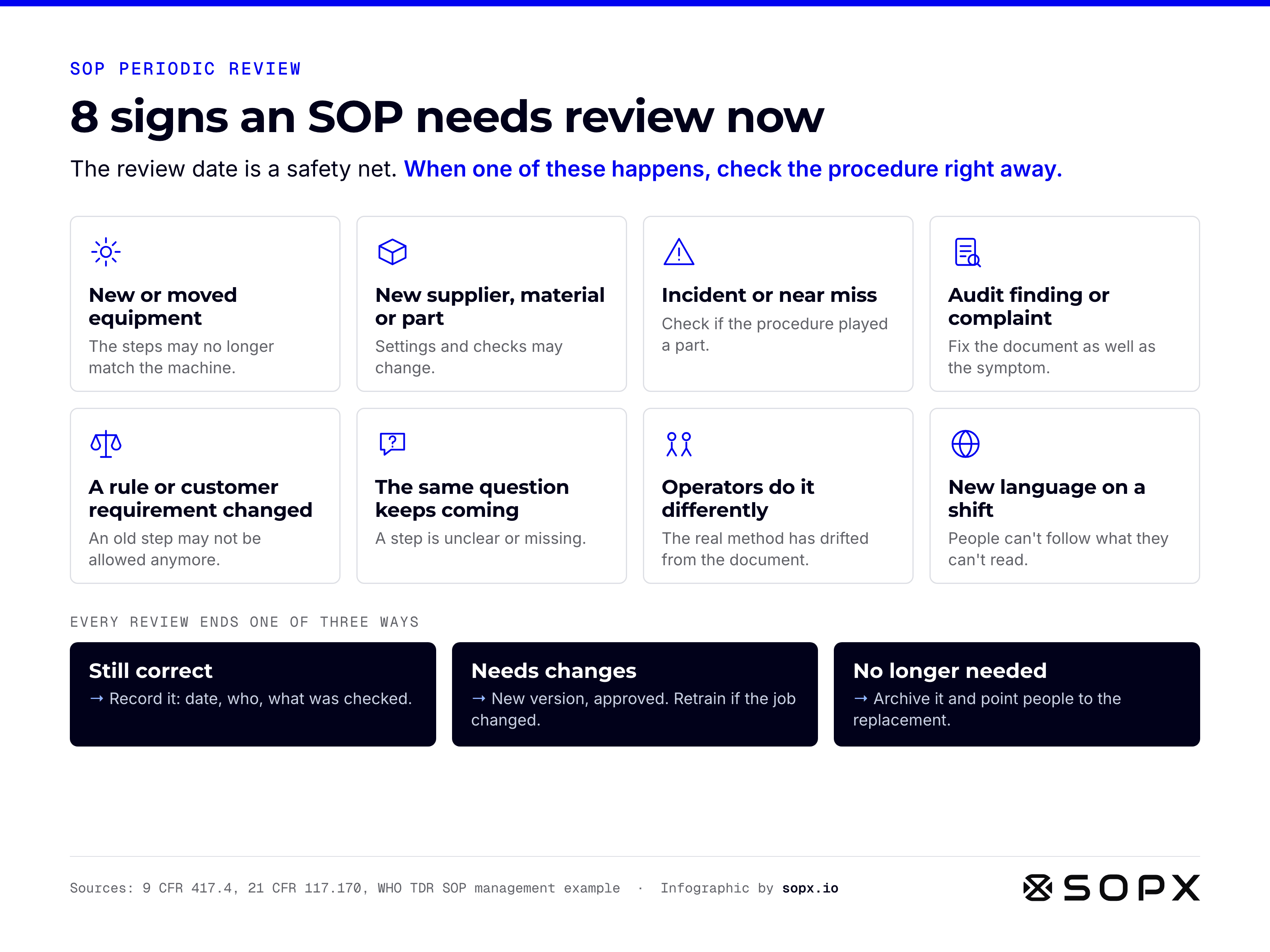
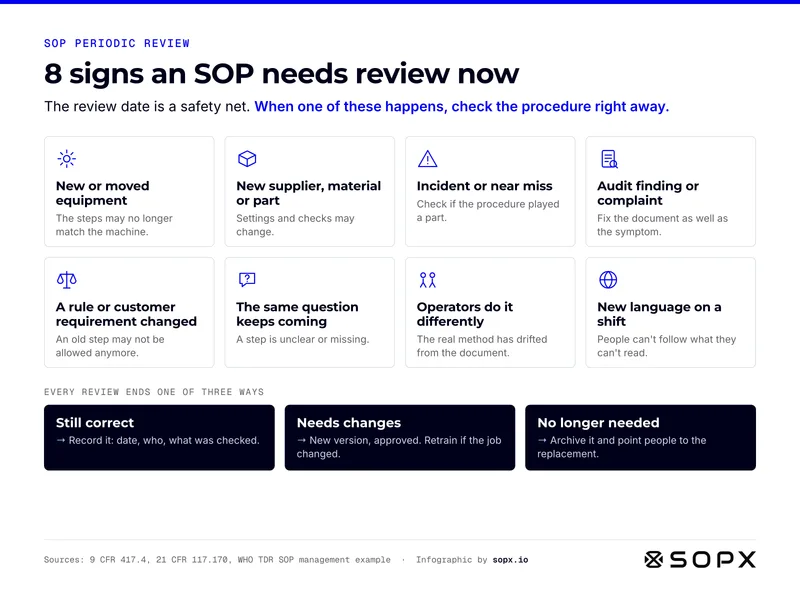
Infographic of 8 events that should trigger an SOP review before its date: new or moved equipment, new supplier or part, incident or near miss, audit finding or complaint, rule or customer requirement change, the same question again and again, operators doing it differently, a new language on a shift. Every review ends one of three ways: still correct, new version, or no longer needed.

8 signs an SOP needs review now, and the 3 ways a review ends

Don't wait for the date: 8 events that mean a procedure may already be wrong.

Full guide: SOP Periodic Review: How Often and What to Check
Embed code
                        <figure><a href="https://sopx.io/insights/sop-periodic-review/"><img src="https://sopx.io/infographics/sop-review-triggers-infographic.png" alt="Infographic of 8 events that should trigger an SOP review before its date: new or moved equipment, new supplier or part, incident or near miss, audit finding or complaint, rule or customer requirement change, the same question again and again, operators doing it differently, a new language on a shift. Every review ends one of three ways: still correct, new version, or no longer needed." width="1600" height="1200" loading="lazy" style="max-width:100%;height:auto"></a><figcaption><a href="https://sopx.io/insights/sop-periodic-review/">8 signs an SOP needs review now, and the 3 ways a review ends</a>. Infographic by <a href="https://sopx.io/">SOPX</a> (CC BY 4.0).</figcaption></figure>
                      
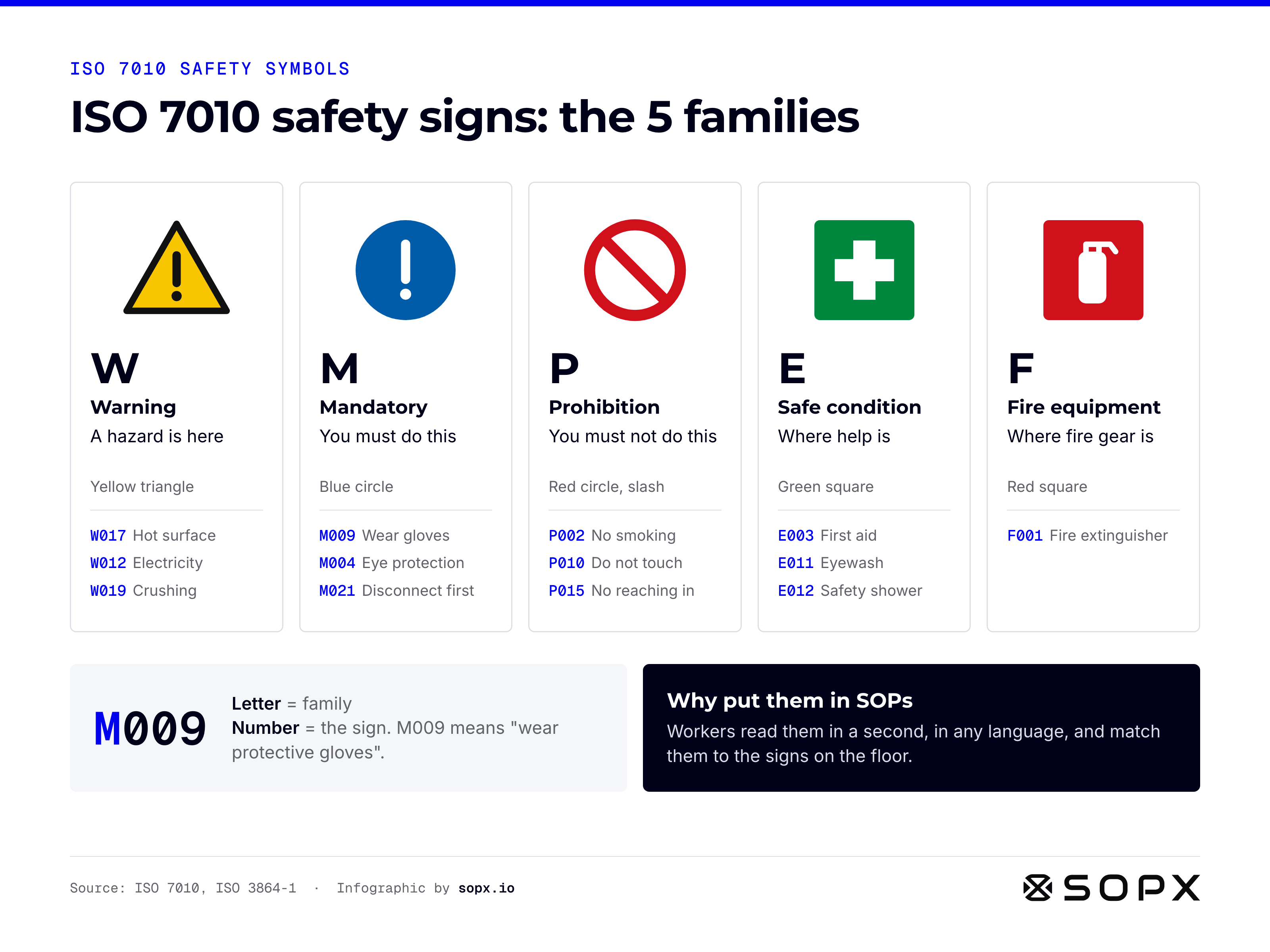
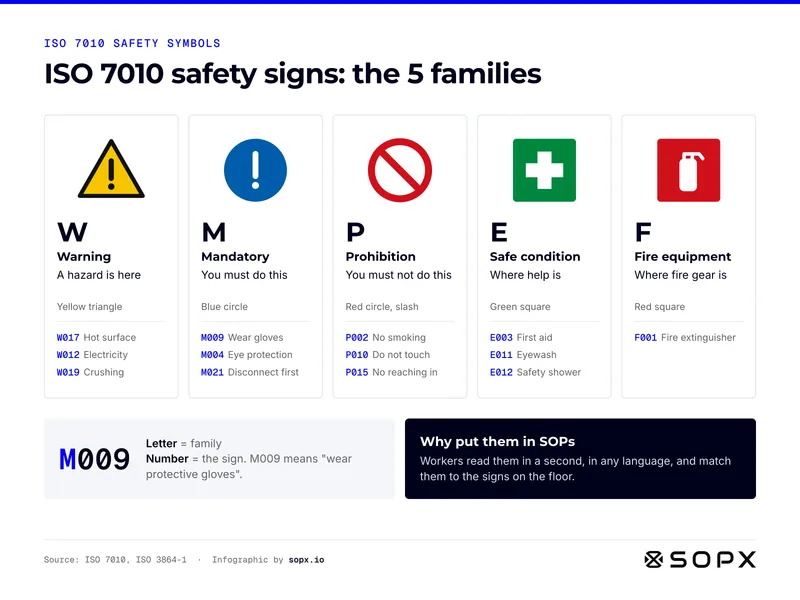
ISO 7010 safety signs infographic showing the five sign families: W warning (yellow triangle, a hazard is here), M mandatory (blue circle, you must do this), P prohibition (red circle with slash), E safe condition (green square, where help is), F fire equipment (red square). Example codes like W017 hot surface, M009 wear gloves, E003 first aid.

ISO 7010 safety signs: the 5 families, colours and codes

ISO 7010 safety signs at a glance: the five sign families, their shapes and colours, example codes, and how to read a code.

Full guide: ISO 7010 Safety Symbols in SOPs and Work Instructions
Embed code
                        <figure><a href="https://sopx.io/insights/iso-7010-safety-symbols-in-sops/"><img src="https://sopx.io/infographics/iso-7010-safety-signs-infographic.png" alt="ISO 7010 safety signs infographic showing the five sign families: W warning (yellow triangle, a hazard is here), M mandatory (blue circle, you must do this), P prohibition (red circle with slash), E safe condition (green square, where help is), F fire equipment (red square). Example codes like W017 hot surface, M009 wear gloves, E003 first aid." width="1600" height="1200" loading="lazy" style="max-width:100%;height:auto"></a><figcaption><a href="https://sopx.io/insights/iso-7010-safety-symbols-in-sops/">ISO 7010 safety signs: the 5 families, colours and codes</a>. Infographic by <a href="https://sopx.io/">SOPX</a> (CC BY 4.0).</figcaption></figure>
                      
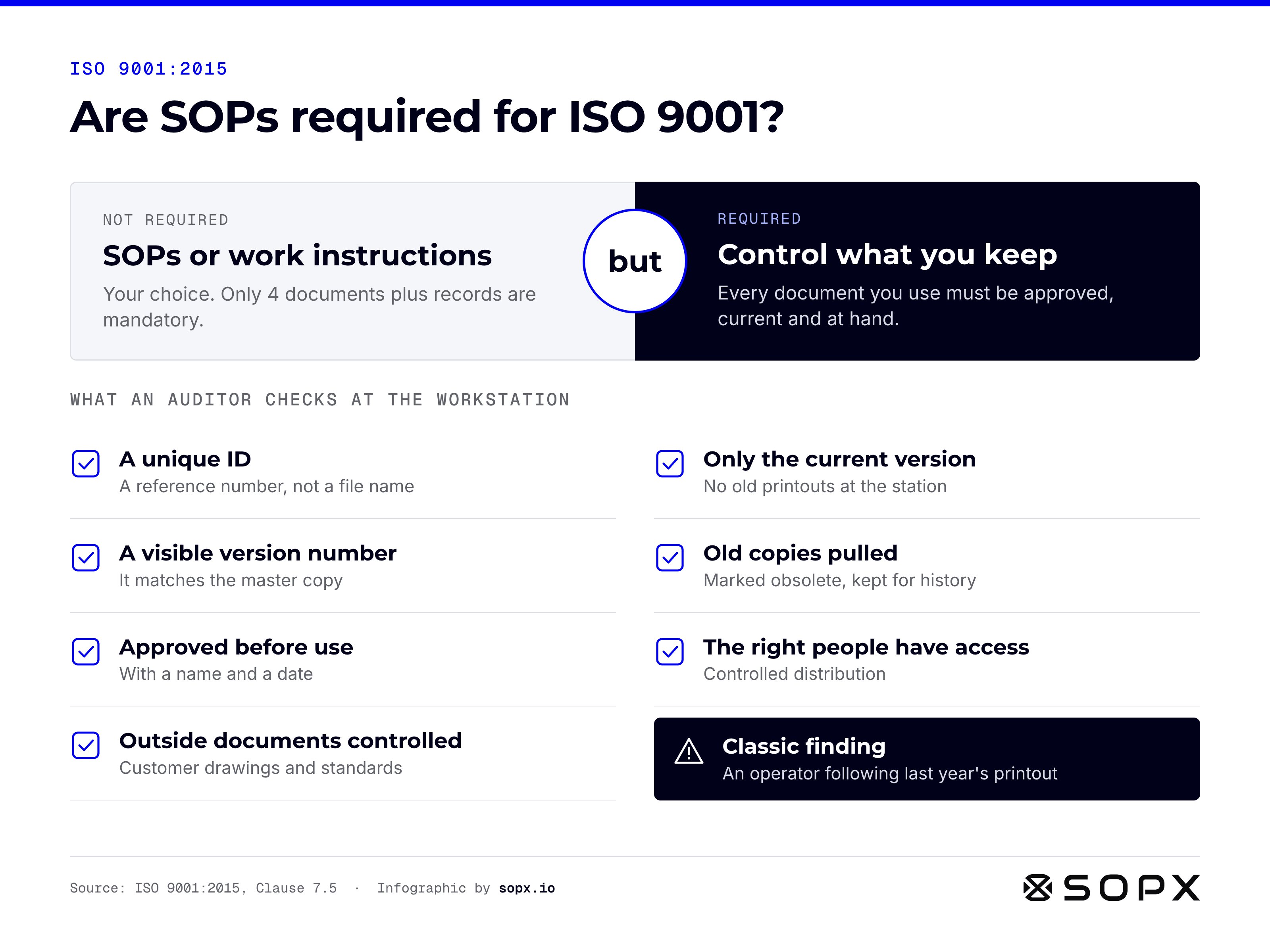
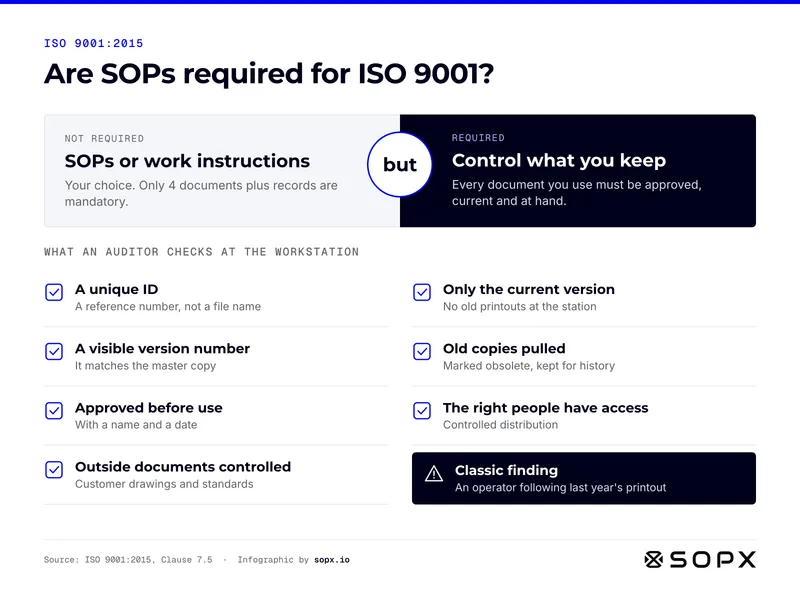
ISO 9001 infographic: SOPs and work instructions are not required, but every document you keep must be controlled. Auditor checklist: a unique ID, a visible version number, approval before use with name and date, only the current version at the station, old copies pulled, the right people have access, outside documents controlled. Classic finding: last year's printout.

Are SOPs required for ISO 9001? What auditors check

ISO 9001 SOPs and work instructions at a glance: what is optional, what is required, and what an auditor checks at the workstation.

Full guide: ISO 9001 SOPs and Work Instructions: What Is Required
Embed code
                        <figure><a href="https://sopx.io/insights/iso-9001-sops-and-work-instructions/"><img src="https://sopx.io/infographics/iso-9001-sops-and-work-instructions-infographic.png" alt="ISO 9001 infographic: SOPs and work instructions are not required, but every document you keep must be controlled. Auditor checklist: a unique ID, a visible version number, approval before use with name and date, only the current version at the station, old copies pulled, the right people have access, outside documents controlled. Classic finding: last year's printout." width="1600" height="1200" loading="lazy" style="max-width:100%;height:auto"></a><figcaption><a href="https://sopx.io/insights/iso-9001-sops-and-work-instructions/">Are SOPs required for ISO 9001? What auditors check</a>. Infographic by <a href="https://sopx.io/">SOPX</a> (CC BY 4.0).</figcaption></figure>
                      
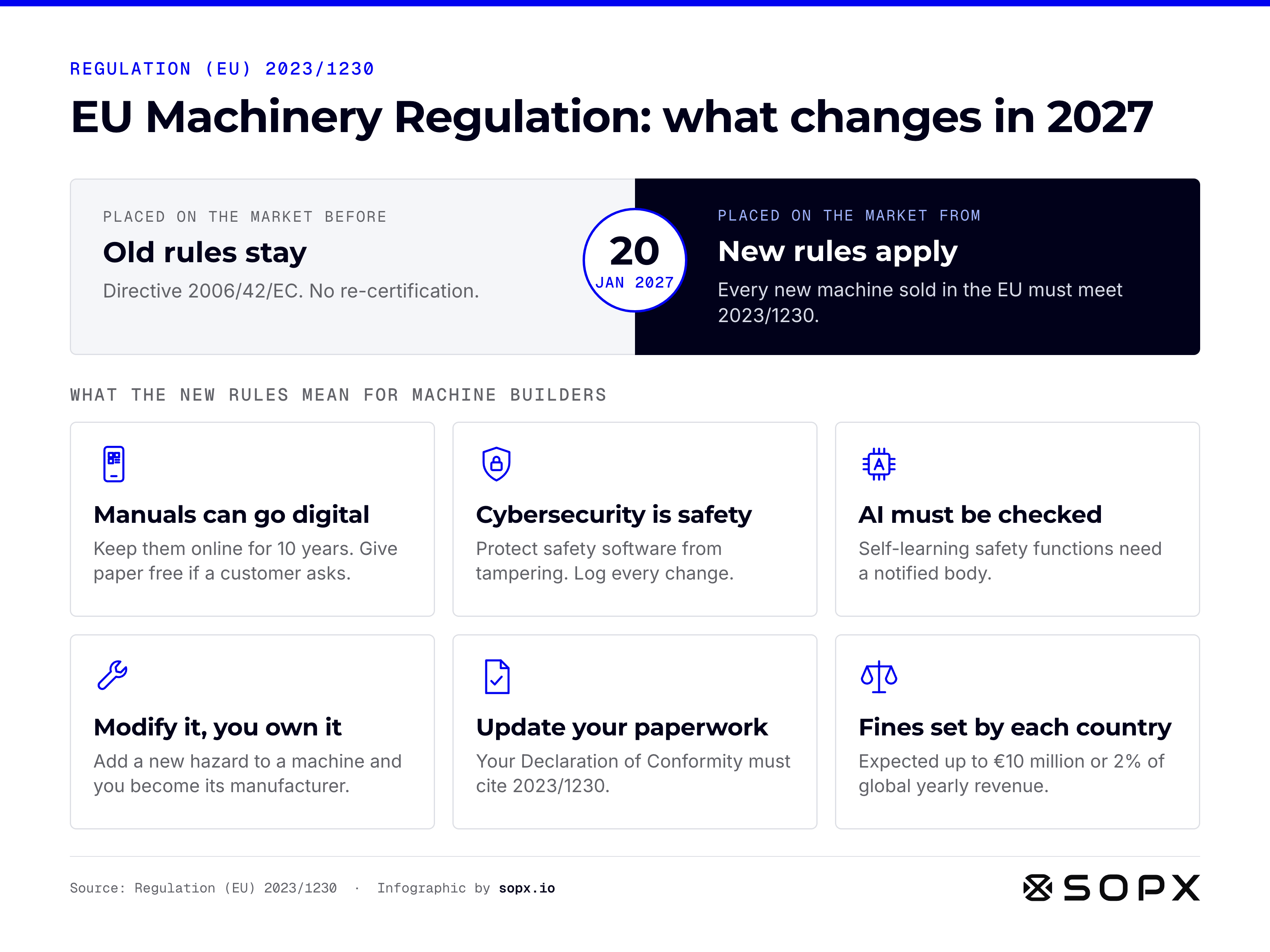
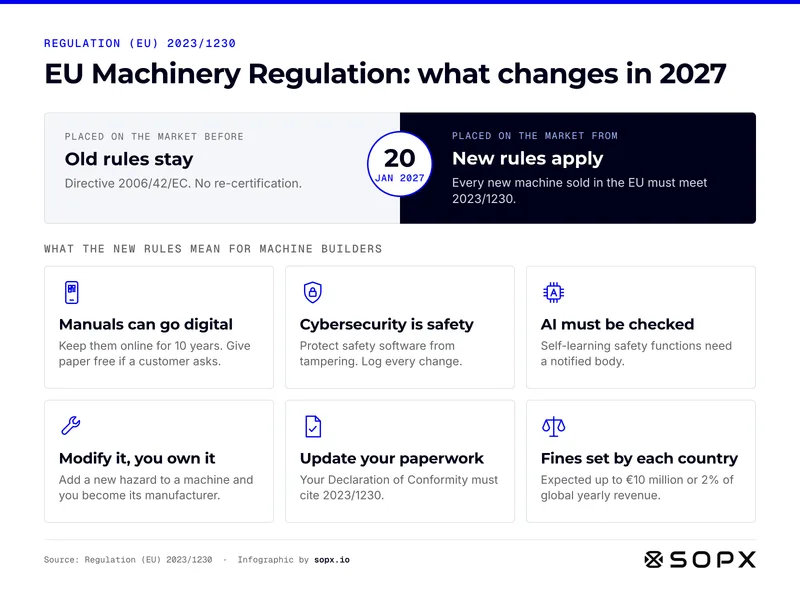
EU Machinery Regulation 2023/1230 infographic: machines placed on the EU market before 20 January 2027 stay under Directive 2006/42/EC, new machines must meet 2023/1230. What changes: digital manuals kept online 10 years, cybersecurity as a safety rule, AI safety checked by a notified body, modifiers become the manufacturer, new Declaration of Conformity, fines set per country.

EU Machinery Regulation 2023/1230: what changes in 2027

EU Machinery Regulation 2023/1230 at a glance: which rules apply to your machine, and what changes for machine builders.

Full guide: EU Machinery Regulation 2023/1230: 2027 OEM Checklist

Embed code
                        <figure><a href="https://sopx.io/insights/eu-machinery-regulation-2023-1230/"><img src="https://sopx.io/infographics/eu-machinery-regulation-2023-1230-infographic.png" alt="EU Machinery Regulation 2023/1230 infographic: machines placed on the EU market before 20 January 2027 stay under Directive 2006/42/EC, new machines must meet 2023/1230. What changes: digital manuals kept online 10 years, cybersecurity as a safety rule, AI safety checked by a notified body, modifiers become the manufacturer, new Declaration of Conformity, fines set per country." width="1600" height="1200" loading="lazy" style="max-width:100%;height:auto"></a><figcaption><a href="https://sopx.io/insights/eu-machinery-regulation-2023-1230/">EU Machinery Regulation 2023/1230: what changes in 2027</a>. Infographic by <a href="https://sopx.io/">SOPX</a> (CC BY 4.0).</figcaption></figure>
                      

Writing SOPs and work instructions

What goes into a procedure, and how the documents fit together.
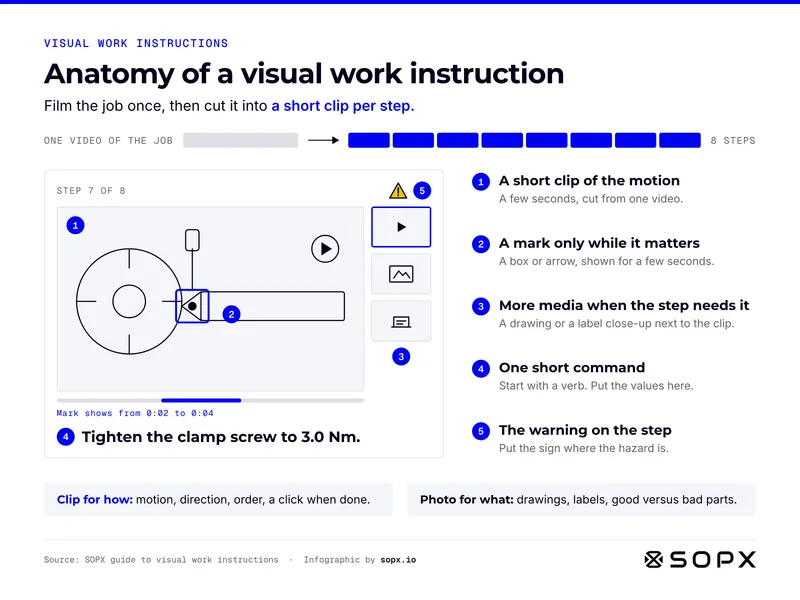
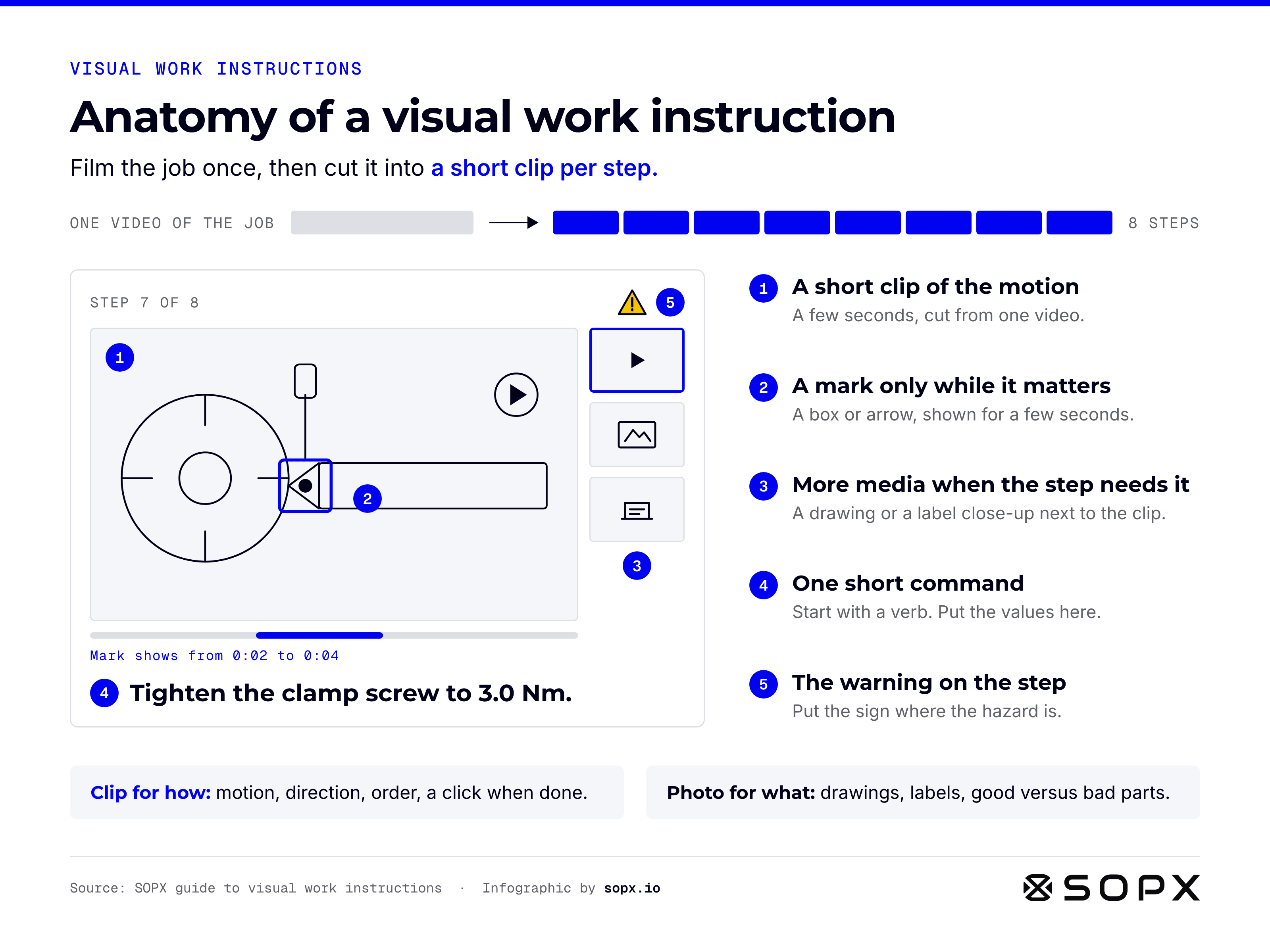
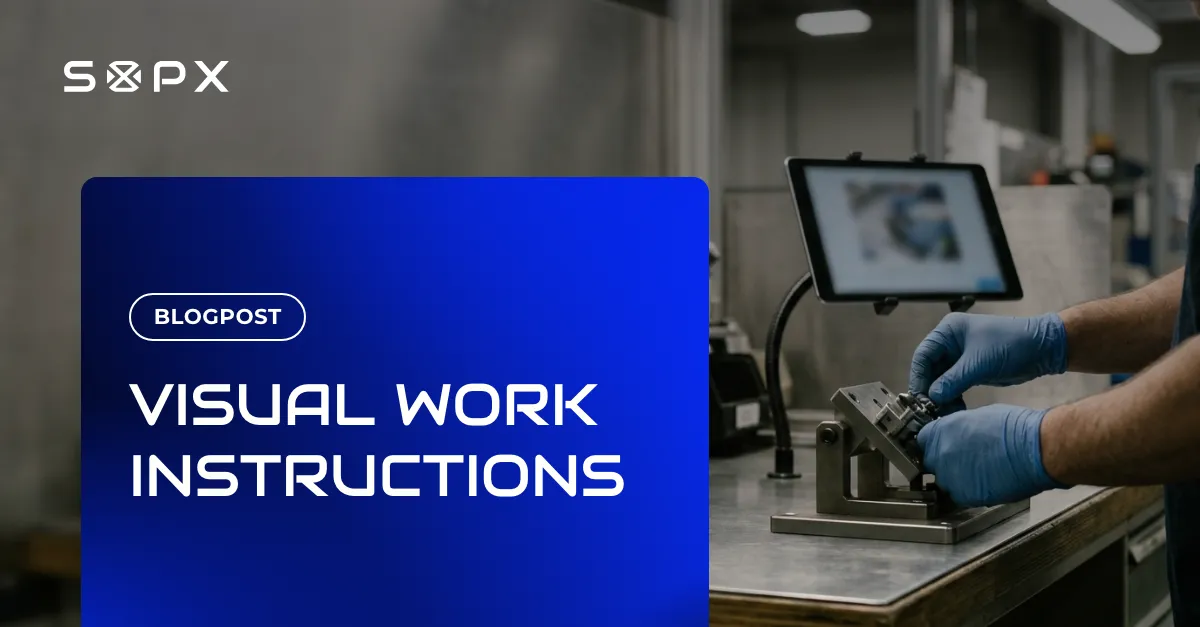
Anatomy of a visual work instruction. One video of the job is cut into a short clip per step. A sample step shows five parts: a short clip of the motion, a mark that shows only for a few seconds, extra media such as a drawing or label close-up, one short command with the value, and a safety sign on the step. Use a clip for how, a photo for what.

Anatomy of a visual work instruction

The five parts of a readable visual work instruction step, from a short video clip with a timed mark to the safety sign on the step.

Full guide: Visual Work Instructions in Manufacturing: Guide + Example
Embed code
                        <figure><a href="https://sopx.io/insights/visual-work-instructions/"><img src="https://sopx.io/infographics/visual-work-instructions-infographic.png" alt="Anatomy of a visual work instruction. One video of the job is cut into a short clip per step. A sample step shows five parts: a short clip of the motion, a mark that shows only for a few seconds, extra media such as a drawing or label close-up, one short command with the value, and a safety sign on the step. Use a clip for how, a photo for what." width="1600" height="1200" loading="lazy" style="max-width:100%;height:auto"></a><figcaption><a href="https://sopx.io/insights/visual-work-instructions/">Anatomy of a visual work instruction</a>. Infographic by <a href="https://sopx.io/">SOPX</a> (CC BY 4.0).</figcaption></figure>
                      
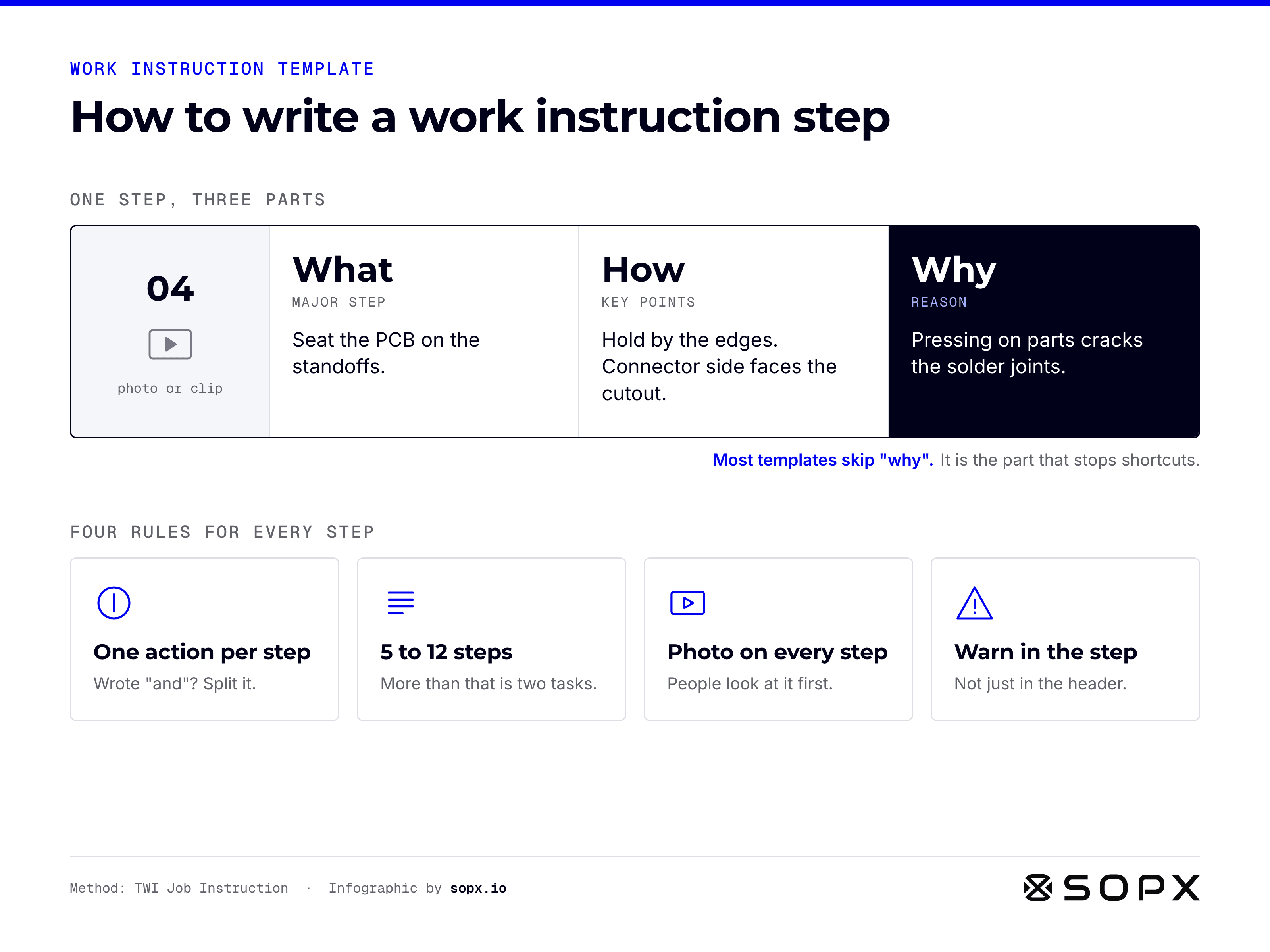
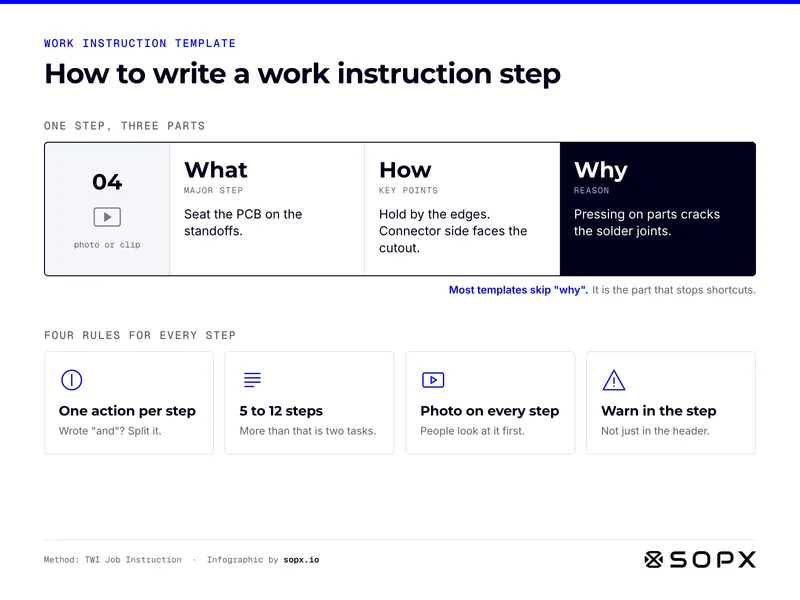
Work instruction template infographic showing how to write one step in three parts: what (the major step, seat the PCB on the standoffs), how (key points, hold by the edges), and why (the reason, pressing on parts cracks solder joints). Four rules: one action per step, 5 to 12 steps, a photo on every step, warn inside the step.

How to write a work instruction step: what, how, why

How to write a work instruction step at a glance: the what, how and why of each step, plus four rules that keep steps usable.

Full guide: Work Instruction Template: Free Word Download + Example
Embed code
                        <figure><a href="https://sopx.io/insights/work-instruction-template/"><img src="https://sopx.io/infographics/work-instruction-template-infographic.png" alt="Work instruction template infographic showing how to write one step in three parts: what (the major step, seat the PCB on the standoffs), how (key points, hold by the edges), and why (the reason, pressing on parts cracks solder joints). Four rules: one action per step, 5 to 12 steps, a photo on every step, warn inside the step." width="1600" height="1200" loading="lazy" style="max-width:100%;height:auto"></a><figcaption><a href="https://sopx.io/insights/work-instruction-template/">How to write a work instruction step: what, how, why</a>. Infographic by <a href="https://sopx.io/">SOPX</a> (CC BY 4.0).</figcaption></figure>
                      
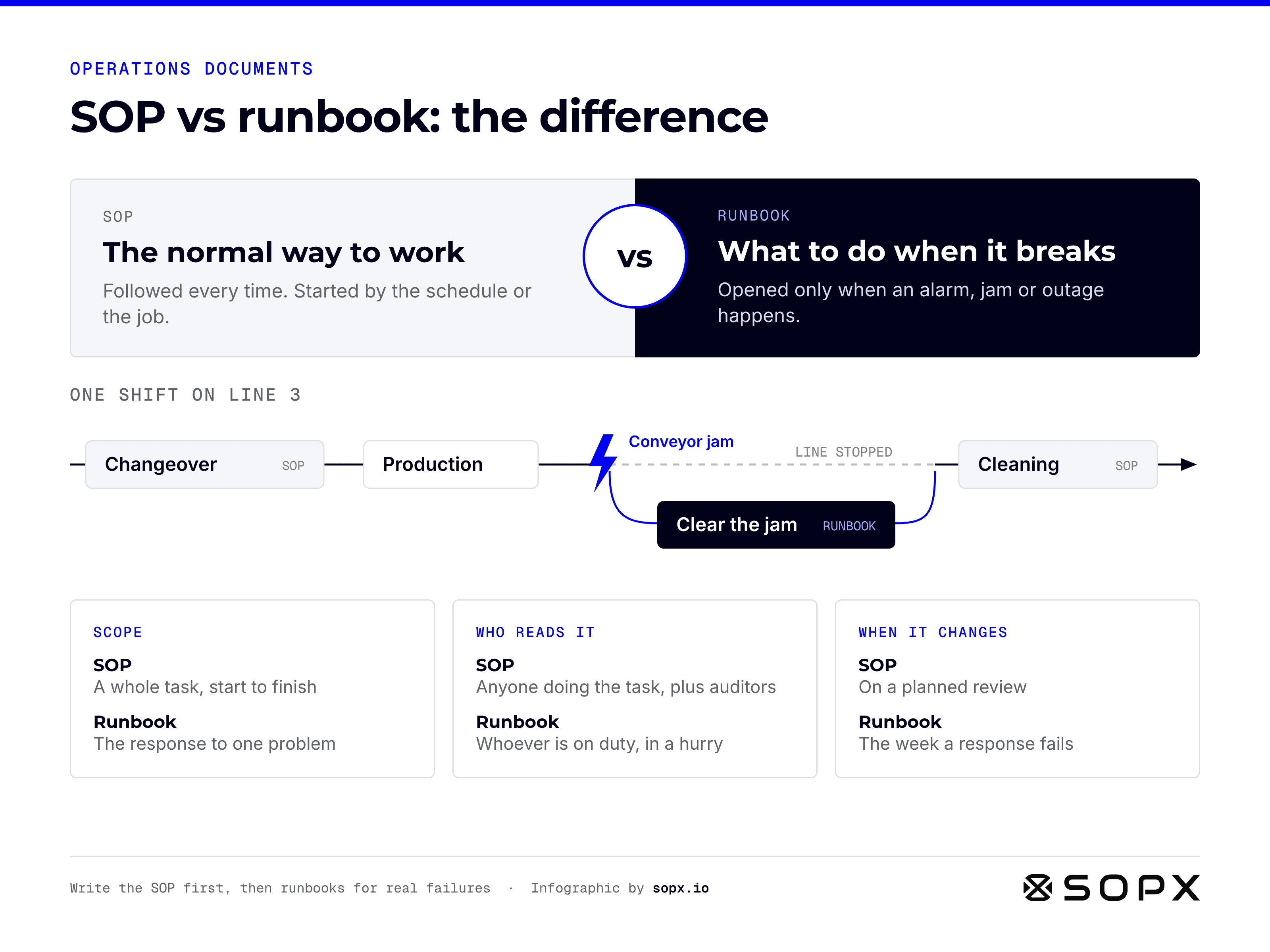
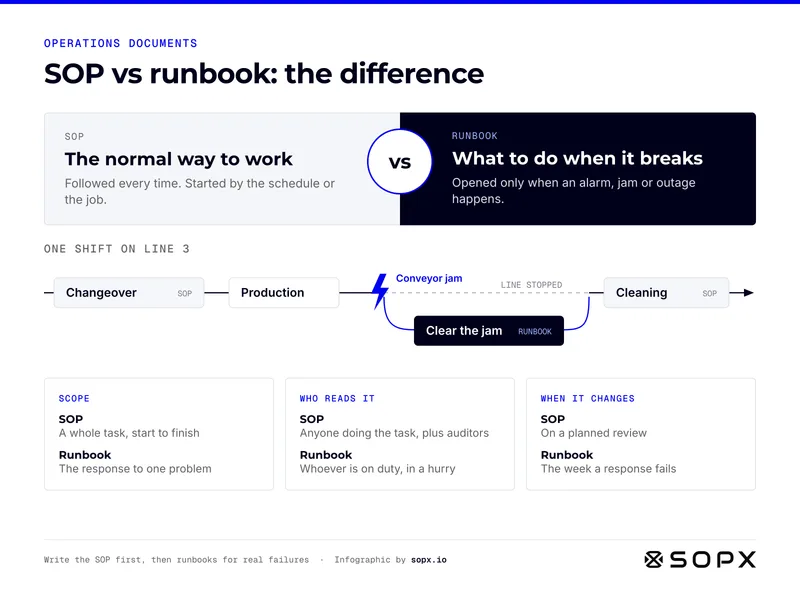
SOP vs runbook infographic. An SOP is the normal way to work, followed every time and started by the schedule. A runbook is what to do when something breaks, opened only on an alarm, jam or outage. One shift: changeover SOP, production, a conveyor jam triggers the clear-the-jam runbook, then the cleaning SOP. Also compares scope, readers and update timing.

SOP vs runbook: the difference in one picture

SOP vs runbook at a glance: what starts each one, how they fit into a real shift, and how they differ in scope, readers and updates.

Full guide: SOP vs Runbook: What's the Difference and When to Use Each
Embed code
                        <figure><a href="https://sopx.io/insights/sop-vs-runbook/"><img src="https://sopx.io/infographics/sop-vs-runbook-infographic.png" alt="SOP vs runbook infographic. An SOP is the normal way to work, followed every time and started by the schedule. A runbook is what to do when something breaks, opened only on an alarm, jam or outage. One shift: changeover SOP, production, a conveyor jam triggers the clear-the-jam runbook, then the cleaning SOP. Also compares scope, readers and update timing." width="1600" height="1200" loading="lazy" style="max-width:100%;height:auto"></a><figcaption><a href="https://sopx.io/insights/sop-vs-runbook/">SOP vs runbook: the difference in one picture</a>. Infographic by <a href="https://sopx.io/">SOPX</a> (CC BY 4.0).</figcaption></figure>
                      
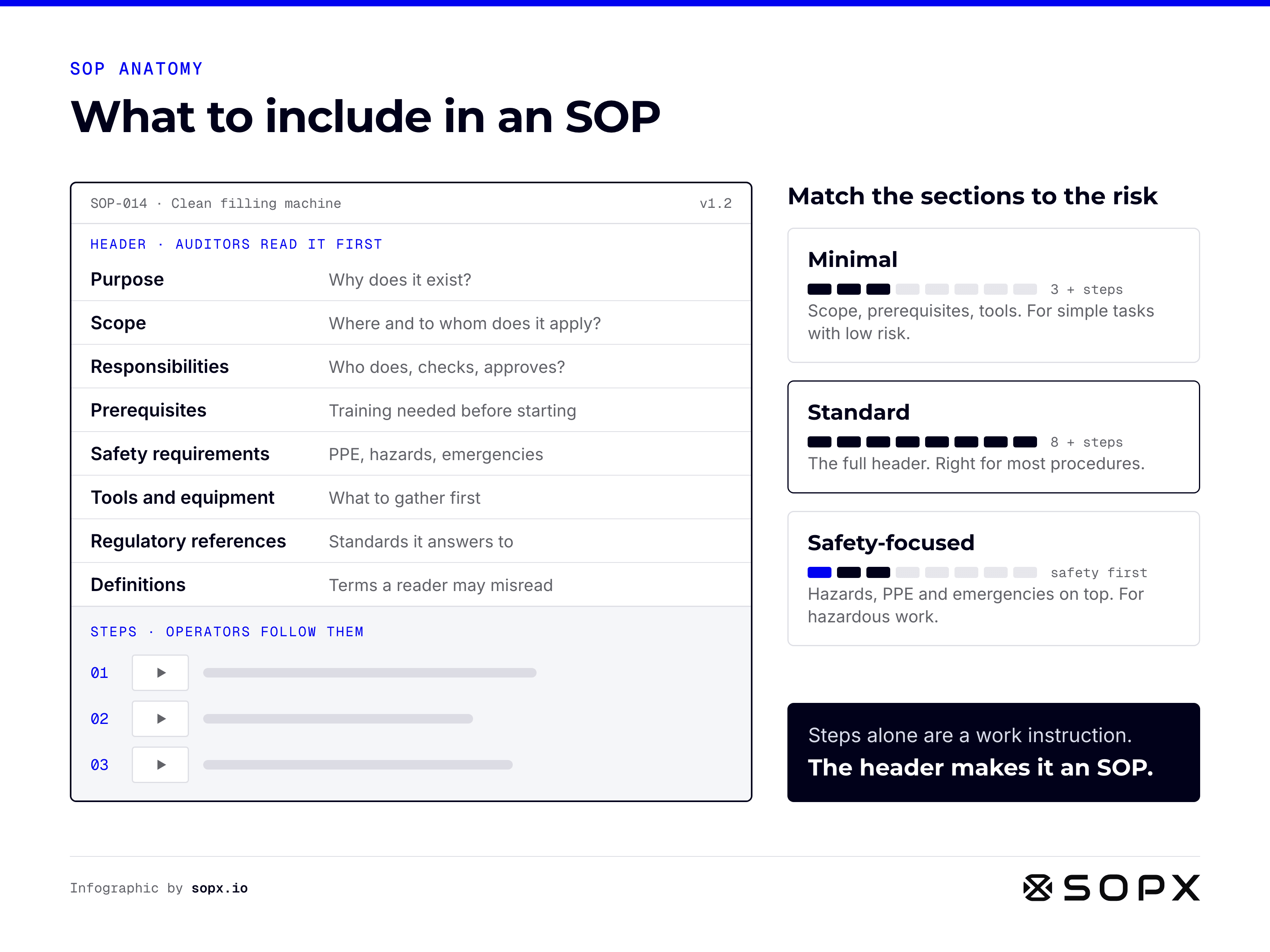
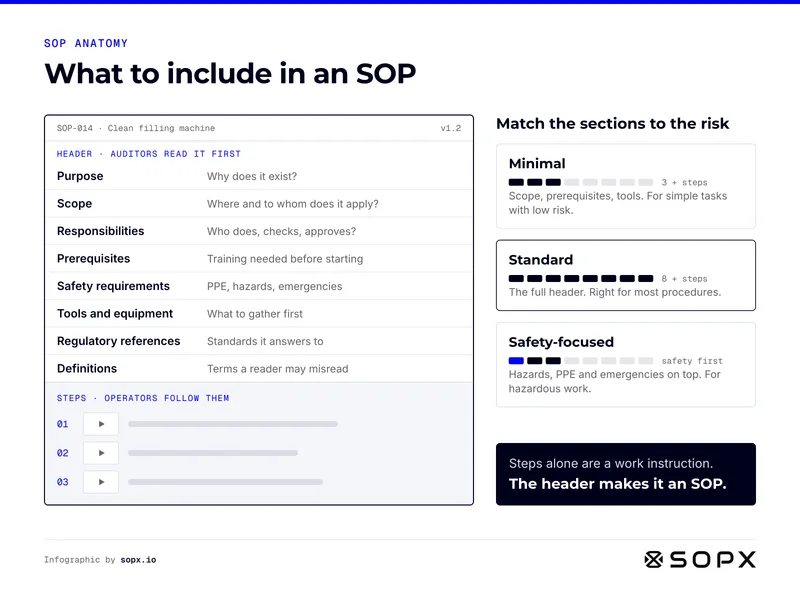
What to include in an SOP infographic: an SOP page with a header of eight sections (purpose, scope, responsibilities, prerequisites, safety requirements, tools and equipment, regulatory references, definitions) above the numbered steps. Three levels: minimal (3 sections), standard (all 8), safety-focused. Steps alone are a work instruction.

What to include in an SOP: the sections and when to use them

What to include in an SOP at a glance: the eight header sections, the steps, and how many sections each kind of task needs.

Full guide: What to Include in an SOP: The Sections Every Procedure Needs
Embed code
                        <figure><a href="https://sopx.io/insights/what-to-include-in-an-sop/"><img src="https://sopx.io/infographics/what-to-include-in-an-sop-infographic.png" alt="What to include in an SOP infographic: an SOP page with a header of eight sections (purpose, scope, responsibilities, prerequisites, safety requirements, tools and equipment, regulatory references, definitions) above the numbered steps. Three levels: minimal (3 sections), standard (all 8), safety-focused. Steps alone are a work instruction." width="1600" height="1200" loading="lazy" style="max-width:100%;height:auto"></a><figcaption><a href="https://sopx.io/insights/what-to-include-in-an-sop/">What to include in an SOP: the sections and when to use them</a>. Infographic by <a href="https://sopx.io/">SOPX</a> (CC BY 4.0).</figcaption></figure>
                      
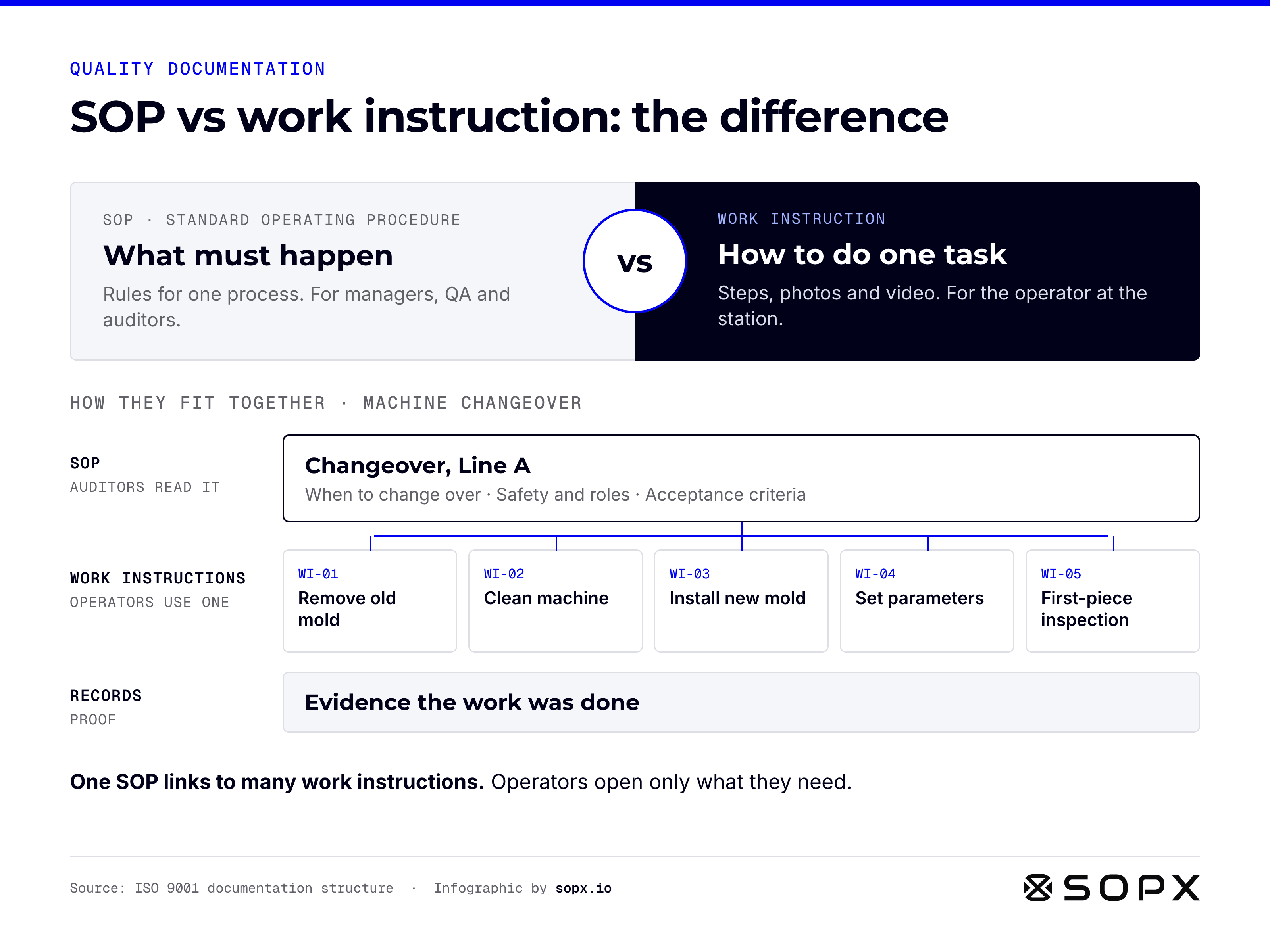
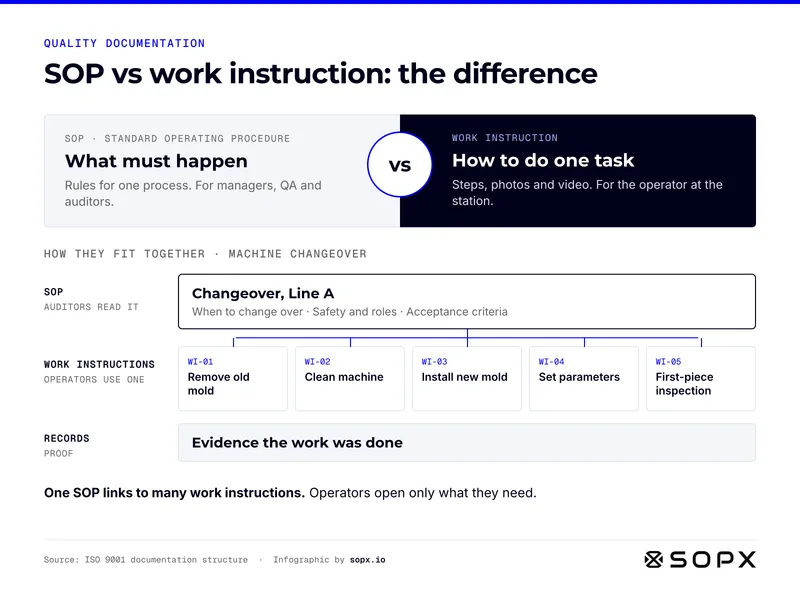
SOP vs work instruction infographic. An SOP says what must happen: rules for one process, read by managers, QA and auditors. A work instruction shows how to do one task with steps, photos and video. Example: one changeover SOP links to five work instructions, from removing the old mold to first-piece inspection, with records as proof.

SOP vs work instruction: the difference

SOP vs work instruction at a glance: what each document does, who uses it, and how one SOP links to many work instructions.

Full guide: SOP vs Work Instruction vs SOI vs SWI: Real Differences

Embed code
                        <figure><a href="https://sopx.io/insights/sop-vs-work-instructions/"><img src="https://sopx.io/infographics/sop-vs-work-instructions-infographic.png" alt="SOP vs work instruction infographic. An SOP says what must happen: rules for one process, read by managers, QA and auditors. A work instruction shows how to do one task with steps, photos and video. Example: one changeover SOP links to five work instructions, from removing the old mold to first-piece inspection, with records as proof." width="1600" height="1200" loading="lazy" style="max-width:100%;height:auto"></a><figcaption><a href="https://sopx.io/insights/sop-vs-work-instructions/">SOP vs work instruction: the difference</a>. Infographic by <a href="https://sopx.io/">SOPX</a> (CC BY 4.0).</figcaption></figure>
                      

Video and AI

Turning recordings into SOPs, and what a person still checks.
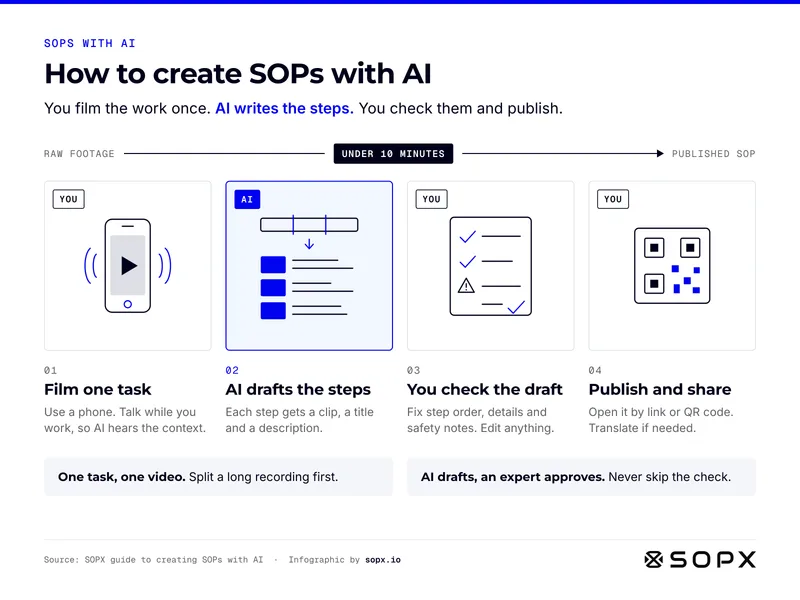
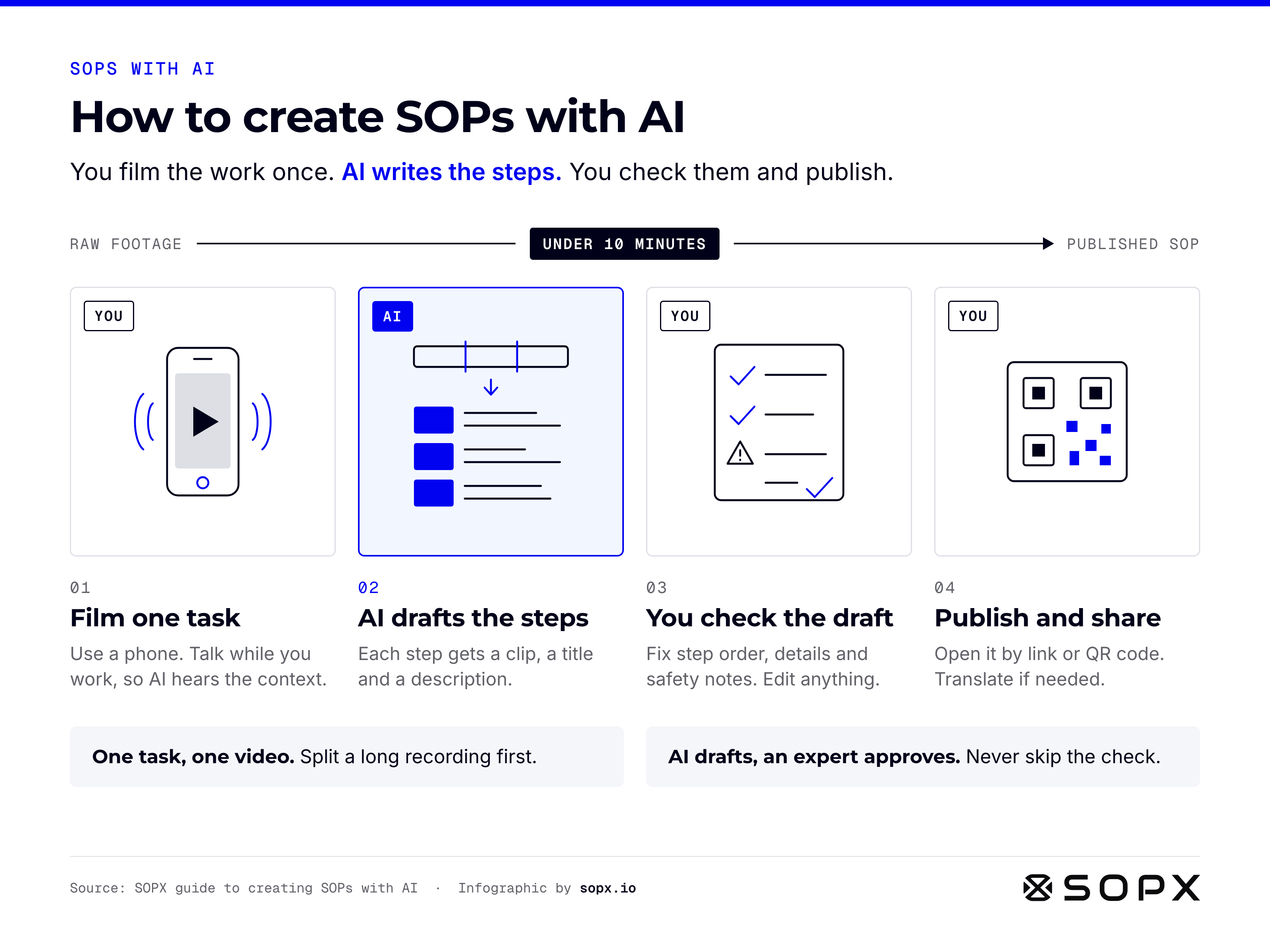
How to create SOPs with AI infographic. Four steps from raw footage to a published SOP in under 10 minutes: you film one task on a phone while talking, AI drafts the steps with a clip, title and description each, you check the draft for step order, details and safety notes, then you publish and share by link or QR code. Tips: one task per video, and an expert always approves the AI draft.

How to create SOPs with AI in 4 steps

How to create SOPs with AI at a glance: what you do, what the AI does, and two habits that keep the draft accurate.

Full guide: How to Create SOPs with AI from Video or PDF
Embed code
                        <figure><a href="https://sopx.io/insights/how-to-create-sops-with-ai/"><img src="https://sopx.io/infographics/how-to-create-sops-with-ai-infographic.png" alt="How to create SOPs with AI infographic. Four steps from raw footage to a published SOP in under 10 minutes: you film one task on a phone while talking, AI drafts the steps with a clip, title and description each, you check the draft for step order, details and safety notes, then you publish and share by link or QR code. Tips: one task per video, and an expert always approves the AI draft." width="1600" height="1200" loading="lazy" style="max-width:100%;height:auto"></a><figcaption><a href="https://sopx.io/insights/how-to-create-sops-with-ai/">How to create SOPs with AI in 4 steps</a>. Infographic by <a href="https://sopx.io/">SOPX</a> (CC BY 4.0).</figcaption></figure>
                      
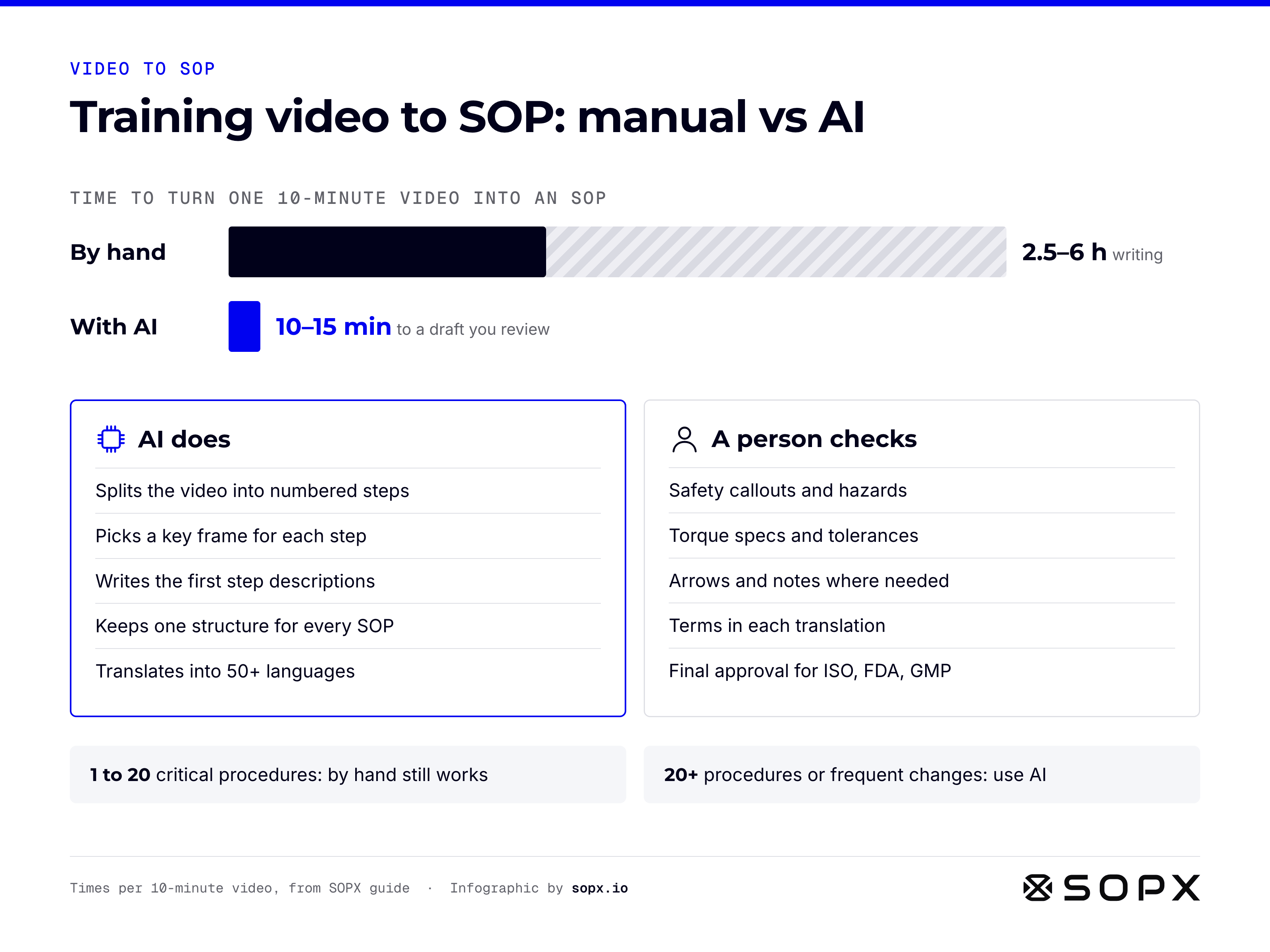
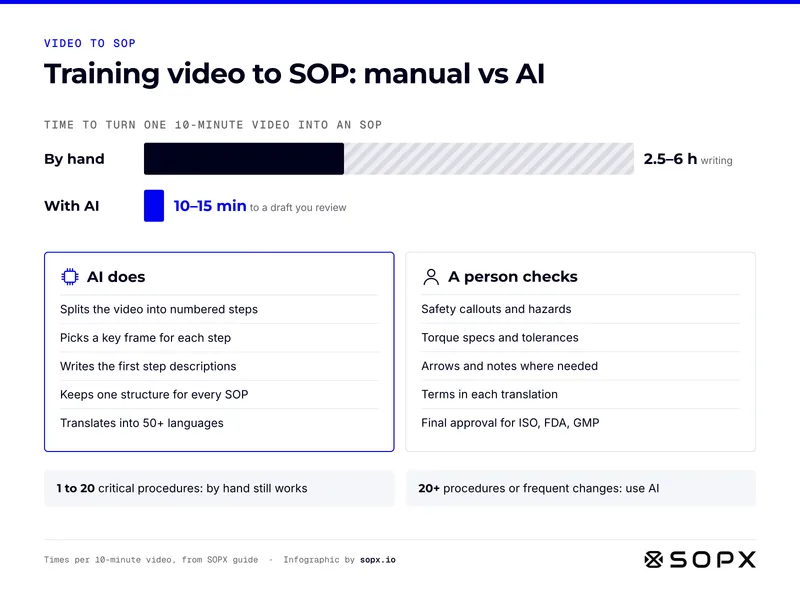
Training video to SOP infographic. Turning one 10-minute video into an SOP takes 2.5 to 6 hours by hand, or 10 to 15 minutes with AI to a draft you review. AI splits steps, picks key frames, writes first descriptions, keeps one structure and translates. A person checks safety callouts, specs, annotations, translations and final approval.

Training video to SOP: manual vs AI, time and roles

Training video to SOP at a glance: how long manual and AI conversion take, what the AI does, and what a person still checks.

Full guide: How to Create SOPs from Video: Manual and AI Methods
Embed code
                        <figure><a href="https://sopx.io/insights/convert-training-videos-to-sops/"><img src="https://sopx.io/infographics/convert-training-videos-to-sops-infographic.png" alt="Training video to SOP infographic. Turning one 10-minute video into an SOP takes 2.5 to 6 hours by hand, or 10 to 15 minutes with AI to a draft you review. AI splits steps, picks key frames, writes first descriptions, keeps one structure and translates. A person checks safety callouts, specs, annotations, translations and final approval." width="1600" height="1200" loading="lazy" style="max-width:100%;height:auto"></a><figcaption><a href="https://sopx.io/insights/convert-training-videos-to-sops/">Training video to SOP: manual vs AI, time and roles</a>. Infographic by <a href="https://sopx.io/">SOPX</a> (CC BY 4.0).</figcaption></figure>
                      
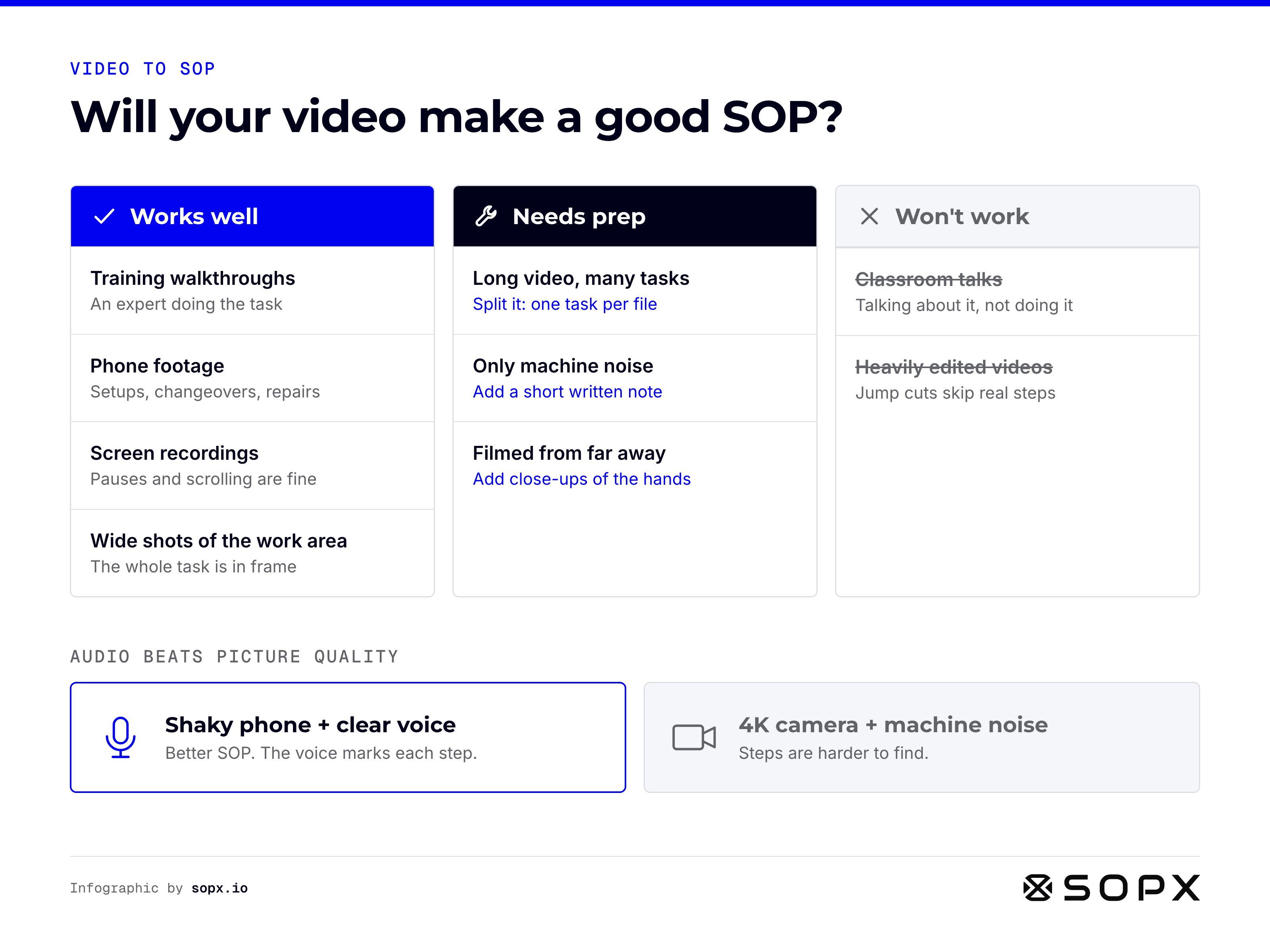
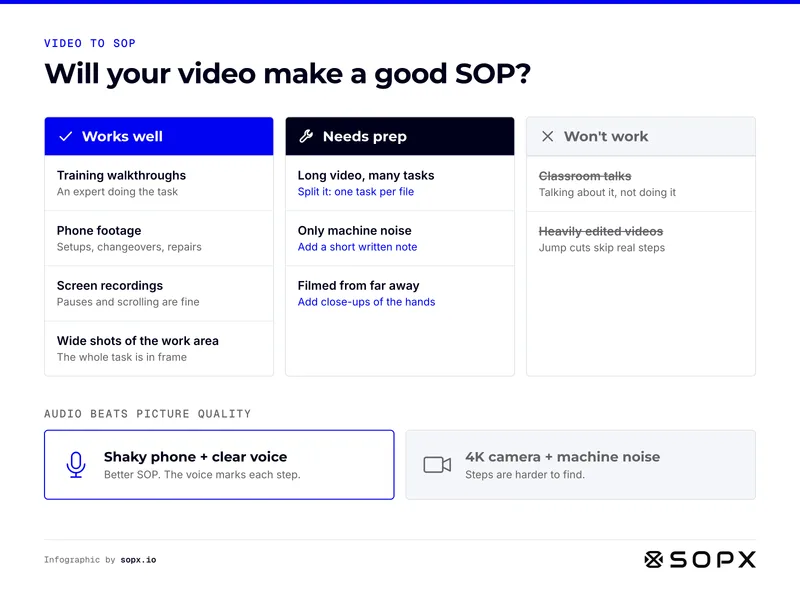
Video to SOP infographic sorting existing videos. Works well: training walkthroughs, phone footage of setups and repairs, screen recordings, wide shots of the work area. Needs prep: long videos with many tasks (split them), only machine noise (add a note), filmed from far away (add close-ups). Won't work: classroom talks, heavily edited videos. Audio beats picture quality.

Video to SOP: will your existing video make a good SOP?

Video to SOP at a glance: which existing videos convert well, which need prep, which won't work, and why audio matters more than resolution.

Full guide: Video to SOP: 3 Ways to Convert Existing Videos

Embed code
                        <figure><a href="https://sopx.io/insights/video-to-sop-with-existing-videos/"><img src="https://sopx.io/infographics/video-to-sop-with-existing-videos-infographic.png" alt="Video to SOP infographic sorting existing videos. Works well: training walkthroughs, phone footage of setups and repairs, screen recordings, wide shots of the work area. Needs prep: long videos with many tasks (split them), only machine noise (add a note), filmed from far away (add close-ups). Won't work: classroom talks, heavily edited videos. Audio beats picture quality." width="1600" height="1200" loading="lazy" style="max-width:100%;height:auto"></a><figcaption><a href="https://sopx.io/insights/video-to-sop-with-existing-videos/">Video to SOP: will your existing video make a good SOP?</a>. Infographic by <a href="https://sopx.io/">SOPX</a> (CC BY 4.0).</figcaption></figure>
                      

Choosing software

Which tool fits which job, and what each path costs.
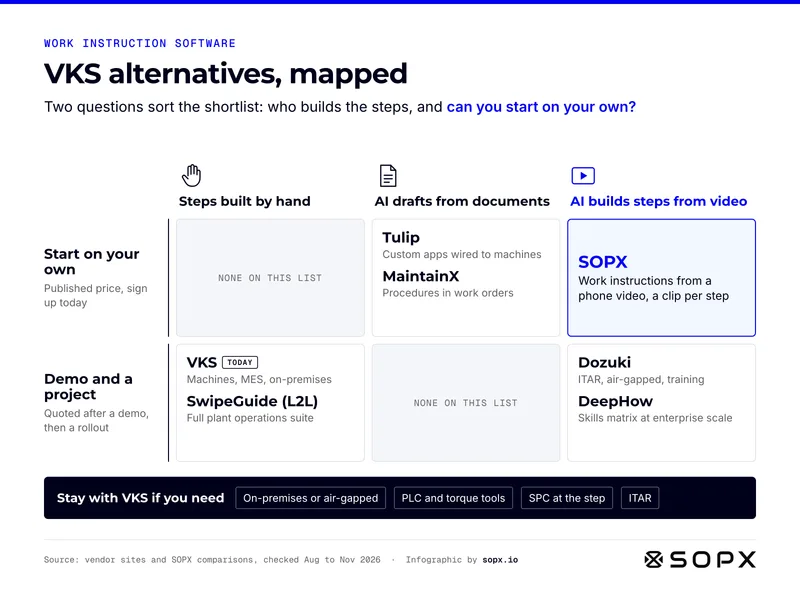
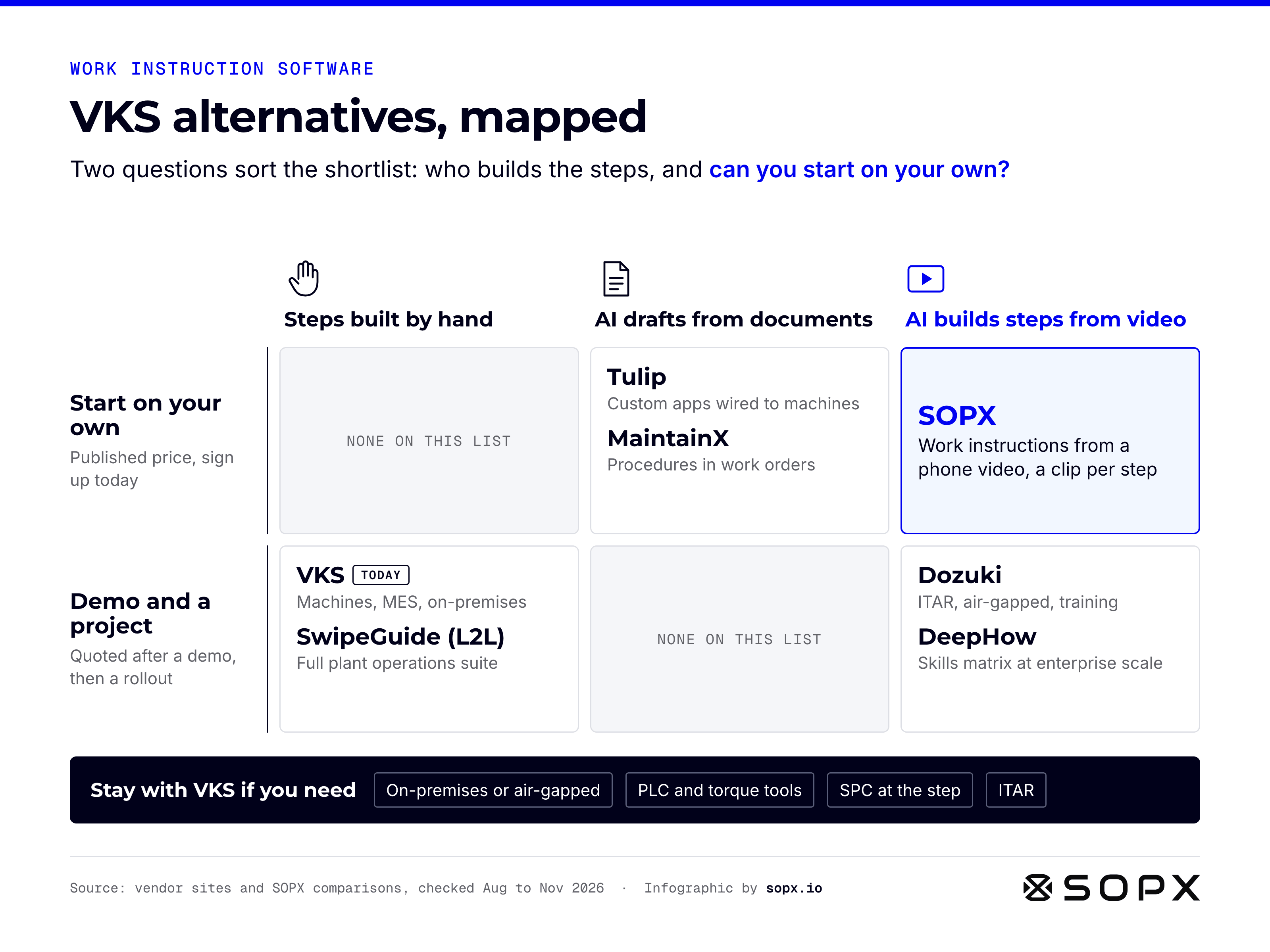
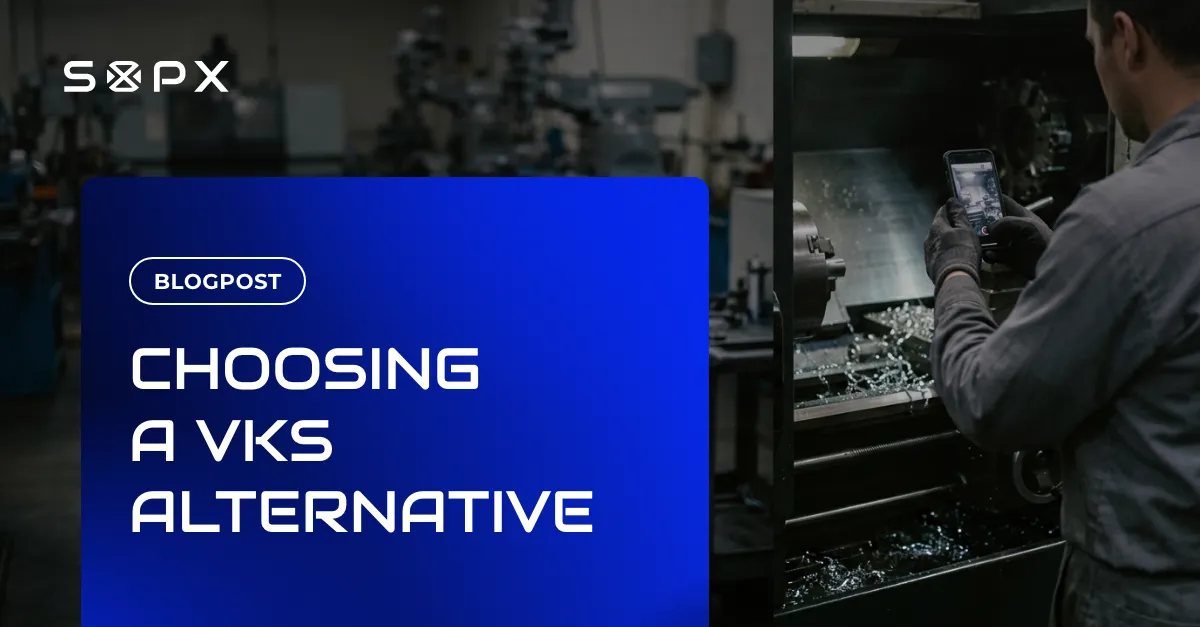
VKS alternatives mapped on two questions: who builds the steps and can you start on your own. Steps built by hand with a demo and project: VKS, SwipeGuide. AI from documents, start on your own: Tulip, MaintainX. AI builds steps from video with a demo and project: Dozuki, DeepHow. AI from video, start on your own: SOPX. Stay with VKS for on-premises, PLC and torque tools, SPC or ITAR.

VKS alternatives, mapped by who builds the steps

VKS alternatives at a glance: how each tool builds work instruction steps, whether you can start without a demo, and when VKS is still the right choice.

Full guide: Best VKS Alternatives in 2026: 6 Work Instruction Tools
Embed code
                        <figure><a href="https://sopx.io/insights/best-vks-alternatives/"><img src="https://sopx.io/infographics/best-vks-alternatives-infographic.png" alt="VKS alternatives mapped on two questions: who builds the steps and can you start on your own. Steps built by hand with a demo and project: VKS, SwipeGuide. AI from documents, start on your own: Tulip, MaintainX. AI builds steps from video with a demo and project: Dozuki, DeepHow. AI from video, start on your own: SOPX. Stay with VKS for on-premises, PLC and torque tools, SPC or ITAR." width="1600" height="1200" loading="lazy" style="max-width:100%;height:auto"></a><figcaption><a href="https://sopx.io/insights/best-vks-alternatives/">VKS alternatives, mapped by who builds the steps</a>. Infographic by <a href="https://sopx.io/">SOPX</a> (CC BY 4.0).</figcaption></figure>
                      
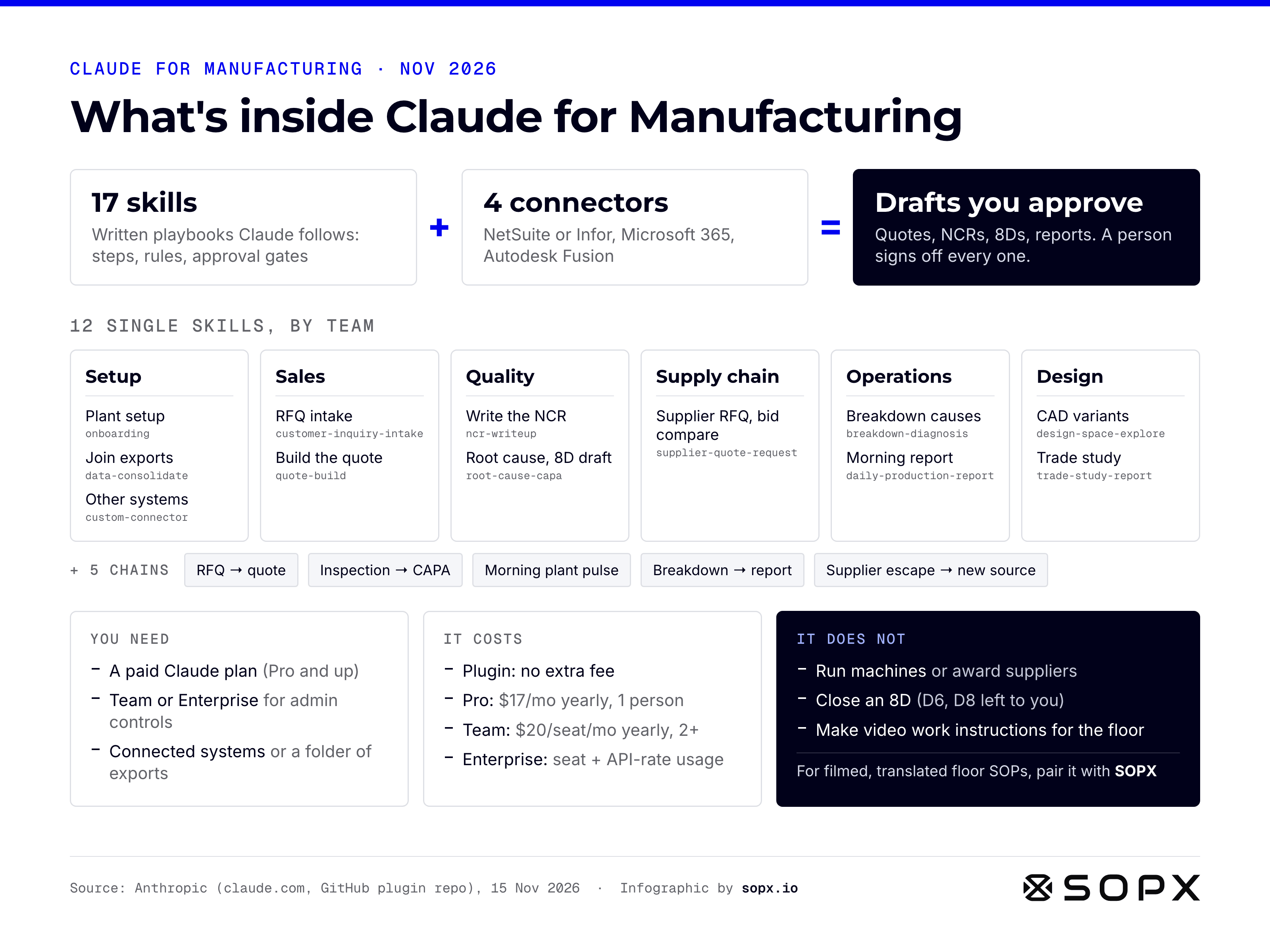
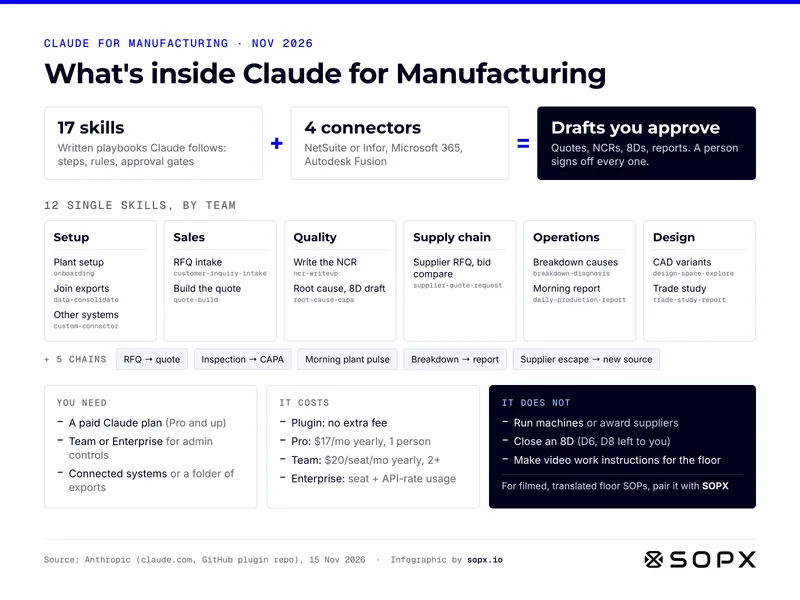
Claude for Manufacturing infographic: 17 skills plus 4 connectors (NetSuite or Infor, Microsoft 365, Autodesk Fusion) equal drafts a person approves. Twelve single skills by team: setup, sales, quality, supply chain, operations, design. Five chains such as RFQ to quote. Needs a paid Claude plan. Does not run machines, close an 8D or make floor work instructions.

What's inside Claude for Manufacturing: 17 skills, 4 connectors, and the limits

Claude for Manufacturing at a glance: what the plugin contains, what you need to run it, what it costs, and what it leaves to you.

Full guide: Claude for Manufacturing: What It Is, Cost and Limits
Embed code
                        <figure><a href="https://sopx.io/insights/claude-for-manufacturing/"><img src="https://sopx.io/infographics/claude-for-manufacturing-infographic.png" alt="Claude for Manufacturing infographic: 17 skills plus 4 connectors (NetSuite or Infor, Microsoft 365, Autodesk Fusion) equal drafts a person approves. Twelve single skills by team: setup, sales, quality, supply chain, operations, design. Five chains such as RFQ to quote. Needs a paid Claude plan. Does not run machines, close an 8D or make floor work instructions." width="1600" height="1200" loading="lazy" style="max-width:100%;height:auto"></a><figcaption><a href="https://sopx.io/insights/claude-for-manufacturing/">What's inside Claude for Manufacturing: 17 skills, 4 connectors, and the limits</a>. Infographic by <a href="https://sopx.io/">SOPX</a> (CC BY 4.0).</figcaption></figure>
                      
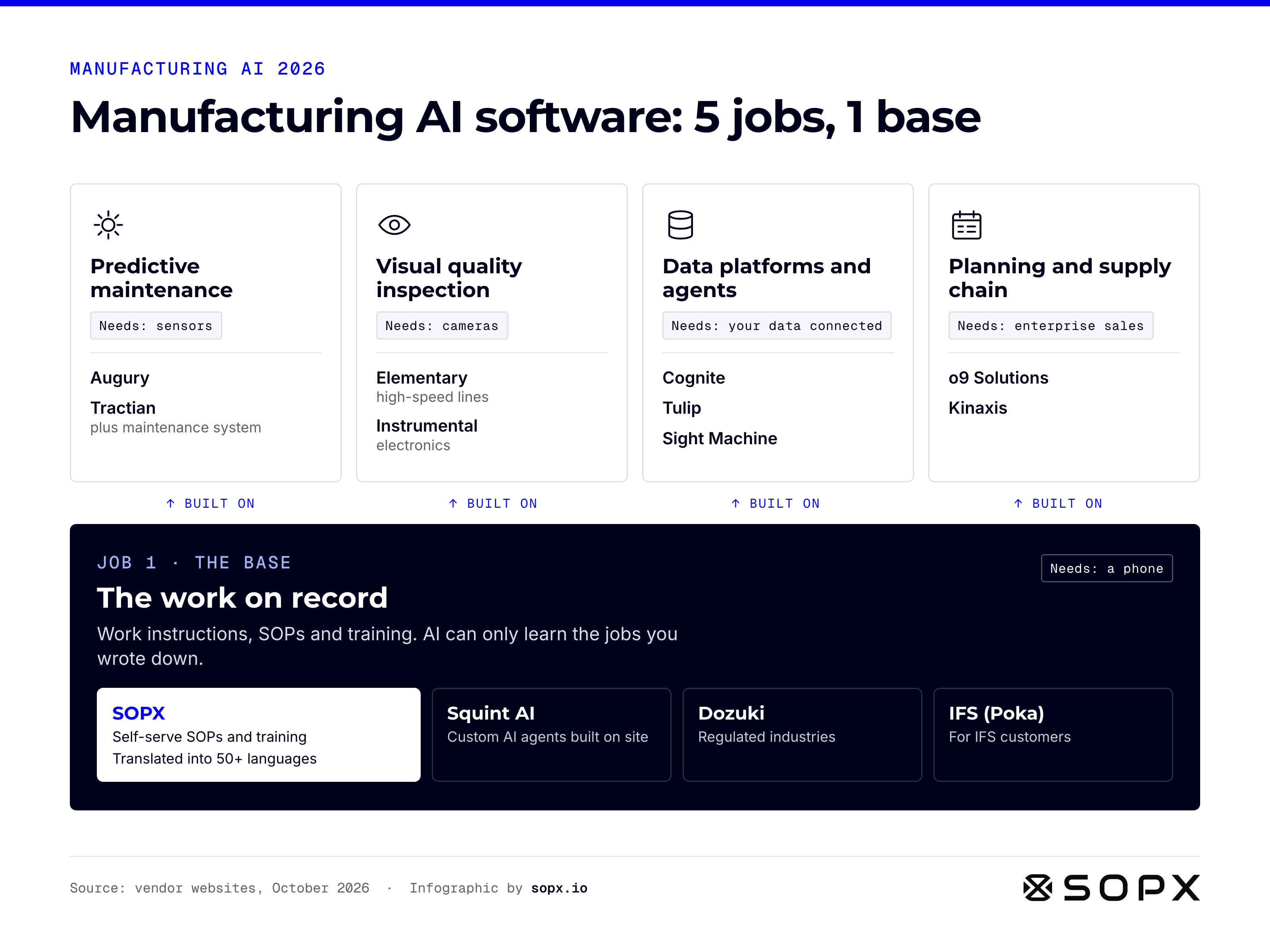
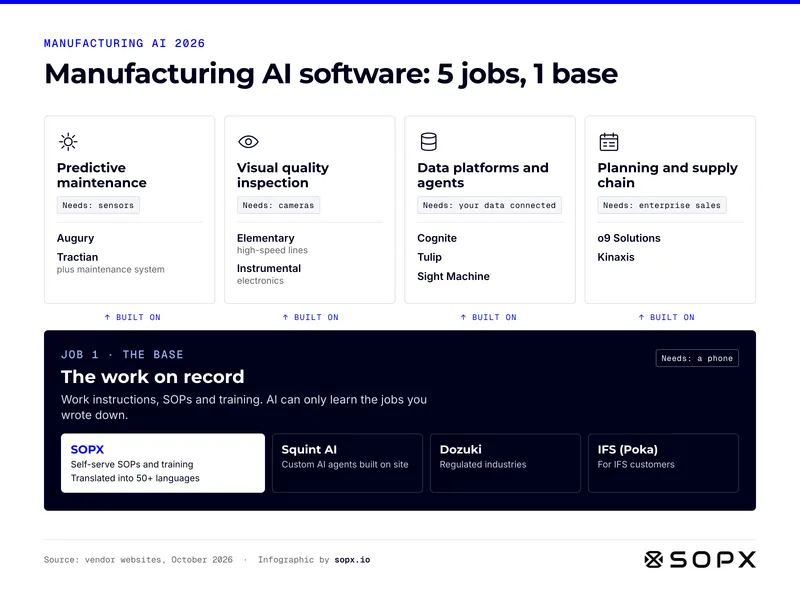
Manufacturing AI software infographic: four jobs built on one base. Predictive maintenance (Augury, Tractian) needs sensors. Visual inspection (Elementary, Instrumental) needs cameras. Data platforms (Cognite, Tulip, Sight Machine) need connected data. Planning (o9, Kinaxis) is enterprise. The base is the work on record: SOPX, Squint AI, Dozuki, IFS.

Manufacturing AI software: 5 jobs and the base they share

Manufacturing AI software at a glance: the five jobs AI does in a plant, what each needs to start, and the work-on-record layer underneath.

Full guide: Manufacturing AI Software: Best Tools by Use Case (2026)
Embed code
                        <figure><a href="https://sopx.io/insights/manufacturing-ai-software/"><img src="https://sopx.io/infographics/manufacturing-ai-software-infographic.png" alt="Manufacturing AI software infographic: four jobs built on one base. Predictive maintenance (Augury, Tractian) needs sensors. Visual inspection (Elementary, Instrumental) needs cameras. Data platforms (Cognite, Tulip, Sight Machine) need connected data. Planning (o9, Kinaxis) is enterprise. The base is the work on record: SOPX, Squint AI, Dozuki, IFS." width="1600" height="1200" loading="lazy" style="max-width:100%;height:auto"></a><figcaption><a href="https://sopx.io/insights/manufacturing-ai-software/">Manufacturing AI software: 5 jobs and the base they share</a>. Infographic by <a href="https://sopx.io/">SOPX</a> (CC BY 4.0).</figcaption></figure>
                      
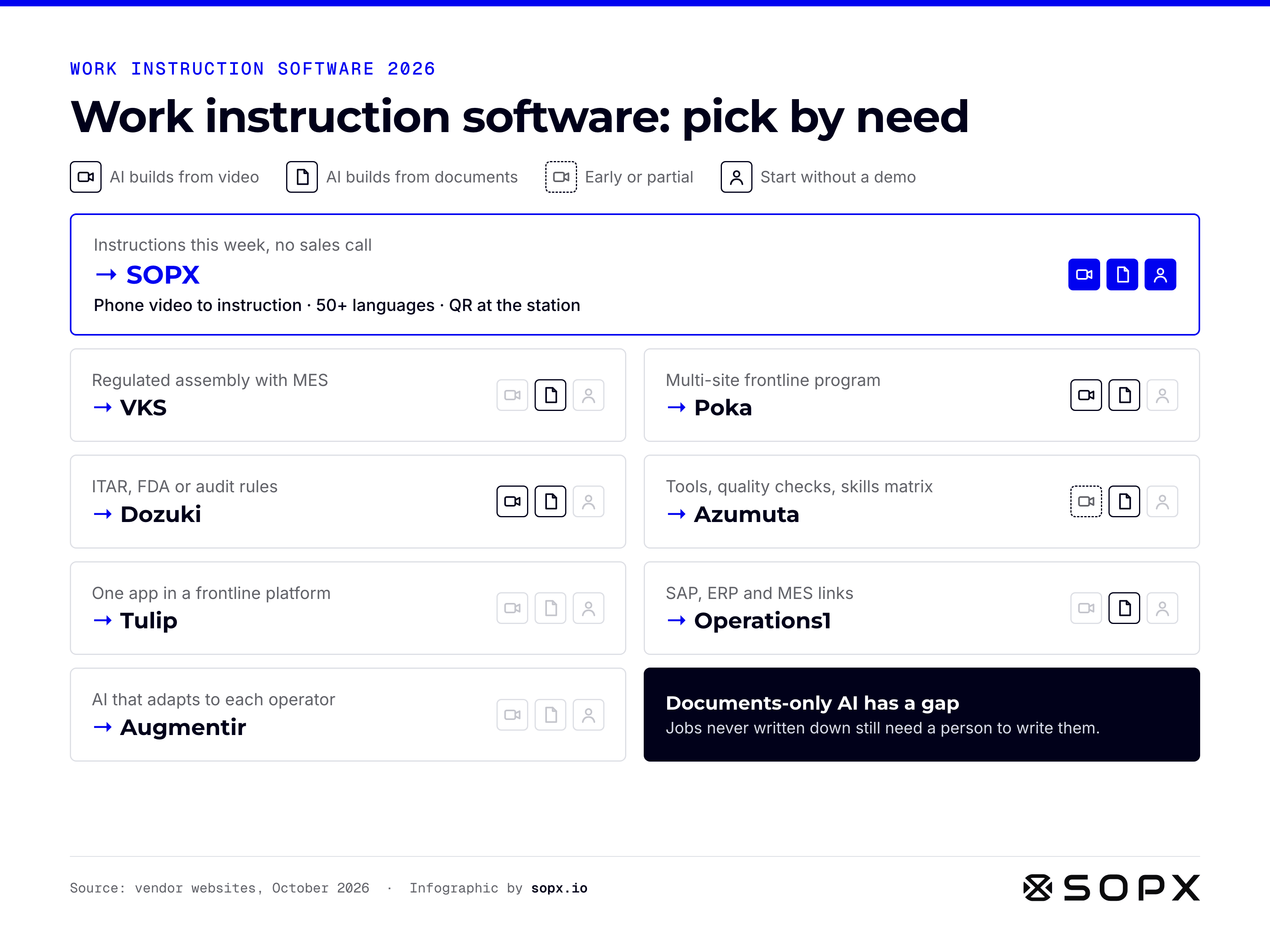
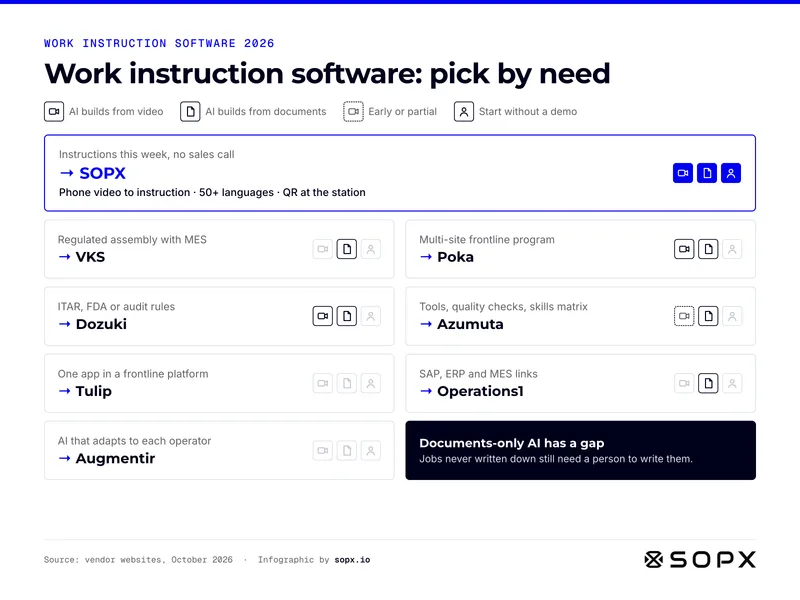
Work instruction software for manufacturing, picked by need: SOPX for instructions this week from phone video, VKS for regulated assembly with MES, Poka for multi-site programs, Dozuki for ITAR or FDA, Azumuta for skills matrix, Tulip as one app in a platform, Operations1 for SAP links, Augmentir for adaptive AI. Icons show what each AI builds from.

Work instruction software for manufacturing: pick by need

Work instruction software at a glance: the best tool for each manufacturing need, what its AI builds from, and whether you can start without a demo.

Full guide: Best Work Instruction Software for Manufacturing in 2026
Embed code
                        <figure><a href="https://sopx.io/insights/best-work-instruction-software-manufacturing/"><img src="https://sopx.io/infographics/best-work-instruction-software-manufacturing-infographic.png" alt="Work instruction software for manufacturing, picked by need: SOPX for instructions this week from phone video, VKS for regulated assembly with MES, Poka for multi-site programs, Dozuki for ITAR or FDA, Azumuta for skills matrix, Tulip as one app in a platform, Operations1 for SAP links, Augmentir for adaptive AI. Icons show what each AI builds from." width="1600" height="1200" loading="lazy" style="max-width:100%;height:auto"></a><figcaption><a href="https://sopx.io/insights/best-work-instruction-software-manufacturing/">Work instruction software for manufacturing: pick by need</a>. Infographic by <a href="https://sopx.io/">SOPX</a> (CC BY 4.0).</figcaption></figure>
                      
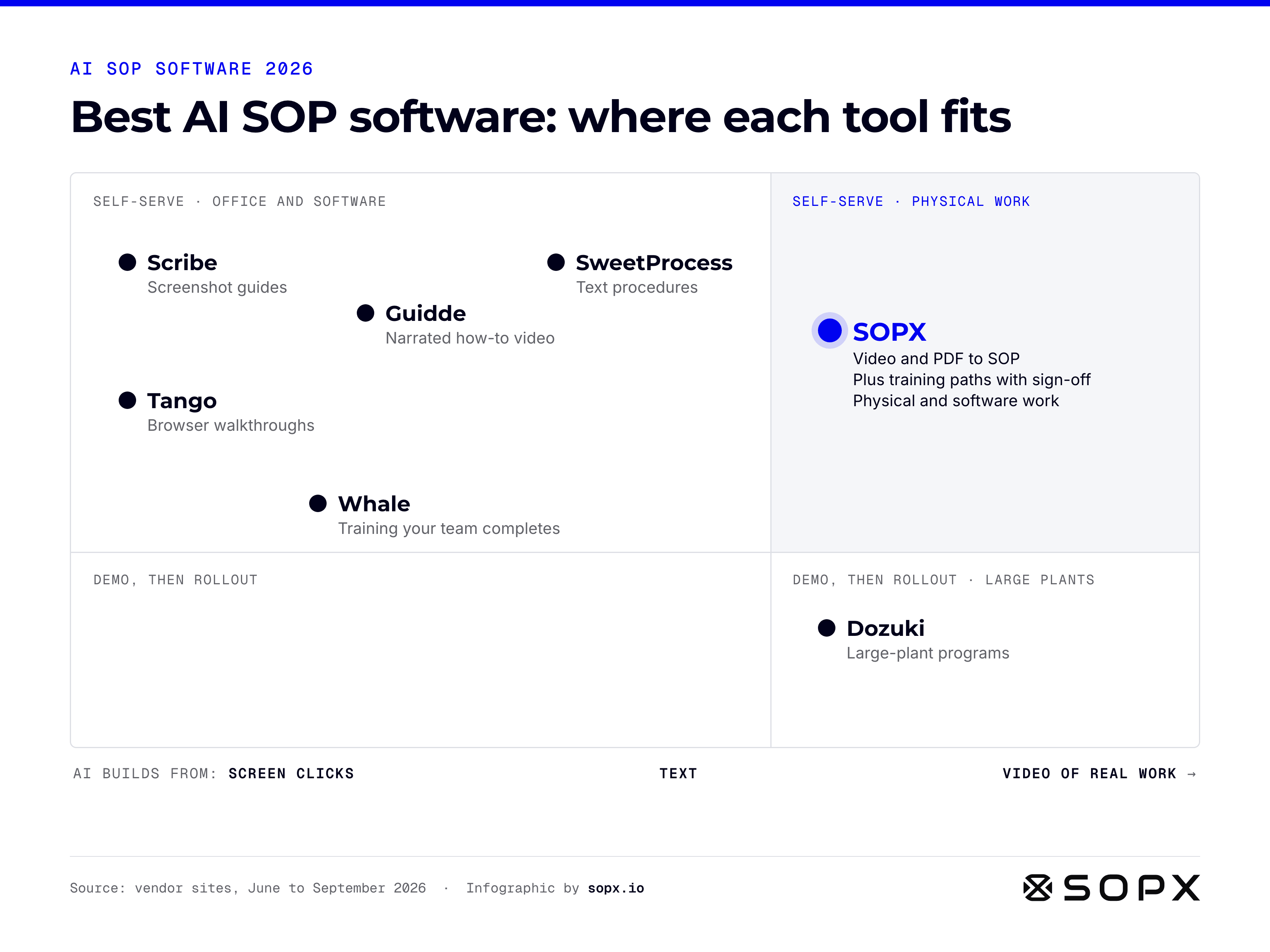
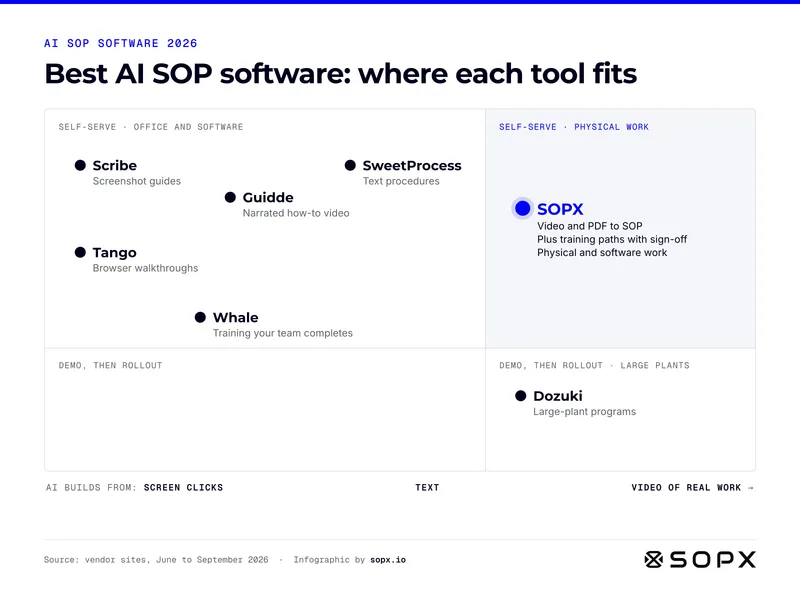
Best AI SOP software map for 2026. Horizontal axis: what the AI builds from, screen clicks to text to video of real work. Vertical: self-serve in minutes or demo and rollout. Scribe, Tango, Guidde, Whale and SweetProcess sit in self-serve office and software. SOPX sits alone in self-serve physical work, with training paths and sign-off. Dozuki is demo and rollout for large plants.

Best AI SOP software 2026: where each tool fits

Best AI SOP software at a glance: what each tool's AI builds from, and whether you can start on your own or need a demo and rollout.

Full guide: Best AI SOP Software 2026: 7 Tools for Physical Work
Embed code
                        <figure><a href="https://sopx.io/insights/best-ai-sop-software/"><img src="https://sopx.io/infographics/best-ai-sop-software-infographic.png" alt="Best AI SOP software map for 2026. Horizontal axis: what the AI builds from, screen clicks to text to video of real work. Vertical: self-serve in minutes or demo and rollout. Scribe, Tango, Guidde, Whale and SweetProcess sit in self-serve office and software. SOPX sits alone in self-serve physical work, with training paths and sign-off. Dozuki is demo and rollout for large plants." width="1600" height="1200" loading="lazy" style="max-width:100%;height:auto"></a><figcaption><a href="https://sopx.io/insights/best-ai-sop-software/">Best AI SOP software 2026: where each tool fits</a>. Infographic by <a href="https://sopx.io/">SOPX</a> (CC BY 4.0).</figcaption></figure>
                      
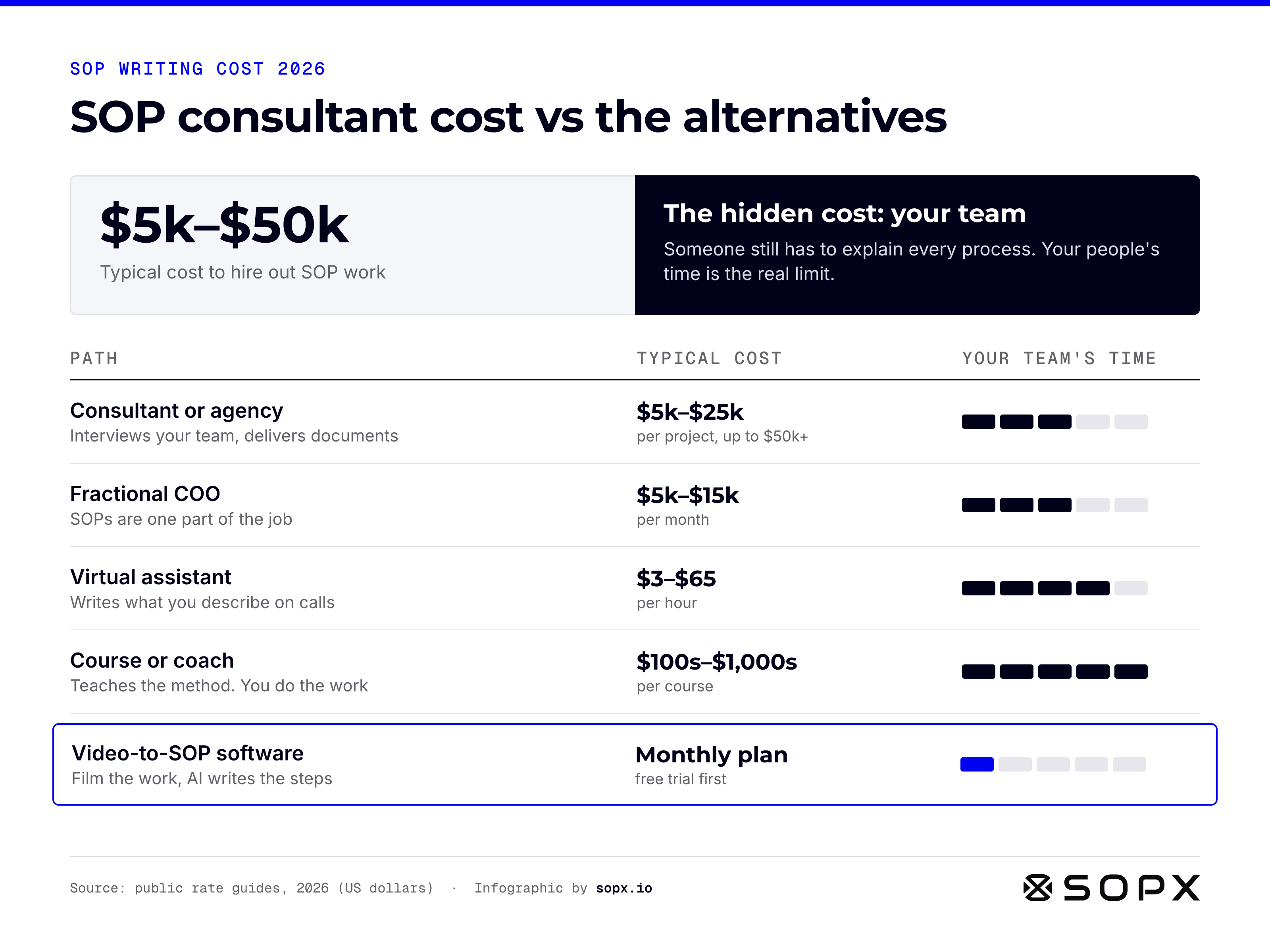
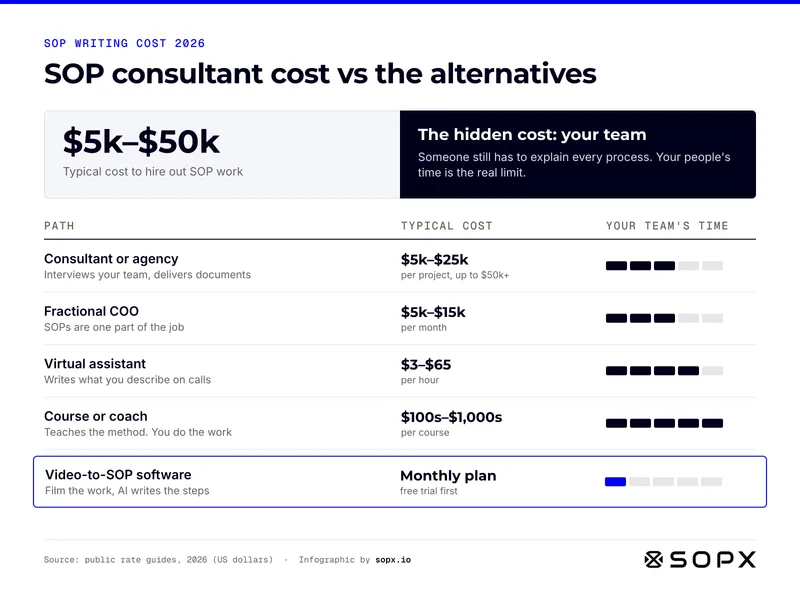
SOP consultant cost infographic for 2026: hiring out SOP work typically costs 5,000 to 50,000 US dollars. Paths compared by cost and team time: consultant or agency 5k to 25k per project, fractional COO 5k to 15k per month, virtual assistant 3 to 65 dollars per hour, course or coach, and video-to-SOP software on a monthly plan with the least team time.

SOP consultant cost vs the alternatives (2026)

SOP consultant cost at a glance: what each way of getting SOPs written costs in 2026, and how much of your team's time it still needs.

Full guide: Hiring Someone to Build Your SOPs: What It Costs in 2026
Embed code
                        <figure><a href="https://sopx.io/insights/sop-consultant-cost/"><img src="https://sopx.io/infographics/sop-consultant-cost-infographic.png" alt="SOP consultant cost infographic for 2026: hiring out SOP work typically costs 5,000 to 50,000 US dollars. Paths compared by cost and team time: consultant or agency 5k to 25k per project, fractional COO 5k to 15k per month, virtual assistant 3 to 65 dollars per hour, course or coach, and video-to-SOP software on a monthly plan with the least team time." width="1600" height="1200" loading="lazy" style="max-width:100%;height:auto"></a><figcaption><a href="https://sopx.io/insights/sop-consultant-cost/">SOP consultant cost vs the alternatives (2026)</a>. Infographic by <a href="https://sopx.io/">SOPX</a> (CC BY 4.0).</figcaption></figure>
                      
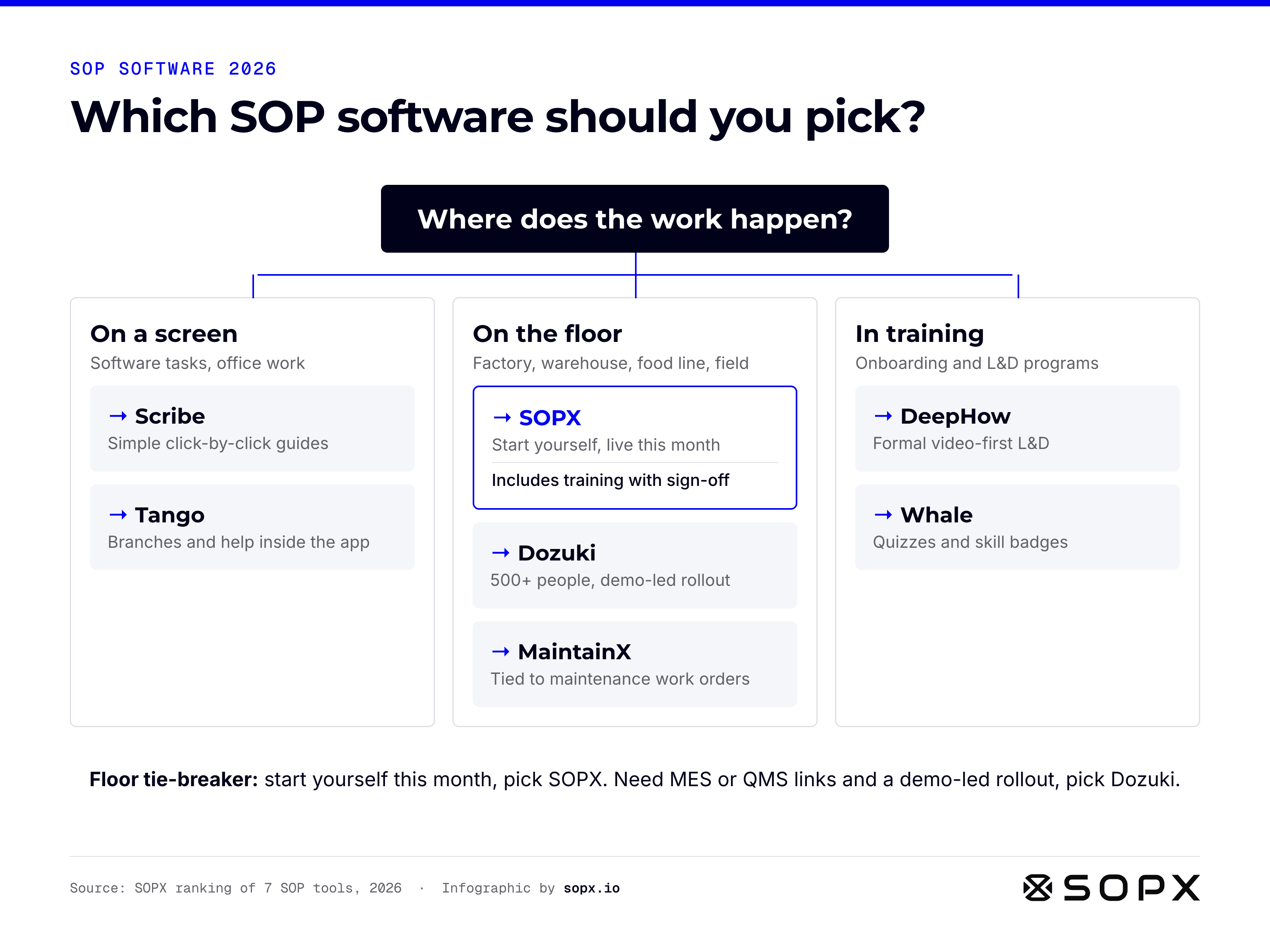
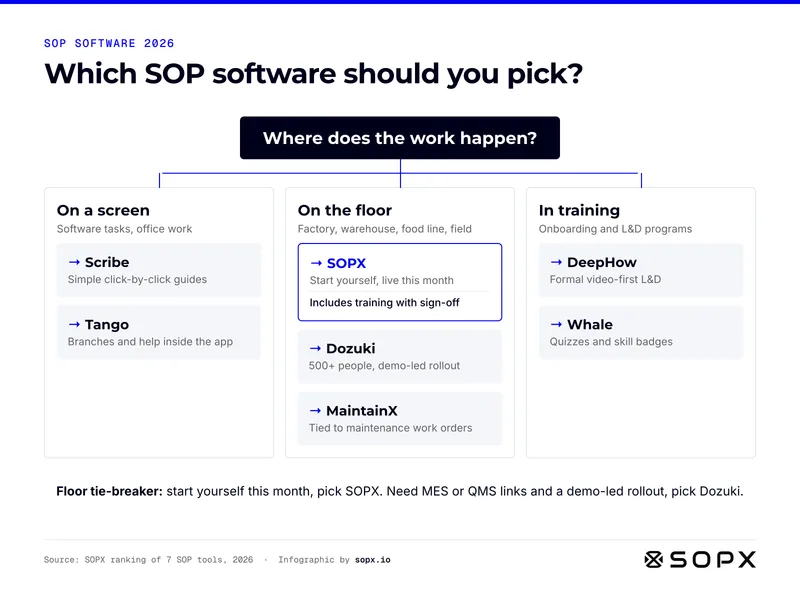
SOP software decision tree for 2026, starting from where the work happens. On a screen: Scribe for click-by-click guides, Tango for branches and in-app help. On the floor: SOPX to start yourself this month, Dozuki for 500+ people and a demo-led rollout, MaintainX for work orders. In training: DeepHow for video-first L&D, Whale for quizzes and skill badges. SOPX includes training with sign-off.

Which SOP software should you pick? A 2026 decision tree

Which SOP software to pick at a glance: one question about where the work happens, then the best-fit tool for each case.

Full guide: SOP Software: 7 Best Tools Compared by Use Case (2026)

Embed code
                        <figure><a href="https://sopx.io/insights/best-sop-software/"><img src="https://sopx.io/infographics/best-sop-software-infographic.png" alt="SOP software decision tree for 2026, starting from where the work happens. On a screen: Scribe for click-by-click guides, Tango for branches and in-app help. On the floor: SOPX to start yourself this month, Dozuki for 500+ people and a demo-led rollout, MaintainX for work orders. In training: DeepHow for video-first L&amp;D, Whale for quizzes and skill badges. SOPX includes training with sign-off." width="1600" height="1200" loading="lazy" style="max-width:100%;height:auto"></a><figcaption><a href="https://sopx.io/insights/best-sop-software/">Which SOP software should you pick? A 2026 decision tree</a>. Infographic by <a href="https://sopx.io/">SOPX</a> (CC BY 4.0).</figcaption></figure>
                      

Training and onboarding

How new hires learn the job, and how to make it faster.
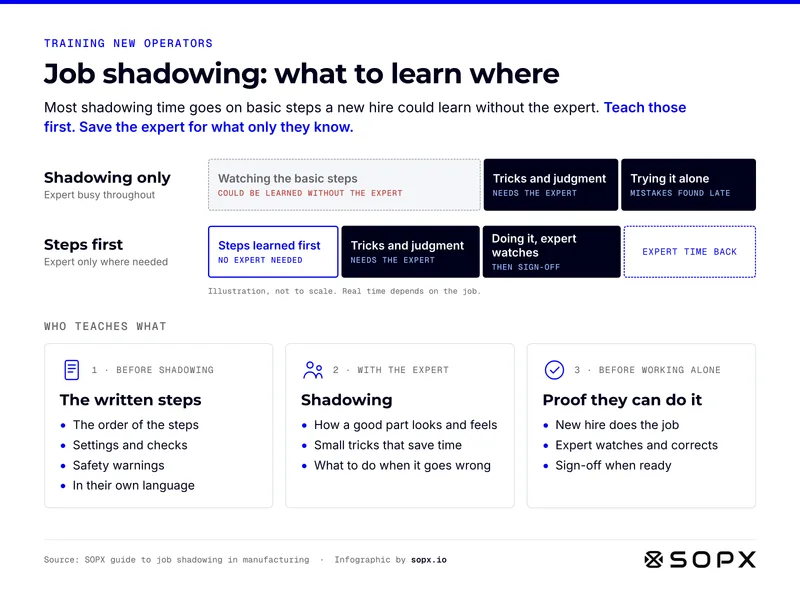
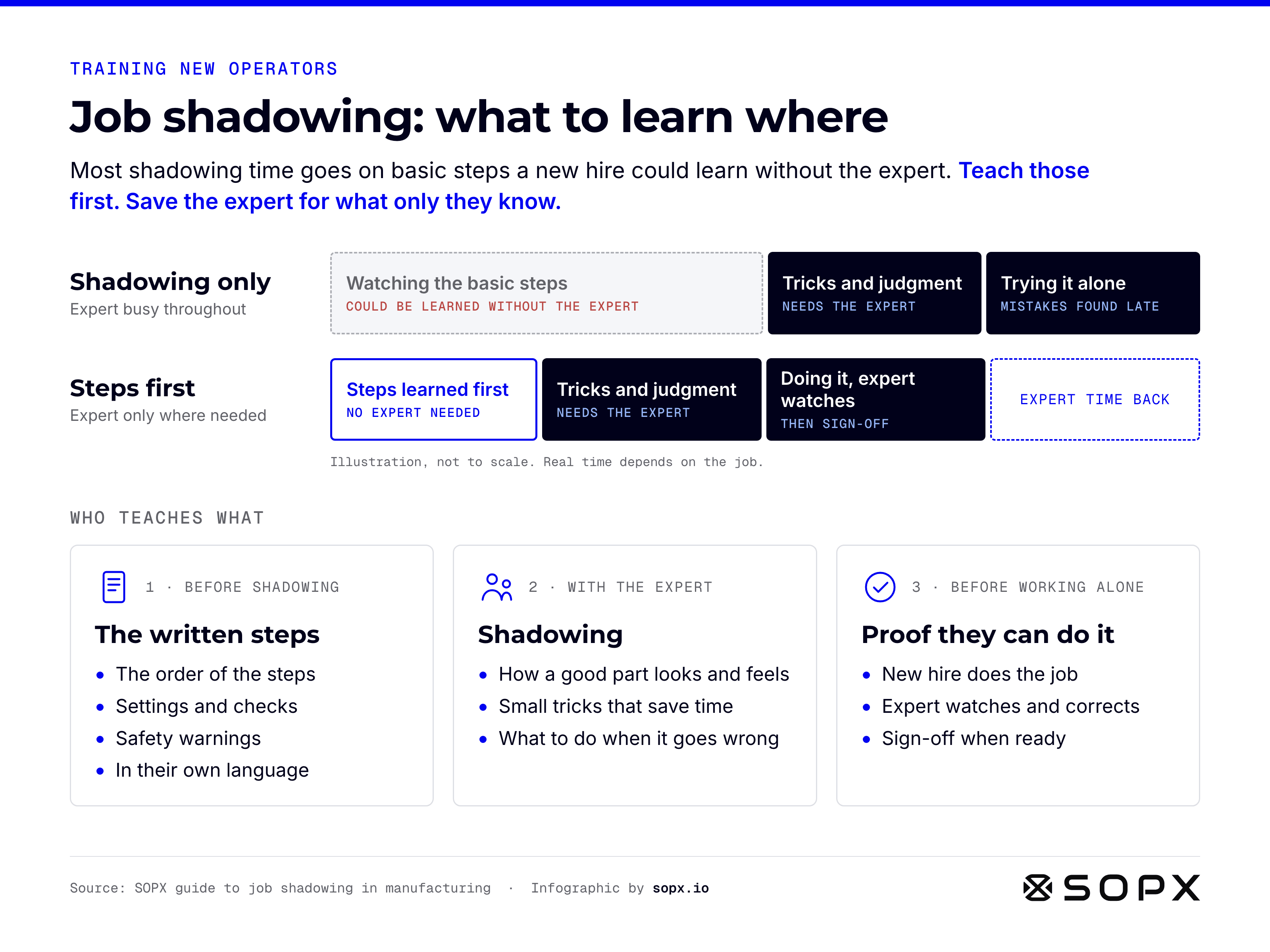
Job shadowing infographic. Two time bars compare shadowing only, where most expert time goes on watching basic steps, with steps first, where the new hire learns the steps alone and the expert only teaches judgment and watches the first runs. Below, who teaches what: written steps before shadowing, the expert for judgment and feel, then proof and sign-off.

Job shadowing in manufacturing: what to learn from steps, from the expert, and by doing

Job shadowing at a glance: teach the basic steps first, and save the expert for judgment, feel and the sign-off.

Full guide: Job Shadowing in Manufacturing: How to Make It Work

Embed code
                        <figure><a href="https://sopx.io/insights/job-shadowing/"><img src="https://sopx.io/infographics/job-shadowing-infographic.png" alt="Job shadowing infographic. Two time bars compare shadowing only, where most expert time goes on watching basic steps, with steps first, where the new hire learns the steps alone and the expert only teaches judgment and watches the first runs. Below, who teaches what: written steps before shadowing, the expert for judgment and feel, then proof and sign-off." width="1600" height="1200" loading="lazy" style="max-width:100%;height:auto"></a><figcaption><a href="https://sopx.io/insights/job-shadowing/">Job shadowing in manufacturing: what to learn from steps, from the expert, and by doing</a>. Infographic by <a href="https://sopx.io/">SOPX</a> (CC BY 4.0).</figcaption></figure>
                      

License

Free to use with credit

Every infographic here is licensed CC BY 4.0. Use it in articles, reports, slides, training and print, also for commercial work. Credit SOPX with a link to the source article. CC BY 4.0

How to credit

On a website
Infographic: [title] by SOPX (link to the article), CC BY 4.0
In slides or print
Source: SOPX, sopx.io, CC BY 4.0
If you changed it
Adapted from [title] by SOPX, CC BY 4.0

License questions

Something missing? Ask us on a call

Can I use these infographics for commercial work?

Yes. CC BY 4.0 allows commercial use, as long as you credit SOPX with a link to the source article.

Can I crop, translate or edit an infographic?

Yes. The license allows changes. Say that you changed it, keep the credit, and do not suggest that SOPX endorses your version.

What credit do I need to give?

The title, SOPX as the author, a link to the source article, and CC BY 4.0. The embed code already includes all of this.

Can I use them in training slides and printouts?

Yes. Put a short line on the slide or page, for example: Source: SOPX, sopx.io, CC BY 4.0.

Where do the facts come from?

Each infographic summarizes a SOPX article, and the article lists its sources. Standards and laws change, so check the official source before you rely on anything legal.

Can I request a new infographic?

Yes. Email [email protected] with the topic and how you would use it.

Want SOPX in your workflow?

Move from evaluation to rollout with SOPX for operations and training teams.