Best AI SOP Software 2026: 7 Tools for Physical Work

Most AI SOP tools only capture screen clicks. I tested 6 of 7 hands-on to see which ones handle physical and mixed work.
TL;DR
For physical and digital work, multilingual teams, and a fast self-serve rollout, SOPX is the pick. Most other AI SOP tools only convert on-screen clicks.
- SOPX builds a structured SOP from any video or existing PDF, not just screen recordings, and translates into 50+ languages.
- Scribe, Tango, and Guidde apply AI to on-screen work only. They are polished for software docs but cannot document a machine setup.
- Whale has the strongest training layer here: flow builder, quizzes, and skill badges. It also feels the heaviest to learn, and its video steps are screenshots with timings.
- SweetProcess drafts procedure text from a prompt. It is text-first, with no AI video-to-SOP and no translation.
- Dozuki has strong AI work instruction creation, but it is demo-gated and built for large enterprises.
- SOPX publishes its pricing and offers a free trial. It is not a complete training system: no courses, no quizzes.
Full disclosure up front. I am Jure, cofounder and CTO of SOPX, one of the tools on this list. So I am biased, and I am not going to pretend otherwise. I have written this so that if your situation matches a different winner, you pick that tool instead. Every entry includes what the tool is not good for, including SOPX. For each tool I also add a short, slightly technical AI assessment, from my seat as head of AI here.
A quick scope note. This is the AI-creation cut, and it leans hard on one question most roundups skip. Does the AI actually work for physical and mixed processes (digital plus hands-on), or only for clicks on a screen? If you want the broader category ranked by use case, including maintenance, enterprise, and office tools, see Best SOP Software in 2026.
What “AI SOP creation software” actually means
People search for an “AI SOP generator,” but generator is the wrong mental model. A generator suggests a one-time conversion. Upload a video, download a Word doc, done. Real procedures are not one and done. They change when the line changes, when the user interface is updated, when a new hire joins, when an auditor asks for the current version.
So the useful category is AI SOP creation software. These are tools that use AI to build a procedure quickly, make it easy to share from one place, then help you keep it current, translated, and in front of the people who do the work. The tools below split into four kinds:
- Video and document AI (SOPX, Whale, Dozuki): AI turns a recording or an existing PDF into structured steps.
- Screen-capture AI (Scribe, Tango, Guidde): AI turns on-screen clicks into a guide or narrated video.
- Text AI (SweetProcess): AI drafts procedure text from a prompt, then you add media manually.
- General-purpose AI (ChatGPT, Gemini): writes a plausible SOP from patterns, not from your actual process.
Which kind you need depends on where your work happens and who has to follow it. For the wider category map, see SOP software and work instruction software. The document-control side this article does not cover, approvals and revision history once you are running hundreds of procedures, is its own category called SOP management software.
Creating the SOP is only half the value
A procedure only pays off when it gets used, not when it gets made. Most of the return shows up after the SOP exists:
- Training. A new hire follows the steps instead of shadowing a senior operator for two weeks.
- Reference when it counts. For a task someone runs twice a year, or a step where a mistake is expensive, the SOP is right there as a reference at the moment they need it.
- Learning and upskilling. People pick up adjacent jobs from the same knowledge library, so the line is not one sick day away from stalling.
- Executing the work. The procedure guides the actual job and captures that each step was done.
This is the real line between an AI SOP generator and AI SOP software. A generator hands you a file. Software puts the procedure in a worker’s hands, supports the work as they do it, and confirms it happened. When you compare the tools below, weigh how the SOP gets used as heavily as how fast it gets made.
Quick ranking
- SOPX. Best AI SOP software for physical operations and teams. Manufacturing, food production, field service, healthcare, warehousing, plus software workflows.
- Scribe. Best for AI capture of on-screen software workflows. Fast, polished screenshot guides.
- Whale. Best for turning an AI SOP into training your team completes. Onboarding flows, quizzes, e-signatures, and skill badges.
- Tango. Best for browser walkthroughs, live Guide Me overlays, and click automation.
- Guidde. Best for AI-narrated software how-to video with voiceover in many languages.
- SweetProcess. Best for AI-drafted text procedures, policies, and a knowledge base.
- Dozuki. Best for connected worker programs in large enterprise manufacturing with an implementation budget.
AI SOP software comparison table
| Tool | AI builds from | Self-serve | First SOP | Languages | Best fit | From |
|---|---|---|---|---|---|---|
| SOPX | Video + PDF + text prompt | Yes | Under 10 min | 50+ | Physical work | $9/user/mo |
| Scribe | Screen clicks | Yes | Minutes | 10 (paid) | Software docs | $25/user/mo |
| Whale | Clicks + video + docs | Yes | Minutes | 60+ | Training | Free, $249/mo |
| Tango | Screen clicks | Yes | Minutes | 10 (Ent.) | Browser tasks | ~$15/user/mo |
| Guidde | Screen clicks | Yes | Minutes | Voiceover 50+ | Software video | ~$18/creator/mo |
| SweetProcess | Text prompt | Yes | Minutes | None | Office docs | $99/mo (10) |
| Dozuki | Video + docs | No, demo | ~120 days | 100+ | Enterprise mfg | Custom |
“AI builds from” is the input the AI structures into a procedure. “First SOP” is time from signup to a procedure a worker can open. Prices reflect published rates as of June 2026, and Whale as of September 2026, where $249 buys 3 creators on annual billing. SweetProcess is flat for up to 10 users. Dozuki is demo-gated, with third-party listings near $850/month at a 50-user minimum before services.
How I evaluated these tools
I signed up for and tried every tool with a self-serve trial (SOPX, Scribe, Whale, Tango, Guidde, SweetProcess). Dozuki sells through a demo, so that picture comes from its own product pages, public listings, and independent reviews. If you work there and I got something wrong, email [email protected] and I will fix it.
I ranked on six things that matter when you are picking an AI SOP tool in 2026:
- AI capability. Does the AI do the real work of building a procedure, or just slap a transcript on a recording? Was it built around AI, or bolted on later?
- Time to value. How fast from signup to a published SOP a worker can actually use.
- Ease of use and sharing. Can a non-technical operator build and share an SOP without training? Can the team pull it up by QR code right at the workstation, at the point of work?
- Self-serve. Can a team of 50 start this week without a demo, a quote, and an implementation project?
- Made for teams. Workspaces, roles, analytics, search, and translation for multilingual crews.
- Execution and use. Once the SOP exists, does the tool help people use it: train new hires, reference it at the critical moment, upskill, and confirm the work was done? Or does it just hand you a document and stop?
No tool wins on every axis. Each winner below wins the work it was built for.
1. SOPX: Best AI SOP software for physical operations and teams
SOPX is the best AI SOP creation software for physical operations because it was built around AI from the ground up, not added to a legacy doc tool. Upload a phone video of any real-world process, or an existing PDF, and the AI builds a structured video SOP in under 10 minutes, with a trimmed clip, title, and rich-text description per step. No writing, no blank page.
Here is where SOPX leads:
- AI capability. AI-native. It segments raw video into steps and converts PDFs into editable digital SOPs with images mapped to the right steps. The AI does the structuring, not just the captioning.
- Time to value. Sign up and publish your first real SOP the same day. No demo, no implementation project, and you can evaluate it without a sales process.
- Ease of use and sharing. Simple enough that an operator builds the SOP, not a technical writer. Share by link or a QR code at the machine, and viewers open it instantly when they need it.
- Self-serve. Public per-seat pricing, a free trial with no credit card, and in-app upgrade. No sales call to start. Custom pricing for larger teams (100+).
- Made for teams. Workspaces and role-based access, organization-wide search, and AI translation into 50+ languages so a multilingual floor reads every SOP in its own language.
- Built to be used, not just made. This is where the value compounds. Full screen mode shows one step at a time for an operator at the machine. Think of it like a PowerPoint, but accessible anywhere with no special app, and built in minutes straight from video. Run mode attaches forms and checklists to steps so they confirm and sign off each one, with a note and signature. So the same SOP trains a new hire, sits ready as a reference for the rare or high-stakes task, helps people upskill into adjacent jobs, and proves the work was actually done. Analytics show who viewed and ran what, so you can see where people get stuck.
There is a bonus that matters more every year. Video SOPs with short, TikTok or YouTube Shorts style steps suit a younger (Gen Z and Millennial), high-turnover workforce that learns from short video the way they learn everything else. A new hire follows the clip step by step instead of reading a 40-page binder. Images are great for quick reference, but video shows the right movements, order, and details you cannot capture in a single image.
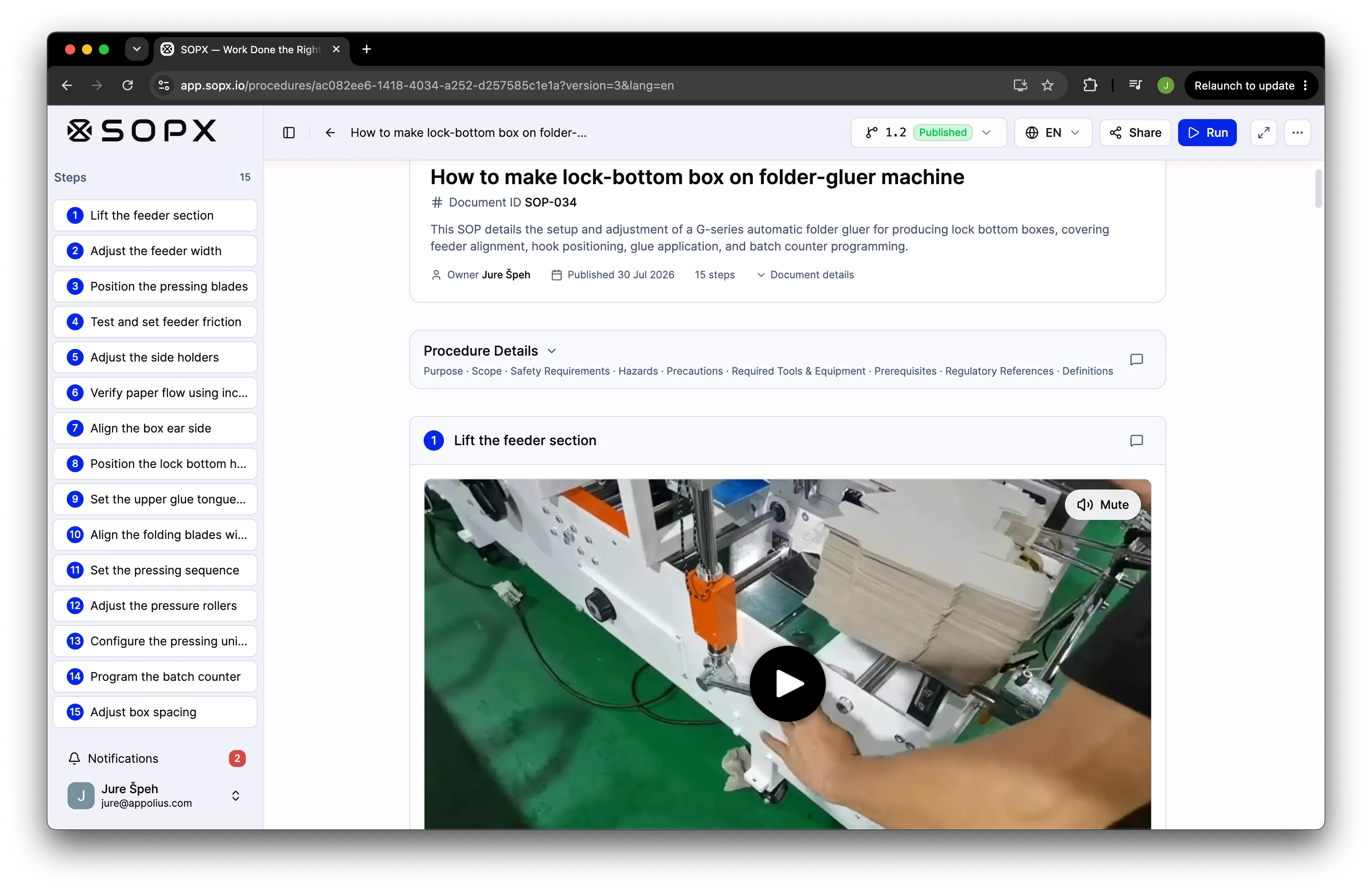
A machine setup SOP generated from a phone recording. Every step carries its own trimmed video clip, and the header holds the document ID, version, and the safety and scope fields an auditor asks for. This is the output none of the screen-capture tools below can produce, because the work never touches a screen.
AI assessment:
- AI analyzes the video and its narration, extracts the key information, crops the clips, and picks thumbnails.
- It also extracts text and images from PDFs.
- Translation is not just a basic Google Translate pass. It uses an understanding of the topic to translate meaning, not only words.
- Many more AI features are in the pipeline, so stay tuned!
What it is not good for:
- Pure office workflows that happen on a screen (Scribe or Tango are faster there, with browser auto-capture, though you do not get video steps in those tools).
- Enterprise connected worker programs with execution data synced to MES or QMS (Dozuki).
- Teams that need a formal LMS with coaching and assessments.
Honest trade-off: SOPX is younger than Dozuki or SweetProcess. There is no offline mode (you can export PDF for that case), and the AI draft still needs a human review for accuracy (as everywhere AI is involved). If your processes happen in the real world and you want to publish this week, that is the trade we are built for.
Who it is best for: Operations, plant, and training managers at 20 to 300 person manufacturers, food producers, warehouses, and field service teams, especially where “no one has time to write SOPs” is the blocker, or where teams want to move to digital SOPs with a better experience than outdated SharePoint documents.
How much SOPX costs: Free trial with 5 AI SOPs, 3 translations, no credit card, with free users so you can evaluate with your team. Pro pricing is published openly on the pricing page. Enterprise is custom by operation size, with SSO/SCIM, audit trail, branding, and API access as paid add-ons.
2. Scribe: Best for AI capture of on-screen software workflows
Scribe is the best AI SOP tool for screen-recorded software workflows because its browser extension auto-captures your clicks and AI writes the step text in seconds. When the process you are documenting happens on a computer, this is the fast path.
Scribe is the best-known tool here, listed on just about every chart like this one. I created an account, and here is my honest opinion. It is simple to use. Install the extension, start capturing your workflow, and you get a procedure. The steps are simple, just a number and a short instruction, easy to edit, and they already include annotations showing where to click. I also liked the sharing options (scroll, movie, or slides). What I missed were videos on each step for more context and quicker learning. Some of our customers already use Scribe, but they say it only works for app workflows and is not built for real-world processes in manufacturing, construction, or hospitality.
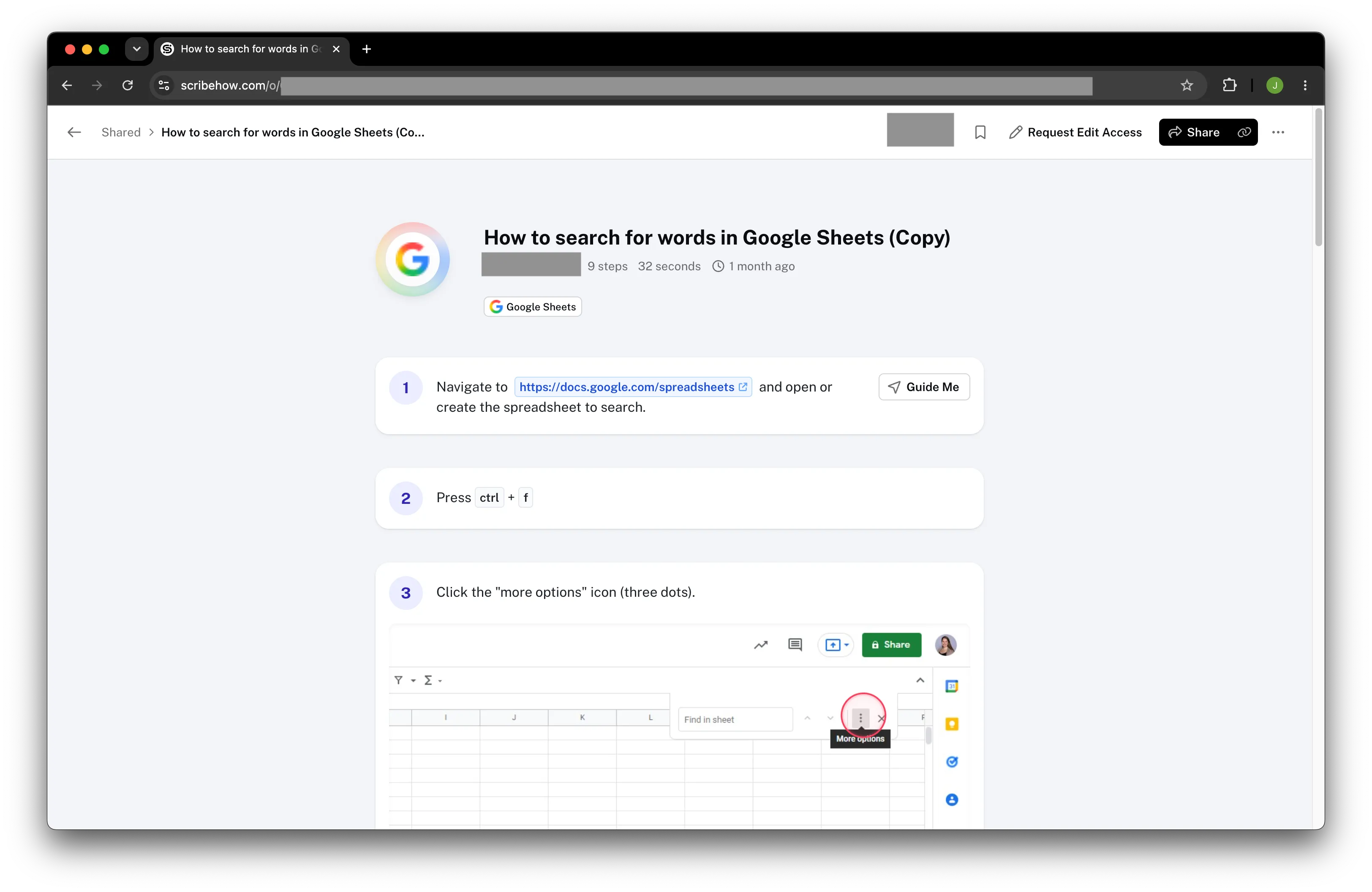
Nine steps captured in 32 seconds, each one a short instruction with the click target circled automatically. For a browser task this is genuinely hard to beat. Note what a step is here. It is a line of text and a screenshot, with no clip and no room for the context a physical task needs.
AI assessment:
- Despite heavy marketing of their AI, I think it is mostly used to extract data from screenshots and to transcribe audio on the Pro plan.
- Translation is available on the Enterprise plan only, so I could not review that part.
What it is good for:
- Software tutorials, CRM and admin-panel how-tos, IT onboarding.
- Customer success teams documenting workflows for clients.
- Fast screenshot guides with no writing.
What it is not good for:
- Any work off a screen (factory floor, warehouse, food line, field service) or mix of screen&physical (healthcare, field service, laboratories).
- Multilingual frontline teams (translation is 10 languages, on higher tiers, and it does not translate text baked into screenshots).
- Video-based procedures where motion and timing matter more than clicks.
Who it is best for: Customer success, IT, and SaaS teams documenting software. If the process only involves a mouse and keyboard, Scribe fits.
Pricing: Free tier. Pro from about $25/user/month, or roughly $13/seat/month on a team plan with a 5-seat minimum (about $65/month to start, June 2026). Enterprise is quote-only.
Read the full SOPX vs Scribe comparison →
3. Whale: Best for turning an AI SOP into training your team completes
Whale is the best AI SOP tool for teams whose problem starts after the SOP exists, because the same AI that drafts the procedure turns it into assigned training with a quiz and a signed record of who completed it.
I signed up for the free plan and put a real video through it. The creation side works. Drop in a recording and it sections the video into what they call a “checklist”. Each step gets a screenshot, with a circle drawn on the part that matters. The step splits and the titles came out well. Step Recorder captures your clicks and turns a screen recording into an SOP, with no separate recording tool needed. Docs Import felt simpler: a Word or PDF file comes back as one formatted rich-text document, so you get the file digitised with the steps left as they were written. I could not find a way to combine a video and a document into one SOP.
Where it pulls ahead is everything after the procedure. The Training module has a flow builder, and you can assemble genuinely advanced onboarding paths with it. The quiz feature is good too. An org chart with skill badges shows who is trained on what across the company. It is the most complete training layer of anything I tried for this list.
The pricing model is worth calling out, because it changes what a rollout costs. Whale charges for creators, and members who only read a procedure or complete training do not take a creator seat. Read the small print though. Every plan below Enterprise includes what Whale calls limited members, so a 500 person site ends up on a custom quote. The step up is steep too. You go from the free plan straight to $249 a month on annual billing, which is $2,988 a year. It is still a different answer from the per-seat model most other tools here use.
My honest reaction after spending some time in it: this is a lot of software. The feature set is genuinely strong, and I still found it confusing and limited at times. Boards, checklists, teams, team library, and team playbooks took me a while to tell apart, and I did not always find my way around cleanly. Their in-app AI assistant is a real help here, drafting new documents and quizzes fast.
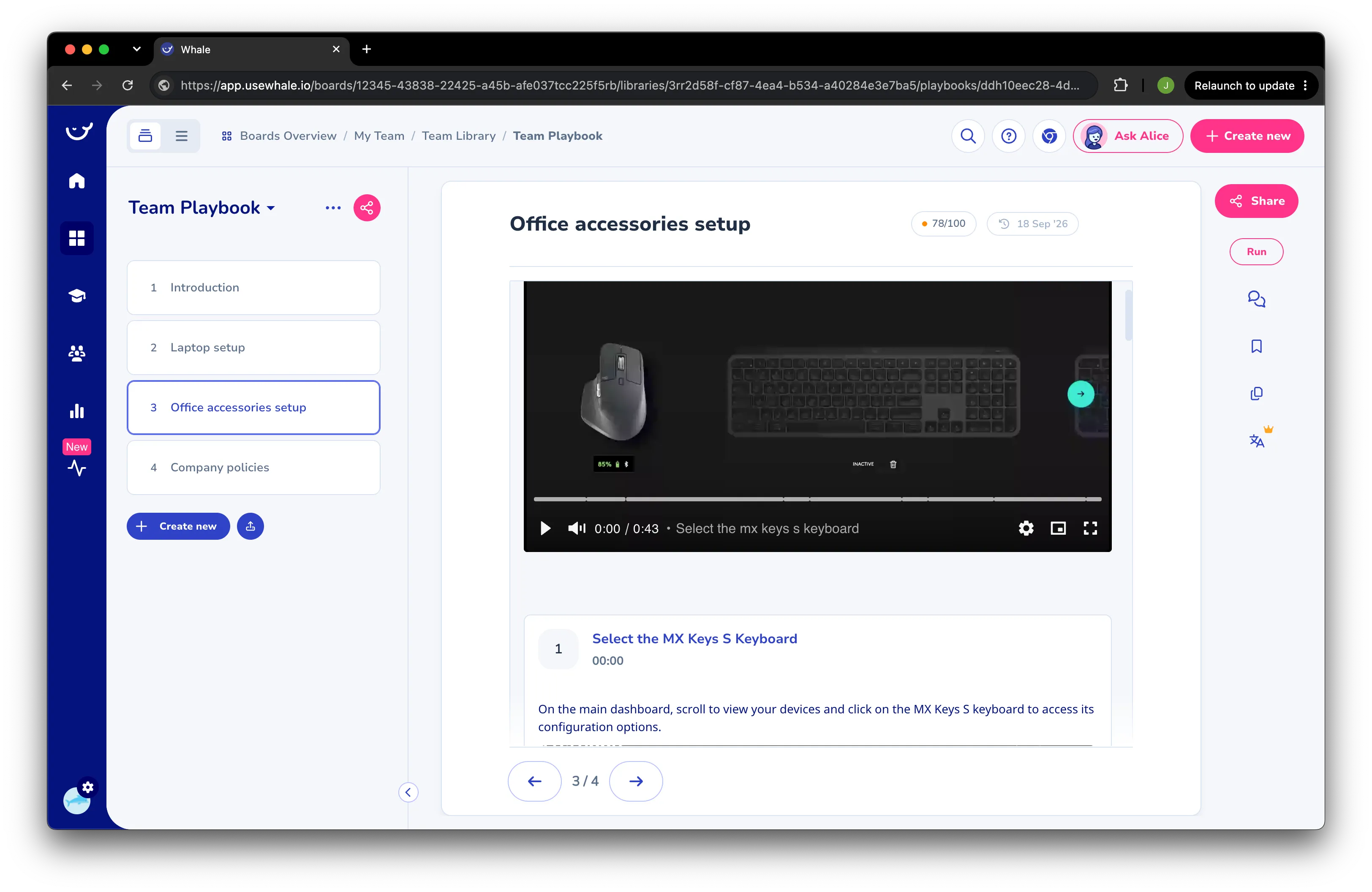
A screen workflow, which is the shape this format fits best. Watch where the video sits. One 43 second recording at the top of the page, with step 1 pointing into it at 00:00 rather than holding a clip of its own. The 78/100 badge is the AI health score. The breadcrumb is worth a look too, Boards Overview / My Team / Team Library / Team Playbook, which is the nesting that took me a while to tell apart.
AI assessment:
- You drop in a video and it sections it, similar to SOPX. The steps came out well, though each one carries a screenshot rather than a direct video clip.
- Alice is an in-app chatbot, and the best use I found for it was improving an SOP after the draft already exists.
- The AI SOP Health Score is the more interesting piece, and nothing else here has an equivalent. It flags documentation decay, which is a real failure mode once a library has been sitting for a year.
- Auto-translate returned a result instantly. It felt like a plain translation, and I could not find a way to edit it afterwards.
What it is good for:
- Screen workflow guidance through their Chrome extension.
- Building training flows, with quizzes and completion tracking behind them.
- Mapping skills across the organization with an org chart and badges.
- Compliance evidence: the current version, who signed, and what is overdue.
What it is not good for:
- Physical process documentation. Each step carries a screenshot and a start time that jumps you to the full video at the top of the page. There is no end point, no clip on the step itself, and I could not find a way to adjust either one. Clip accuracy on my video was mixed.
- Updating a procedure later. A step holds one image, and a new step can only take another frame from the original video. That is fine for a screen workflow, where one recording holds every click and one screenshot shows it. On a line, a step often needs a wide shot and a close-up of the gauge, and when one machine changes you want to re-film that step alone. Here that means recording the whole procedure again.
- Reading at the machine. The platform feels heavy for an operator, and watching the video means clicking back up to the top for every step.
- Multilingual floors that need corrections. Auto-Translate is fast and covers 60+ languages, but I could not adjust the result, which matters when a technical term comes back wrong.
- Step-level data synced to MES or QMS. It holds the procedures and the training records. Inspections and corrective actions live elsewhere.
Honest trade-off: the feature list is the selling point and the cost. If someone owns the setup, the training side is the most complete here. If you want a supervisor to open it and publish a procedure the same afternoon, expect a learning curve first. AI creation also runs on monthly credits that scale with creators, from 50 to 250 per creator, so size that with them before you convert a large backlog.
Who it is best for: Operations, HR, and L&D leads at 50 to 500 person companies that need training records as much as procedures, and that have someone with the time to set the system up properly.
Pricing: Free Forever plan with 1 creator and 10 members. Scale is $249/month on annual billing or $399 monthly, with 3 creators, and extra creators are $29 each. Advance is $499/month annual or $799 monthly, with 5 creators, and adds SSO, granular permissions, e-signatures, and a video editor. Enterprise is priced on request and is the only plan with unlimited members, approval flows, SCIM, and API access. A member can read, search, comment, and complete training (September 2026).
Read the full SOPX vs Whale comparison →
4. Tango: Best for browser walkthroughs and click automation
Tango is the best AI SOP tool for live, in-browser guidance because its Chrome extension auto-captures clicks into a guide and its Guide Me overlays coach people through software in real time. It also automates repetitive browser tasks on its top tier.
Honestly, it feels similar to Scribe in many ways. Both are browser extensions that capture steps as you click. As far as I could tell, the main difference is that Tango leans on its workflow helper, Guide Me, which walks you through the steps and shows you where to click. It also supports video embeds, a way of sharing workflows by turning procedures into polished videos. I liked the animated screenshots with annotations in the step list. But I do not see how I could use this tool for a physical task like a compressor oil change or a food packaging line cleaning process.
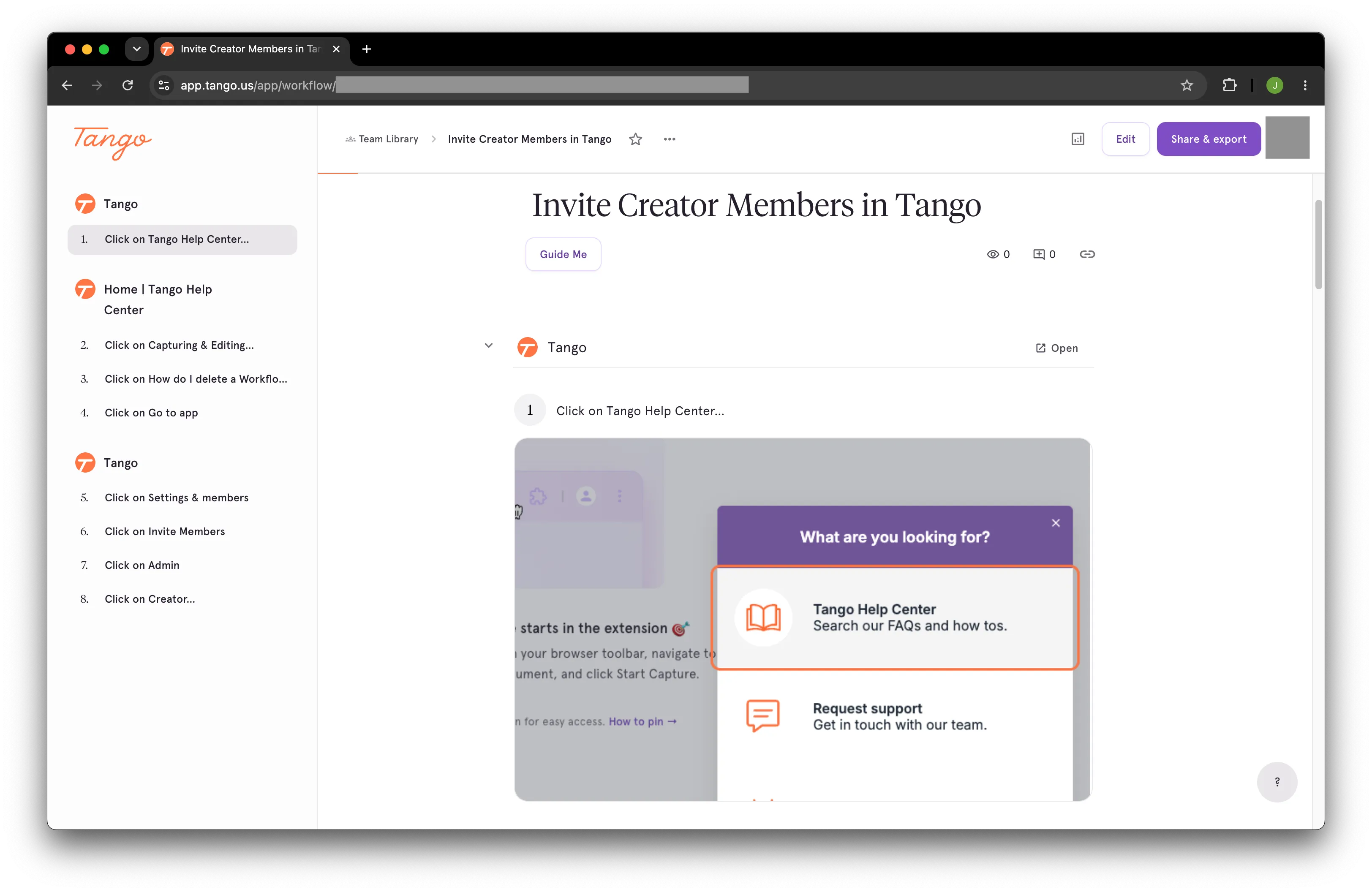
Every step is a click, phrased as one: “Click on Settings and members”, “Click on Invite Members”. The Guide Me button replays the same path as an overlay inside the live app, which is the real differentiator against Scribe. Both assume the work happens in a browser tab.
AI assessment:
- Like Scribe, the main mechanic is taking screenshots and inspecting the HTML to know which elements to auto-annotate.
- AI is probably used to take the text from the screen and turn it into a short, clean description.
- Voice transcription on the Pro plan.
- Workflow translation on the Enterprise plan.
What it is good for:
- Click-by-click walkthroughs for SaaS tools.
- Live Guide Me overlays pinned inside web apps.
- Browser automation for repetitive data entry (Enterprise).
What it is not good for:
- Physical, off-screen processes (it captures software only).
- Multilingual floors (translation is 10 languages, Enterprise only; the interface is English only).
- Teams that need proof of execution (no sign-off checklists with captured results).
Who it is best for: Software, enablement, and support teams that live in a browser.
Pricing: Generous free plan (up to 10 users, 5 workflows). Pro about $15/user/month on an annual team plan; more for 1 to 2 seats or monthly billing (June 2026). Translation, Guide Me, automation, and SSO sit behind custom Enterprise pricing.
Read the full SOPX vs Tango comparison →
5. Guidde: Best for AI-narrated software how-to video
Guidde is the best AI SOP tool for polished software how-to video because it captures an on-screen workflow and generates a narrated video guide with AI voiceover in many languages. It is built for customer education and support content.
Guidde takes a slightly different approach to preparing digital guides. It still uses an extension to capture the browser steps, and I like the blur feature, where you select a website element and Guidde blurs it so it is hidden in the final output. But here is the catch. The output is not just a step-by-step procedure, it is a single video split into sections (think of a standard YouTube video with chapters in the progress bar). Each section has an AI-generated voice describing what to do, animated screenshots, and overlays with text, arrows, and other elements. The rest of the guide is a standard step-by-step procedure with annotated screenshots, similar to Scribe or Tango. Again, this tool is intended for office use only; to capture desktop apps you need to download their desktop app. One thing to note. If you make a mistake, the guide will confidently include it in the final output, and you have to delete it manually.
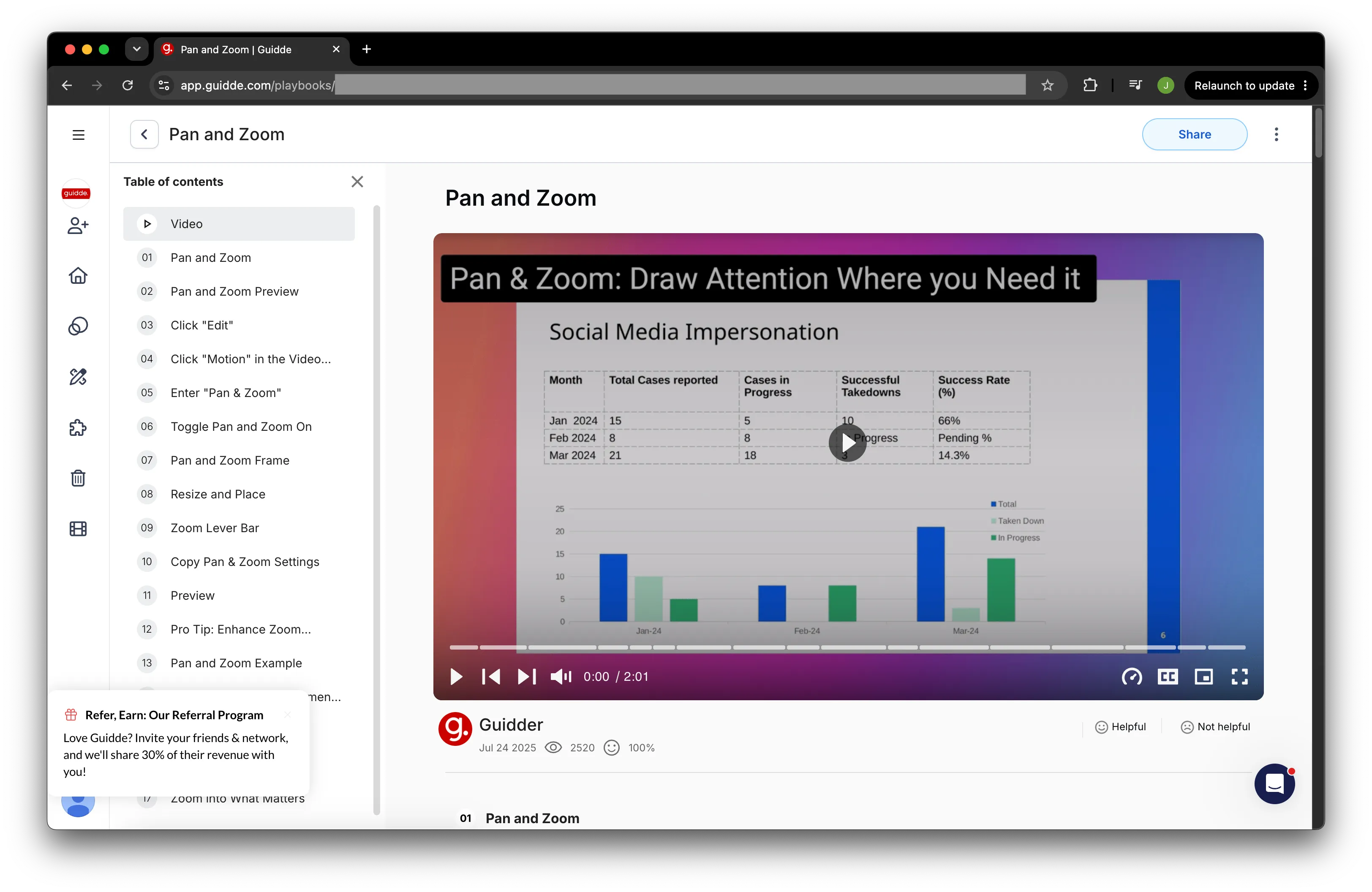
This is what a viewer actually receives, and it shows the shape clearly. A two minute narrated video with a chapter list beside it, then the written steps underneath. The view count and the helpful rating under the player are the giveaway. Guidde is built for content an audience watches, which is why it is strong for a help centre and the wrong format for something an operator follows at a machine.
AI assessment:
- Guidde’s AI usage feels more advanced than what Scribe and Tango offer
- Guidde uses AI to put together the captured steps, prepare descriptions and generate text which is read by AI
- AI voiceover for the video sounds natural
- There are also options to create guides from MP4, PDF, PPTX, and DOCX with AI (similar to SOPX). The results are a bit off for physical videos, which are clearly not their main focus.
What it is good for:
- Help-center and customer-education video.
- Software onboarding and enablement walkthroughs.
- AI voiceover in 50+ languages for software how-tos.
What it is not good for:
- Physical process documentation (it captures software only; it can convert MP4, but the results are not the best).
- A structured SOP document a worker follows at a machine (the output is a produced video with voiceover).
- Full guide translation, which is an Enterprise add-on (voiceover is broad, but on-screen text translation is gated).
Who it is best for: Support, customer education, and software onboarding teams.
Pricing: Free plan (up to 25 videos). Pro about $18 and Business about $39 per creator/month billed annually. Enterprise custom. Publicly listed.
Read the full SOPX vs Guidde comparison →
6. SweetProcess: Best for AI-drafted text procedures and policies
SweetProcess is the best AI SOP tool for text-based procedures because its AI drafts an SOP from a title prompt and drops it into a searchable knowledge base with approvals, task assignment, and quizzes. It is a strong fit for office and service teams that live in documents.
The first thing I noticed when trying SweetProcess is that the user interface feels a bit dated, unlike most others in this review. The core function is creating step-by-step procedures by hand, but they have added AI that generates steps from the title. You can then use their AI assistant to generate text for each step description. SweetProcess includes plenty of features, from tasks, approval flows, and sign-offs to team management. The procedure editor has everything you need when writing steps.
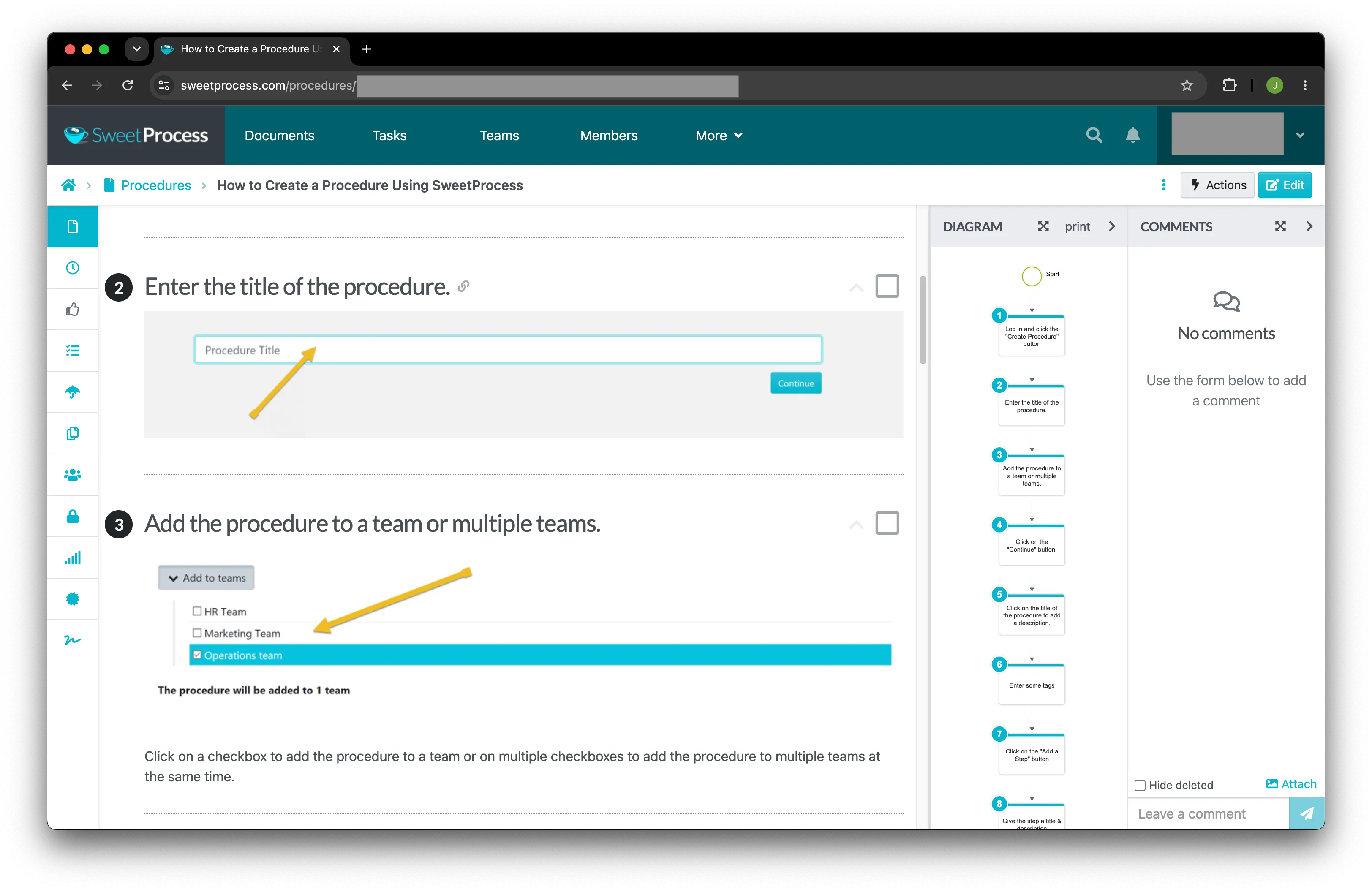
Text-first, exactly as described: the steps are written, and the screenshots and yellow arrows are added by hand. The side panel is worth noting, since it builds a flowchart of the procedure automatically, which is a genuinely useful feature the video-first tools here do not offer.
AI assessment:
- AI is fairly limited in SweetProcess. It can generate steps from a description, which helps with boilerplate, but it can also hallucinate a lot.
- The step-writing helper is nice, but it feels like using ChatGPT, only slower.
What it is good for:
- Procedures, processes, and policies as text, in one knowledge base.
- Suggest-edit approvals, task assignment, and read-confirmation quizzes.
- Flat, all-inclusive pricing and 1,000+ app integrations.
What it is not good for:
- AI video-to-SOP (its AI drafts steps and text; screenshots and video are added manually).
- Multilingual teams (no built-in translation, effectively English only).
- Hands-on, physical work that needs a clip per step.
Who it is best for: Office, agency, and professional-service teams documenting text procedures for compliance.
Pricing: Flat $99/month (or $990/year) for up to 10 users, plus $5 per added user. Every feature is included on every plan, with a 14-day free trial (2026).
Read the full SOPX vs SweetProcess comparison →
7. Dozuki: Best for AI work instructions in large enterprise manufacturing
Dozuki is the best AI SOP tool for large enterprise manufacturers because its CreatorPro AI converts expert video and legacy documents into work instructions inside a full connected-worker platform with MES, LMS, and QMS integrations. It is thorough, audit-ready, and built for compliance-heavy environments.
I could not test this one myself, since it is demo-gated. Dozuki is a well-established enterprise connected-worker platform, where work instructions are just one part of the solution. It is focused on compliance and broad integration options. They offer a complex 10-step approval process, work orders, learning pathways, and operational workflows. Recently they have started investing in industrial AI to generate work instructions from different sources. Customers who switched from Dozuki to SOPX told us it felt “heavy, complex, and expensive.”
No screenshot for this one. Dozuki has no self-serve trial, so I will not present marketing images as hands-on testing. For what the platform costs and where it genuinely wins, see the Dozuki pricing breakdown.
AI assessment:
- Hard to tell how well the AI is integrated, or how well it works, since I could not get hands-on with the product.
- I will not judge it from the marketing speak on their website.
What it is good for:
- Multi-site manufacturers with dedicated ops, IT, and training teams.
- Step-level data capture synced to MES, CMMS, and QMS.
- Compliance-grade approval workflows, training pathways, and AI search across approved instructions.
What it is not good for:
- Fast, self-serve adoption (it is demo-gated; new customers went live in an average of about 120 days in 2025).
- Small and mid-sized teams (third-party listings show a 50-user minimum).
- Predictable, transparent cost (onboarding, content conversion, and support are billed on top of the subscription).
Who it is best for: 500-plus person industrial manufacturers with a documentation team and a multi-quarter implementation plan.
Pricing: Custom, demo-gated. Third-party 2025 listings put it near $850/month at a 50-user minimum (about $10,000/year before services), with implementation and add-ons extra.
Read the full SOPX vs Dozuki comparison →
AI SOP generator vs AI SOP creation software: what is the difference?
This is the distinction that decides whether a tool actually helps you a year from now.
An AI SOP generator does a one-time conversion. You feed it a recording or a prompt, it produces an artifact, and that is the end of its job. Useful for a quick draft, but the moment your process changes, you are back to square one, and there is no record of who is following the current version.
AI SOP software is a platform. It generates the first draft just as fast, then keeps the procedure alive. You version it when the line changes, translate it for the next shift, share it by QR at the machine, and use Run mode and analytics to confirm the work was done and find where people get stuck. SOPX is built as the second kind. So is Dozuki, at enterprise scale and price.
If you only ever need a single throwaway guide, a generator is fine. I suggest using general LLMs for this task (ChatGPT or Gemini). If procedures are part of how your operation runs, you want software that maintains them.
Can you just use ChatGPT or Gemini?
You can, and for a generic first draft it is genuinely useful. ChatGPT and Gemini will write a plausible SOP structure in seconds, and at around $20/month they are cheap.
Here are the June 2026 limits. In Gemini chat you can upload a video file up to 2GB, or other files up to 100MB, with total video length up to 5 minutes. On Google AI Pro or Google AI Ultra you can extend that to 1 hour. ChatGPT caps the file size at 512MB per video file, with no strict duration limit.
The limit is that a general-purpose model writes from patterns, not from your actual process. It cannot watch a senior operator set up a machine, capture the shortcut they use, or produce a step-by-step guide with a video clip a worker follows on a phone. It does not translate and version that guide for your floor (you need to do that manually), and it gives you no proof anyone followed it. You need to copy-paste, add screenshots on your own, add arrows and other annotations in another software. You don’t get the best user experience of segmenting videos into short video clips for each step. For a deeper breakdown, see ChatGPT vs SOP software for work instructions. A good workflow is to draft a procedure recording plan with an LLM, film it, and build the real, maintained procedure in AI SOP software.
Which one should you pick?
Short version:
- Physical work: factory floor, food line, warehouse, hospitality, field service → SOPX
- Software workflows in a browser → Scribe or Tango
- Training flows, quizzes, and a skills view of your team → Whale
- Polished narrated software how-to video → Guidde
- Text procedures and policies for office teams → SweetProcess
- Enterprise manufacturing with MES/QMS integration and an implementation budget → Dozuki
If you are reading this page, the answer comes down to what you need. Software, physical procedures, or a mix? If it is software, start with Scribe. If it is physical or a mix, go with SOPX, especially if you want to try it first, test it on a few real processes, and roll it out slowly across teams and departments. If you know you need a complete connected-worker platform from the start, you should probably choose Dozuki.
Frequently Asked Questions
What is AI SOP software?
AI SOP software uses AI to create standard operating procedures from a recording, a document, or a prompt, then helps you store, translate, share, and update them. The best tools go beyond a one-time draft and keep procedures current, with version control, search, and a way to confirm the work was followed.
What is the difference between an AI SOP generator and AI SOP software?
An AI SOP generator does a one-time conversion and stops. AI SOP software generates the first draft just as fast, then maintains it with versioning, translation, sharing, and execution tracking. If procedures change or matter for compliance, you want the software, not just the generator.
Which AI SOP tool works for physical or mixed (digital and physical) processes?
Most AI SOP tools (Scribe, Tango, Guidde) only capture on-screen clicks, so they cannot document a machine setup, a cleaning step, or any hands-on work. Whale sections an uploaded video into steps, though each step carries a screenshot and a link back to the full recording. SOPX is built around physical and mixed work. It turns a phone video, a screen recording, or a PDF into a structured SOP with a trimmed clip on every step, so a team that runs both digital and hands-on processes keeps everything in one place.
What is the best AI SOP software for manufacturing?
For most 20 to 300 person manufacturers, SOPX is the best fit. Film a process on a phone and the AI builds a structured SOP in under 10 minutes, translated into 50+ languages. Large enterprise manufacturers with an implementation budget and MES or QMS integration needs should look at tools like Dozuki.
Can AI accurately create SOPs?
AI gets you a strong structured draft fast, but a human should review it. In SOPX, the AI segments your real video or PDF into steps, then you edit any step before publishing. The accuracy comes from documenting your actual process on video, not from a model guessing what your process probably looks like.
Which AI SOP tools support multiple languages?
SOPX translates SOPs into 50+ languages on paid plans, with a side-by-side editor to review each step. Guidde offers AI voiceover in many languages. Scribe and Tango translate into about 10 languages on higher tiers. Whale auto-translates instantly into 60+ languages, with no way to correct the result. SweetProcess has no built-in translation.
What is the best free way to create SOPs with AI?
SOPX has a free trial with 5 AI-generated SOPs and 3 translations, no credit card. Scribe, Tango, and Guidde have free tiers for on-screen software guides. Whale has a free plan with 1 creator and up to 10 members. For physical work with AI video-to-SOP, the SOPX free trial is the strongest place to start.
Can AI build an SOP from a video?
Yes. This is the core of an AI SOP tool like SOPX. Upload a phone or screen recording and the AI splits it into steps, writes a description for each, trims a clip per step, and picks thumbnails. You review and edit before publishing. Screen-only tools (Scribe, Tango) build from clicks instead, so they cannot turn a video of physical work into an SOP.
How long does it take to create an SOP with AI?
With SOPX, a few minutes. Once your video or PDF is uploaded, the AI returns a structured draft in under 10 minutes, then you spend a little time reviewing and editing before you publish. The slow part is no longer writing from a blank page, it is filming or finding the source material.
Does AI SOP software replace training?
No, and the good ones do not claim to. A video SOP is the reference a new hire follows and returns to; shadowing a senior worker still happens. The win is that the knowledge is captured once and stays available, in every language your team needs, instead of living only in one person’s head.
Start free with SOPX
If your processes happen in the real world and you want AI to build SOPs your team will actually open and follow, SOPX fits. Free trial, no credit card, 5 AI-generated SOPs, PDF import, and translation into 50+ languages.
If a different tool fits your use case better, use that one. Every comparison linked above is a full side-by-side, written by the same team, including the places where SOPX loses.