

SOPX vs DeepHow

The DeepHow alternative with self-serve pricing

DeepHow is a Physical AI platform for enterprise operations: live SOP verification, skills management, and LMS integrations, rolled out over months. SOPX turns a phone recording or an existing PDF procedure into a structured, fully editable SOP with a trimmed clip on every step, published in under 10 minutes, translated into 50+ languages, with Run mode checklists as proof the procedure was followed.

Gregor Obreza Last reviewed: August 24, 2026 ยท Reviewed by Gregor Obreza , Co-founder and CEO

Comparison Summary

SOPX and DeepHow both turn video of real work into step-by-step content in 50+ languages. Upload a phone recording or an existing PDF procedure to SOPX and AI returns a structured SOP with steps, descriptions, and an auto-trimmed clip on every step, published in under 10 minutes and fully editable: reword a step, reorder it, or swap a single clip without regenerating. Approval flow, document IDs, procedure history, Run mode, and training paths with sign-off cover the rest. DeepHow is the enterprise platform: skills matrix, LMS and QMS connectors, live SOP verification, sold through a demo and a three-month rollout. For a 20 to 300 person manufacturer that needs accurate SOPs this quarter, SOPX gets there sooner.

Features

Feature Comparison

Side-by-side comparison of SOPX and competitor capabilities.

SOPX vs DeepHow feature comparison table
Feature SOPX DeepHow
Core
What the product is A self-serve SOP platform. Video or PDF in, structured and editable step-by-step procedure out, with a short clip on every step. A Physical AI platform for operational excellence: knowledge capture, skills management, and AI verification of work as it happens, built for enterprise operations.
AI video to structured SOP YES Upload a process video and AI builds the whole SOP: title, steps, step descriptions, and a trimmed clip per step. AI also fills the SOP header (purpose, scope, responsibilities, safety) from the same recording. YES AI segments, transcribes, and translates video into step-by-step Smart Videos, with text-based editing and 1-click AI dubbing.
Time from video to published SOP Under 10 minutes for a typical process video, on the day you sign up. Fast per video once the platform is live. DeepHow's own site frames the enterprise rollout as three months.
Editing after AI generation Nothing is locked. Rewrite wording, reorder or delete steps, and insert custom steps. Edit any step on its own: trim or replace its clip without regenerating the SOP, add images or an image carousel, annotate frames with arrows and callouts, and place tables inside step descriptions (added July 2026). Tables carry through translation and PDF or Word export. Text-based video editing, flexible Smart Instruction templates, and an AI chat interface for building an instruction. Version control keeps workers on the current version.
Several sources into one procedure Multi-file AI generation reviews up to 5 videos and 5 PDFs together and produces one coherent SOP, with each PDF marked as Procedure or Additional info. Included on the Premium plan. 1-click conversion turns a static PDF or a Smart Video into a Smart Instruction. Merging several sources into one generated procedure is not documented publicly.
Reusing steps across procedures Import steps from another procedure at an exact position, with video clips, annotations, and form fields intact, or duplicate a whole procedure and choose which version to copy. Both added July 2026. Smart Compare uses AI to find differences and overlaps across the content library. It is aimed at keeping a large library consistent rather than assembling a new procedure from existing steps.
Approval and document control Approval flow on every plan: draft, submit for review, approve and publish or request changes, with an optional four-eyes rule blocking self-approval. Every procedure carries your own document ID such as SOP-PROD-014 and a read-only history of who did what and when. On Premium, multi-step approval chains send a version through ordered stages such as Technical review, QA, and HSE, with one or more approvers per stage. Controlled workflows with approvals and structured handoffs, plus version-specific training records showing who is qualified on which version. Presented as part of the enterprise and PharmaCloud offering.
Comments and frontline feedback Comment on a whole procedure, a single step, or the SOP details block, with threaded replies and resolve. Comment-only access lets an operator flag a problem without edit rights. Feedback runs through the training and skills program. Step-level comment threads are not described in their public materials.
Execution proof on the floor Run mode attaches forms and checklists to specific steps, 10 field types including yes/no/na, date, image, and signature, plus a closing note and signature per run. Run results are stored and reviewable. Quizzes and certifications validate knowledge, and the Performance Dashboard tracks completions, scores, and deadlines. Confirming the physical action is handled by Live SOP Verification rather than an operator checklist.
Live, AI-guided step verification NO SOPX has no camera-based verification of the physical action as it happens. YES and this is a real DeepHow advantage. Live SOP Verification, announced June 2026 with NVIDIA Cosmos and Metropolis VSS and deployed at Foxconn, reasons over live video and compares the work against the approved procedure to catch procedural drift.
Skills matrix and competency management Partly. Training paths assign SOPs to people or teams. Trainees sign off with a click or a digital signature, and managers see progress per person, due dates, and downloadable reports. There is no skills matrix, no quizzes, and no auto-assignment by role. YES Smart Skills Management shows who is trained, who is overdue, and where the gaps are, with training assigned by role, shift, or site and dated records for audits.
Operator experience on the floor Full screen mode presents one step at a time, presentation-style, for operators following along at the machine. Search covers every procedure in the organization. Interactive step-by-step video player with in-video search, delivered through the DeepHow Navigator app.
Analytics and reporting Who viewed and ran each procedure and when, most popular procedures, most active team members, and run results with completed checklists. Training progress per person, with downloadable reports. Broader on the training side. Enterprise reporting covers training progress, skills development, and content performance across sites, with prebuilt and custom reports and exports into a data warehouse.
Multi-language support AI translation into 50+ languages in seconds across the whole SOP, step forms included, with a side-by-side review editor so a supervisor can correct floor terminology. Tables and the SOP header translate with it. 50+ languages, plus 1-click dubbing using AI voices or your own.
PDF and document import YES Upload a PDF procedure and AI extracts steps, descriptions, and images. Up to 100 pages on Standard and 200 pages on Premium. Enterprise customers can request up to 500 pages and 200 MB. Every source file stays downloadable. YES 1-click conversion turns a static PDF into a Smart Instruction.
Mobile apps and capture Web only. On a phone or tablet, Add image and Add video open the rear camera directly, in the step editor and in Run mode image fields, so capture needs no app. There is no native app and no offline mode. Native iOS and Android apps: DeepHow Capture for recording and DeepHow Navigator for viewing, both actively maintained.
Enterprise integrations SSO and SCIM 2.0 provisioning are included in the Enterprise plan, and SCORM 1.2 export puts a procedure into an existing LMS as a trackable course. There is no public API or webhooks, no live two-way sync of users, assignments, or results, and no prebuilt LMS, QMS, or MES connectors. Custom integrations are scoped on Enterprise and billed separately. Far broader. DeepHow's integration directory lists LMS, QMS, MES, HR, and identity providers including SAP SuccessFactors, Workday, Cornerstone, Docebo, Moodle, Veeva Vault, ETQ Reliance, Tulip, Rockwell Automation, Okta, and Microsoft Entra ID.
Regulated and GMP environments Document IDs, approval flow, and procedure history support ISO 9001 clause 7.5 document control. SOPX has no SOC 2 or ISO 27001 certification to advertise and no validated GMP environment. PharmaCloud delivers the full platform in a dedicated GMP-compliant cloud for pharmaceutical and medical device manufacturers, with version-specific training records.
Rollout model Self-serve. Sign up, upload a video, publish the same day. New organizations open with example SOPs written for the industry chosen at onboarding. Enterprise rollout. DeepHow's homepage frames it as an enterprise rollout in three months.
How you get access Direct signup and self-serve checkout. No sales call to start or to upgrade. Request a Demo. As of July 2026 the start-free-trial page no longer offers a self-serve trial and is absent from their sitemap, although older 14-day trial pages are still indexed by search engines.
Pricing transparency Published flat plans with a set number of creators included. Extra creators can be added. Viewers are included at no extra cost on every plan. Free trial on every plan, and Enterprise is a custom quote. Not published. deephow.com has no pricing page as of July 2026, and third-party listings give no reliable numbers.

What changes

What changes when you switch to SOPX

Start today

Sign up, see the price and publish your first SOP the same day. No demo call and no implementation project.

AI writes the SOP

Film the process or upload a PDF. AI writes every step, cuts a clip per step and fills the SOP header.

Grow into a rollout

Approvals, training paths and run mode come with the plans. Enterprise adds SSO, SCIM and a guided rollout across sites.
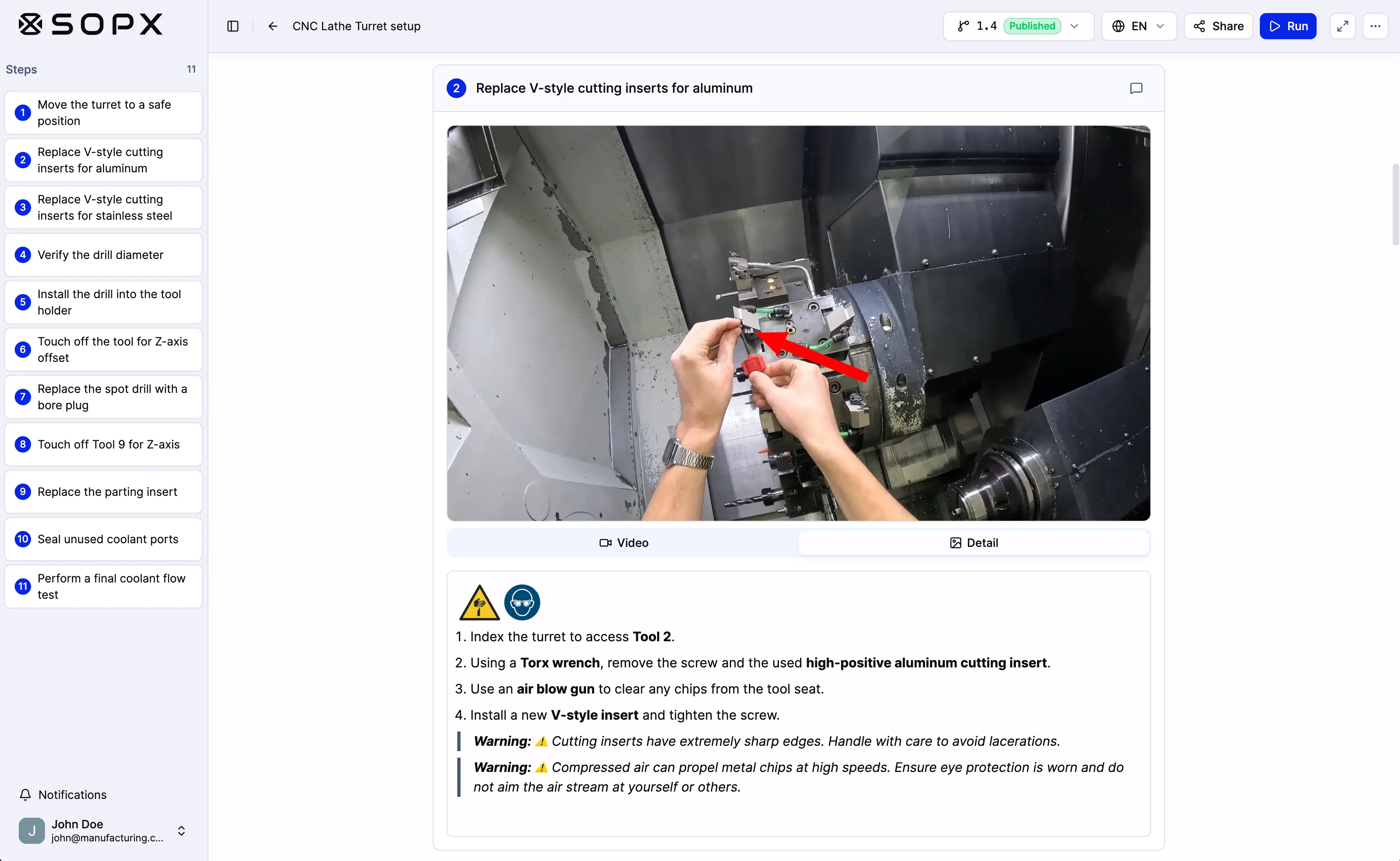
A SOPX procedure with written steps and a short video clip for each step

Pricing

Pricing model

How each tool prices and packages access.

SOPX

See the price and try it on your own video today. No demo call and no credit card. Each plan is a flat monthly fee with creators included, and you can add more. Viewers are included on every plan, so the whole floor uses your SOPs and the price stays the same as more people use them. Enterprise is a custom quote.

See SOPX pricing

DeepHow

As of July 2026, deephow.com publishes no pricing page and no self-serve trial: the site's calls to action are Request a Demo and Product Login. Older 14-day trial pages remain indexed but are no longer live. SOPX lists its Standard and Premium plans publicly, with a free trial and self-serve checkout.

Best fit

SOPX is best for:

  • Operations and production managers at 20 to 300 person manufacturers who need dozens of processes documented this quarter: record the work on a phone, upload it, and publish a structured SOP with a trimmed clip on every step in under 10 minutes, with no writing
  • Teams that need SOPs an auditor accepts: document IDs like SOP-PROD-014, approval before publish, and an automatic history of who changed what and when
  • Food production, logistics, field service, and lab teams that want proof the procedure was followed, through Run mode checklists and signatures, plus training paths with sign-off and progress per person
  • Companies sitting on process videos and PDF procedures: a PDF is parsed automatically into steps, descriptions, and extracted images, then translated into 50+ languages, with no implementation project
  • Operations where processes change often, so rewording a step, swapping one clip without regenerating, and reissuing in minutes matters more than program depth

DeepHow might be better if:

  • Enterprises that want AI watching the line in real time. DeepHow's Live SOP Verification, built with NVIDIA Cosmos and Metropolis VSS and deployed at Foxconn, compares live activity against the approved procedure as the work happens
  • Organizations that need a genuine skills matrix: who is trained, who is overdue, where the gaps are, with quizzes, certifications, and dated training records assigned by role, shift, or site
  • Companies that require training and procedures to flow through existing enterprise systems live and two-way, with prebuilt connectors to LMS, QMS, MES, HR, and identity platforms, rather than a SCORM package uploaded to the LMS
  • Pharmaceutical and medical device manufacturers that need a dedicated GMP-compliant cloud, which DeepHow offers as PharmaCloud

Ready to see SOPX in your workflow?

Free trial. No credit card. No demo required.

Other options

Other DeepHow alternatives

Tools teams often weigh alongside DeepHow. Each link opens our side-by-side comparison.

  • Dozuki

    Enterprise connected worker platform for manufacturing with CreatorPro AI work instruction creation, learning pathways with AI-generated competency quizzes, operational workflows, and MES/LMS/QMS integrations. Customer logos include 3M, Caterpillar, and General Mills.

    SOPX vs Dozuki
  • Squint AI

    Enterprise industrial AI platform for manufacturing, energy and field service: AR-guided work instructions, an assistant that answers from your manuals, and industrial agents, sold through a demo with onsite implementation.

    SOPX vs Squint AI
  • SwipeGuide

    Frontline work instruction platform for manufacturing with an AI-assisted drag-and-drop builder, checklists and sign-offs, an offline mobile app, and a skills matrix. Acquired by L2L in September 2024 and now sold as L2L's work instructions module; swipeguide.com redirects to l2l.com as of July 2026.

    SOPX vs SwipeGuide
  • Taqtile

    AI-powered digital work assistant for frontline teams. Manifest delivers spatially anchored AR work instructions on headsets, tablets, and phones, with remote expert assist, evidence capture, and enterprise system integration. Manifest Maker is its free AI authoring app for Apple devices.

    SOPX vs Taqtile
  • VKS

    Digital work instruction platform for manufacturing with connected-tool integration, smart forms, production traceability, and skills management. Sold as VKS Lite, Pro, and Enterprise.

    SOPX vs VKS

Switching

Migrating to SOPX

Two self-serve paths. Both run in your browser, no IT involvement needed.

Bring your existing PDFs

Export work instructions as PDF from your current tool, then drop them into SOPX. The AI extracts text, pulls images, translates if needed, and rebuilds them as structured SOPs in minutes.

Bring your existing process videos

Re-use any video you have already recorded. SOPX generates step-by-step SOPs from raw footage automatically. No re-recording, no manual editing.

Need a managed switch from another tool? We scope migration services on the Enterprise plan and move your existing SOPs into SOPX.

Talk to us about migration

Where it fits

Where SOPX fits next to DeepHow

Teams comparing the two usually pick SOPX for document import , multilingual sops , or work instructions for training . These are workflows where DeepHow's strengths sit in a different lane.

The pattern shows up most in manufacturing and food production , where the work happens off the screen and consistency across shifts and sites matters more than the documentation tool itself.

SOPX at a glance

  • Works in the browser. There is nothing to install.
  • Works on a phone or tablet, so workers open SOPs at the machine.
  • Free trial: 14 days, no credit card.
  • Plans start at $199 per month on Standard, billed yearly, with 3 creators included.
  • Viewers who read and run SOPs are included at no extra cost on every plan.
  • Translates SOPs into 50+ languages.
  • Made for manufacturing and food production teams.

FAQ

Frequently Asked Questions

Quick answers to common questions for this comparison.

01 What is the difference between SOPX and DeepHow?
SOPX is a self-serve SOP platform: upload a video or PDF and AI builds a structured, editable procedure with a clip on every step, published the same day and executed on the floor with Run mode checklists. DeepHow is an enterprise Physical AI platform: it captures expert know-how on video, manages skills and certifications, integrates with LMS, QMS, and MES systems, and verifies work in real time against the approved procedure. SOPX maintains the procedures and trains people on them with training paths and sign-off. DeepHow runs a wider workforce capability program, with skills management and quizzes.
02 Can I edit what SOPX generates, or is the AI output locked?
It is a normal, editable procedure. Rewrite any wording, reorder or delete steps, and insert custom steps. On a single step you can trim or replace the video clip without regenerating the SOP, add images or an image carousel, annotate frames with arrows and callouts, place a table inside the description, and attach Run mode form fields. Steps can also be imported from another procedure at an exact position, with clips, annotations, and form fields intact. Every change lands in procedure history, and earlier versions can be restored.
03 Can SOPX use our existing PDF procedures?
Yes. Upload a PDF and AI parses it into steps, step descriptions, and extracted images and carousels, with no page by page rebuilding. The limit is 100 pages on Standard and 200 pages on Premium, and Enterprise customers can request up to 500 pages and 200 MB. The Premium plan also includes multi-file generation: up to 5 videos and 5 PDFs read together into one coherent SOP, with each PDF marked as Procedure or Additional info. Source files stay downloadable, and the finished SOP translates into 50+ languages.
04 How fast can SOPX publish an SOP?
Under 10 minutes for a typical process video. You upload the recording, AI generates the title, steps, step descriptions, and a trimmed clip per step, plus the SOP header covering purpose, scope, responsibilities, and safety. You review, adjust anything that is off, and publish. There is no demo, no scoping call, and no implementation phase: signup and checkout are self-serve.
05 Can SOPX procedures hold up in an ISO 9001 audit?
SOPX covers the document control side. Every procedure carries a document ID in your own numbering convention, such as SOP-PROD-014, that stays the same across versions and languages, which maps to ISO 9001 clause 7.5. Approval flow requires review before publish and can block self-approval with a four-eyes rule. Procedure history keeps a read-only timeline of creation, submission, approval, changes, and restores with names and timestamps, and Run mode records who executed a procedure and what they signed.
06 Does DeepHow publish pricing or offer a free trial?
As of July 2026, deephow.com publishes no pricing page and the site's calls to action are Request a Demo and Product Login. A 14-day free trial was previously advertised and those pages are still indexed by search engines, but the live page no longer offers a self-serve trial. SOPX publishes its pricing. Standard and Premium are flat monthly plans with creators included, every plan starts with a free trial, and Enterprise is a custom quote.
07 When is DeepHow the better choice than SOPX?
Choose DeepHow when the goal is a workforce capability program rather than a set of procedures your own team maintains. It is built for multi-site enterprises that have a training function, an implementation budget, and requirements SOPX does not meet, particularly camera-based verification on the line, a skills matrix with quizzes and certifications, and validated environments for pharma and medical devices, and it frames rollout as a three-month project. Choose SOPX when the job is accurate, editable, multilingual SOPs live now: a 20 to 300 person manufacturer or food producer, or a field service, logistics, lab, healthcare, or hospitality team that wants to record a process today and publish it today.

Ready to standardize SOPs faster?

See how SOPX fits your operations workflows and documentation standards.