
Explainers ·
Claude for Manufacturing: What It Is, Cost and Limits
Claude for Manufacturing explained: the 17 skills and 4 connectors, who it fits, what you need, what it costs, and what it can't do on the shop floor.


Key takeaways
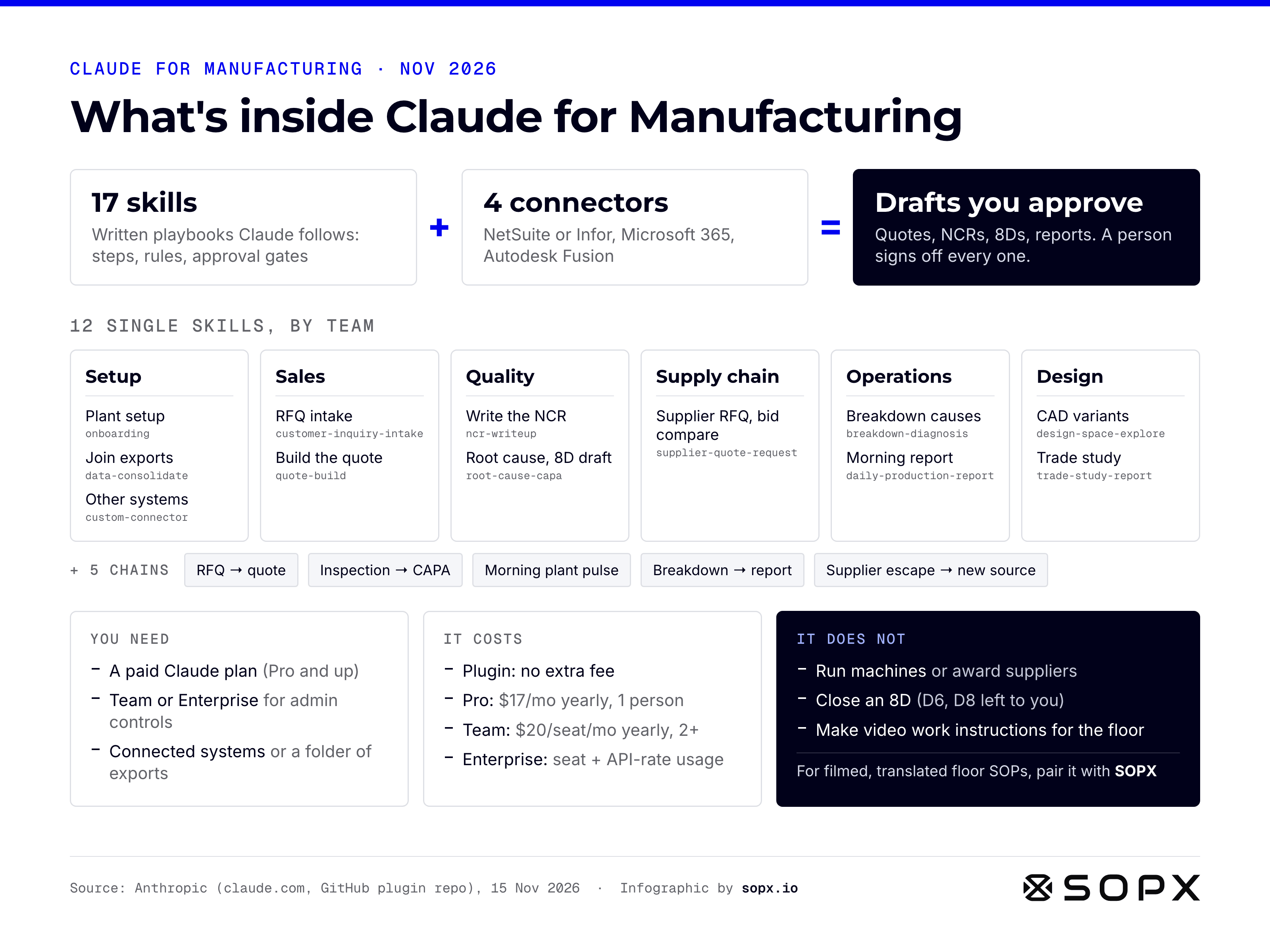
Claude for Manufacturing is a plugin for Claude that Anthropic released on November 12, 2026. It adds 17 manufacturing skills and works with four connectors: Autodesk Fusion, Infor, Microsoft 365 and Oracle NetSuite. It drafts quotes, NCRs (Non-Conformance Reports), 8D (Eight Disciplines) reports, supplier RFQs and the morning production report from your own records. A person reviews every draft. Anthropic launched it for Claude Team and Enterprise, and the plugin itself has no extra fee.
- What it really is: a set of long, written instructions (skills) plus access to your systems (connectors). The skills are open source on GitHub, so you can read every one.
- Who it fits best: discrete, make-to-order plants that quote every job and write up quality issues as NCRs and 8Ds. Process plants (food, chemicals, steel) get part of it today.
- What you need: a paid Claude plan and your systems connected or exported to a shared folder. Team and Enterprise add admin controls. Pro and Max users can still install plugins and skills themselves.
- What it costs: Claude Team starts at $20 per seat per month, billed yearly, for 2 to 150 seats. Enterprise is $20 per seat plus usage at API rates, with a 20-seat minimum.
- What it does not do: run machines, award suppliers, sign off a corrective action, or make work instructions for operators. For filmed, translated work instructions on the floor, you need a tool like SOPX next to it.
Full disclosure. I am Jure, cofounder and CTO of SOPX. SOPX does a different job than Claude for Manufacturing, and I say where it fits further down. Everything about Claude in this article comes from Anthropic’s own pages and its public GitHub code, read on November 15, 2026. If Anthropic changes something, email [email protected] and I will update it.
What is Claude for Manufacturing?
Claude for Manufacturing is “AI for manufacturing teams, delivered as a plugin with ready-made skills for quoting, quality, operations, supply chain, and design,” in Anthropic’s own words. It is not a new AI model or a separate app. It runs inside the Claude you may already use.
Anthropic’s launch post describes it as a plugin with 17 skills and four connectors. It helps manufacturers “draft quotes, quality reports, and supplier requests from the systems they already run.”
Three words matter here:
- Plugin. A package you install into Claude. It bundles skills and connector settings so a team gets them all at once.
- Skill. A written playbook that tells Claude how to do one job: which steps to take, which rules to follow, and when to stop and ask a person.
- Connector. Secure access to another system, such as your ERP or your shared drive, so Claude can read your real data.
Anthropic cites a 2025 Manufacturing Leadership Council survey in which 79% of manufacturers said they still enter data by hand. The plugin targets that work: copying numbers between systems, filling forms and writing up reports.
Who is Claude for Manufacturing for?
Anthropic is clear about the best fit. It is built for discrete manufacturers “where each job has its own quote, drawing and routing,” and where quality issues go into NCRs (Non-Conformance Reports) and 8Ds (Eight Disciplines problem-solving reports). Think machine shops, fabricators, contract manufacturers and electronics assembly.
Process manufacturers such as food, CPG, chemicals and steel get a “partly, today.” The product page FAQ says they can use the morning production report, breakdown diagnosis and supplier skills right away. The quoting and NCR skills fit job shops better.
Inside the plant, the users are office and engineering roles:
| Role | What Claude drafts | Who signs off |
|---|---|---|
| Estimator or sales | RFQ intake form, missing-info list, priced quote | Estimator releases the quote |
| Quality engineer | NCR, root cause ranking, 8D draft | Quality engineer verifies the fix |
| Buyer | Supplier RFQ package, bid comparison, emails | Buyer awards the order |
| Maintenance technician | Ranked causes of a breakdown, preventive maintenance change | Technician checks on the machine |
| Production supervisor | Morning report: output vs plan, OEE losses, scrap | Supervisor acts on it |
| Design engineer | CAD variants in Fusion, trade study memo | Engineer picks the design |
Operators on the floor are not the users. Nothing in the plugin puts instructions in front of the person at the machine. More on that below.
The 17 skills in Claude for Manufacturing
Anthropic’s announcement does not list the skills by name. The plugin’s public GitHub folder does. There are 12 single skills and 5 chains that run several skills in order.
12 single skills
| Team | Skill | What it does |
|---|---|---|
| Setup | onboarding | Tests which systems respond, finds your export folder, learns your shifts and terms, lists what is missing |
| Setup | data-consolidate | Joins exports and connected systems into one workbook, with a list of records that did not match |
| Setup | custom-connector | Tries step by step to reach a system that has no ready connector |
| Sales | customer-inquiry-intake | Turns an RFQ in any format into one form, checks plant capability, suggests bid or no-bid |
| Sales | quote-build | Prices the job from past jobs and cost history, with every number traced to its source |
| Quality | ncr-writeup | Writes the NCR against the exact requirement, scopes suspect parts, searches past NCRs |
| Quality | root-cause-capa | Puts sensor, inspection and maintenance data on one timeline, ranks causes, drafts the 8D |
| Supply chain | supplier-quote-request | Builds the supplier RFQ, compares bids, drafts emails. It never awards the order |
| Operations | breakdown-diagnosis | Ranks likely causes of a failure from sensor data, repair history, photos and the OEM manual |
| Operations | daily-production-report | Builds the morning report: output vs plan, OEE, downtime and scrap in dollars |
| Design | design-space-explore | Creates CAD variants in Autodesk Fusion by changing parameters on the open model |
| Design | trade-study-report | Turns an option matrix into a ranked, cited comparison |
5 chains
- RFQ to quote: intake, then data, then a design step in Fusion, then the quote. It has four approval points.
- Inspection to CAPA (corrective and preventive action): the NCR, then root cause and the 8D draft.
- Morning plant pulse: runs on a schedule and joins last night’s exports into the morning report.
- Breakdown to next report: the diagnosis feeds into the next production report.
- Supplier escape to alternate source: NCR, root cause, then an RFQ to a new supplier.
Anthropic says “these skills are a starting point.” You can change the quoting and quality skills to match your own forms, and Anthropic plans to add more over time.
Which systems does Claude for Manufacturing connect to?
Four connectors, per the launch post:
- Oracle NetSuite: prices quotes against orders, inventory, routings and job costs.
- Infor: looks up purchase orders and stock.
- Microsoft 365: finds procedures, supplier emails and exported reports in shared folders and inboxes.
- Autodesk Fusion: creates and compares design variants from your model.
Some details from the GitHub README matter for planning:
- NetSuite or Infor M3, not both. You pick one ERP.
- Fusion runs locally. The Fusion desktop app must be open, with its built-in MCP server switched on in preferences.
- No connector? Use exports. Save regular exports from your MES, CMMS or quality system to a Microsoft 365 folder, and Claude works from the files.
- Making changes in Infor is a separate plugin. The connector inside Claude for Manufacturing reads Infor. Infor’s own plugin, Infor Industry AI for Claude, can also make changes, such as releasing a purchase order. Access then follows each person’s Infor permissions.
If your plant runs SAP, Epicor, Plex or a homegrown system, the export route is your path today.
What Claude for Manufacturing does not do
This section matters as much as the feature list. Anthropic sets clear limits:
- It does not run equipment. “Claude for Manufacturing doesn’t operate equipment,” says the launch post. Machine control is a separate research project, the Model Hardware Standard. It opened in August 2026 to a first group of labs and advanced manufacturers, and it only works with hardware that has a programming interface.
- It does not decide. “Skills are built to end with a user’s review.” The estimator releases the quote. The buyer awards the order. The supplier skill “never awards,” per the README.
- It does not close the 8D. The root cause skill drafts disciplines D1 to D5 and D7. It leaves D6 (verify the fix) and D8 (close and recognize the team) to the quality engineer.
- It does not change your ERP on its own. The product page says the plugin drafts documents and does not write to systems of record. Team and Enterprise owners can also require approval before any connector changes data, or block changes completely.
- It does not make work instructions for the floor. No skill films a job, writes step-by-step work instructions, translates them for operators or tracks who was trained. The plugin reads procedures from your shared folders. It does not create or deliver them.
Is Claude for Manufacturing just prompts and connectors?
Short answer: technically, yes. That is also the point.
I opened the files on GitHub. Each skill is a folder with a SKILL.md file: a long, plain-text document written to Claude. It has steps, rules, approval gates, output formats and a table of what to do when data is missing. There is one shared helper script for setup. The rest is written instruction. The whole plugin is Apache 2.0 licensed, and the README calls it a “reference implementation” that is not actively maintained or open to contributions.
So if you thought “this is a list of prompts plus some integrations,” you are close. But these are not one-line prompts. The quote skill alone is about 28,000 characters, roughly ten pages of text. The NCR skill is about 21,000. They encode real shop practice:
- The quote skill makes Claude produce two separate blocks: a customer quote you can send, and an internal cost sheet. It rejects a customer quote that shows hours, margin or labor rates.
- The NCR skill checks five places suspect parts could be: installed at the customer, at the customer, in transit, at the machine, or in finished goods. A location nobody checked is never shown as zero.
- Every number in a quote has to trace back to the file and page it came from.
That is the knowledge a good estimator or quality engineer carries around. Anthropic wrote it down so Claude can follow it every time.
What this means for you
Three practical takeaways:
- You can read it before you buy. Open the GitHub folder and read the skill for your job. You will know exactly what Claude will do.
- Your own versions are the real value. The generic skill does not know your quote form, your NCR numbering or your customer’s 8D template. The teams that get the most from it will edit the skills to match how their plant works.
- The model is only as good as your records. Claude prices from past jobs, searches past NCRs and reads procedures from your shared folders. If those are thin or out of date, the drafts will be too.
There is a fun lesson in this. To get an AI to write a proper NCR, Anthropic had to give it about 20,000 characters of written procedure. Your new hires need the same thing: the job written down, current and easy to follow.
What do you need to start?
- A paid Claude plan. The launch post names Team and Enterprise. These plans add admin controls and shared setup. On Pro or Max, see the section below.
- An admin to install the plugin. It sits in Claude’s plugin directory. On Enterprise, admins can make it available to one group or to everyone.
- Your systems connected, or exports in a folder. Connect NetSuite or Infor, Microsoft 365 and Fusion if you use them. For anything else, set up scheduled exports to a Microsoft 365 folder.
- Say “Set us up.” Claude asks which systems you use, tests the connectors and tells you which skills can’t fully run yet.
- One owner per skill. Pick the estimator, quality engineer or supervisor who will review the drafts and tune the skill to your forms.
Anthropic is running a technical webinar on November 17, 2026 if you want to see it live first.
Can you use Claude for Manufacturing on Claude Pro or Max?
Yes, mostly. Anthropic launched it for Team and Enterprise. But the plugins help article says “plugins are available to all paid plans (Pro, Max, Ultra, Team, Enterprise),” and the product page says “paid plans.” Here are the routes, all from Anthropic’s help center, checked on November 15, 2026.
1. Install the plugin yourself. On Pro or Max you don’t need an admin. Open Customize, then Plugins, then Discover, and add it. If it doesn’t show there, choose Add, then Add marketplace, then Add from a repository, and enter anthropics/claude-plugins-official. That is the GitHub repo that holds the plugin.
2. Upload only the skills you need. Skills work on every plan, Free included. Download one skill folder from GitHub, for example ncr-writeup, zip it, and upload it under Customize, then Skills. Code execution must be on. Each skill also points to shared rule files in the repo’s shared folder, so a single skill may skip some checks on its own. Edit the skill text first so it uses your own forms and terms.
3. Use a Project for your templates. Put your quote template, NCR form, quality checklists and procedures in a Claude Project. Claude then follows your format in every chat in that Project. This is the simplest route, with no files to zip.
4. Connect Microsoft 365. The Microsoft 365 connector works on all plans, Pro and Max included. Pro and Max users connect it themselves. Save exports from your ERP, MES or maintenance system to a OneDrive or SharePoint folder, or upload the CSV, PDF and photo files straight into the chat.
5. Add a custom connector. Pro and Max can add custom connectors that use remote MCP (Model Context Protocol, the standard Claude uses to talk to other systems). There is one catch. The server “must be reachable over the public internet,” on port 443. A server inside your plant network or behind a VPN won’t connect. You need IT help to set this up safely.
6. Autodesk Fusion needs your computer. The Fusion connector runs on your own machine, so it works in Claude Code or in a Cowork session running on your computer. Since October 6, 2026, new Cowork tasks on Pro and Max run in the cloud by default, and a cloud session can’t reach a server on your PC.
What you give up on Pro or Max:
- Admin controls. On Team and Enterprise, owners can require approval before a connector changes data, or block changes. Enterprise admins can roll the plugin out to one group.
- Shared setup. On Pro, every person installs and tunes their own copy. Skills and settings don’t spread across the team.
- Usage. Long chains like RFQ to quote will use far more of a plan’s usage than a quick chat. That is my estimate, not an Anthropic figure. One estimator testing the plugin on Pro is fine. A whole quality team running it daily belongs on Team or Enterprise.
My advice: if you want to try it, one person on Pro can test a single skill, such as the NCR or the morning report, on real exports for a week. If it saves time, move the team to Team seats and set up the admin controls.
How much does Claude for Manufacturing cost?
The plugin has no separate price. You pay for the Claude plan of the people who use it. Prices from claude.com/pricing, checked on November 15, 2026, before tax:
| Plan | Price per seat per month | Seats |
|---|---|---|
| Pro | $17 billed yearly, $20 billed monthly | 1 |
| Max | From $100 billed monthly | 1 |
| Team, standard seat | $20 billed yearly, $25 billed monthly | 2 to 150 |
| Team, premium seat | $100 billed yearly, $125 billed monthly (5x the usage of standard) | 2 to 150 |
| Enterprise | $20 billed yearly, plus usage at API rates | 20 minimum |
Example. An estimator, two quality engineers, a buyer and a production supervisor on Team standard seats cost 5 × $20 = $100 per month, billed yearly.
Add three things to your budget:
- Your existing licenses. NetSuite, Infor, Microsoft 365 and Fusion are billed by their own vendors. The plugin does not replace them.
- Heavier users. A long chain like RFQ to quote does much more work than a quick chat. People who run it all day may need premium seats. That is my estimate, not an Anthropic statement.
- Setup time. Someone has to connect systems, set up exports and edit the skills to your forms. Count that person’s time as part of the cost.
Prices can change at Anthropic’s discretion, so check the pricing page before you buy.
Where SOPX fits next to Claude for Manufacturing
Claude for Manufacturing works in the office, around the floor: quotes, NCRs, reports and supplier emails. It leaves one gap that every plant has. The people doing the work need clear, current instructions at the machine. That is what SOPX does.
| Job | Claude for Manufacturing | SOPX |
|---|---|---|
| Draft quotes from ERP data | Yes | No |
| Write NCRs and 8D drafts | Yes | No |
| Morning production report | Yes | No |
| Turn a phone video of a job into a step-by-step work instruction | No | Yes, with a clip per step |
| Translate instructions for operators | No skill for it | Yes, 50+ languages |
| Approve and version procedures | No | Yes, with approval chains |
| QR code at the machine | No | Yes |
| Assign training and collect sign-off | No | Yes, training paths |
They meet in two places.
1. Corrective actions change how work is done. An 8D often ends with a new method: a new torque check, a new setup step, a new inspection point. Claude drafts D7, the step that prevents the problem from coming back. Someone still has to change the work instruction, get it approved and train every shift. With SOPX you film the corrected job on a phone. AI writes each step with a video clip and adds ISO 7010 safety signs. QA approves it, a QR code goes on the machine, and you assign it to the crew as a training path with sign-off. More on that in SOP training records for manufacturing.
2. Claude reads your procedures. The Microsoft 365 connector “finds procedures” in your shared folders. Current, structured procedures make every draft better. SOPX exports to PDF and Word on every plan, and to Markdown on Premium and Enterprise. Markdown is plain text that Claude and any other AI can read cleanly. Put the exports in the folder Claude searches. We explain the export options in export SOPs to PowerPoint and Markdown.
Could you ask Claude to write a work instruction from your notes? Yes, any chat AI can draft text. It can’t watch the job, cut a clip for each step or put it on a tablet at the line. We compared the two in ChatGPT vs SOP software.
Should your plant use Claude for Manufacturing?
It is a good fit if most of these are true:
- You quote custom jobs and your estimators are the bottleneck.
- You write NCRs and 8Ds, and they take hours to assemble.
- You run NetSuite or Infor, and your files live in Microsoft 365.
- You already pay for Claude, or plan to. One person on Pro can test it first.
- You have someone who will tune the skills to your forms.
Wait or start small if:
- Your ERP is not NetSuite or Infor and you have no exports set up.
- Your past jobs, NCRs and procedures are scattered or out of date. Fix the records first. The AI drafts from them.
- Your biggest problem is on the floor: new operators who can’t follow paper instructions, or know-how that lives in two people’s heads. That is a tribal knowledge problem, and it needs work instructions first.
For a wider view of AI tools by job, from maintenance to inspection, see our guide to manufacturing AI software.
FAQ
Is Claude for Manufacturing free?
The plugin has no extra fee, and its code is open source under Apache 2.0. You need a paid Claude plan to use it. Pro is $20 per month, or $17 billed yearly. Claude Team starts at $20 per seat per month billed yearly, with at least 2 seats. Enterprise is $20 per seat plus usage at API rates, with at least 20 seats.
Does Claude for Manufacturing work on Claude Pro?
Mostly, yes. Anthropic’s launch post names Team and Enterprise, but its help center says plugins work on all paid plans, Pro and Max included. You can install from the plugin directory, add Anthropic’s GitHub repo as a marketplace, or upload single skills. You lose the admin controls and shared setup of Team and Enterprise.
Which ERP systems does Claude for Manufacturing support?
It has connectors for Oracle NetSuite and Infor (M3), and you pick one of the two. It also connects to Microsoft 365 and Autodesk Fusion. For other systems, such as SAP or Epicor, you save regular exports to a Microsoft 365 folder and Claude works from those files.
Can Claude for Manufacturing control machines?
No. Anthropic says it does not operate equipment. Machine control is part of a separate research preview called the Model Hardware Standard. It is open to a small group of labs and manufacturers and needs hardware with a programming interface.
Does Claude for Manufacturing work for food and process manufacturing?
Partly. Anthropic says process manufacturers can use the morning production report, breakdown diagnosis and supplier skills today. The quoting and NCR skills are built for discrete, make-to-order plants.
Can Claude for Manufacturing write SOPs and work instructions?
None of its 17 skills is built for that. It reads procedures from your shared folders but does not create, translate or deliver work instructions to operators. Claude can draft text from notes like any chat AI. For video work instructions with a clip per step, approvals and training sign-off, use a tool like SOPX next to it.
What is the difference between a Claude skill and a connector?
A skill tells Claude how to do a job: the steps, rules and when to ask a person. A connector gives Claude access to a system, such as NetSuite or SharePoint. Claude for Manufacturing bundles 17 skills and works with four connectors.