
Comparisons ·
Best VKS Alternatives in 2026: 6 Work Instruction Tools
VKS builds work instructions step by step by hand and quotes prices after a demo. Compare 6 VKS alternatives on AI authoring, price, rollout time and machine integration.

Key takeaways
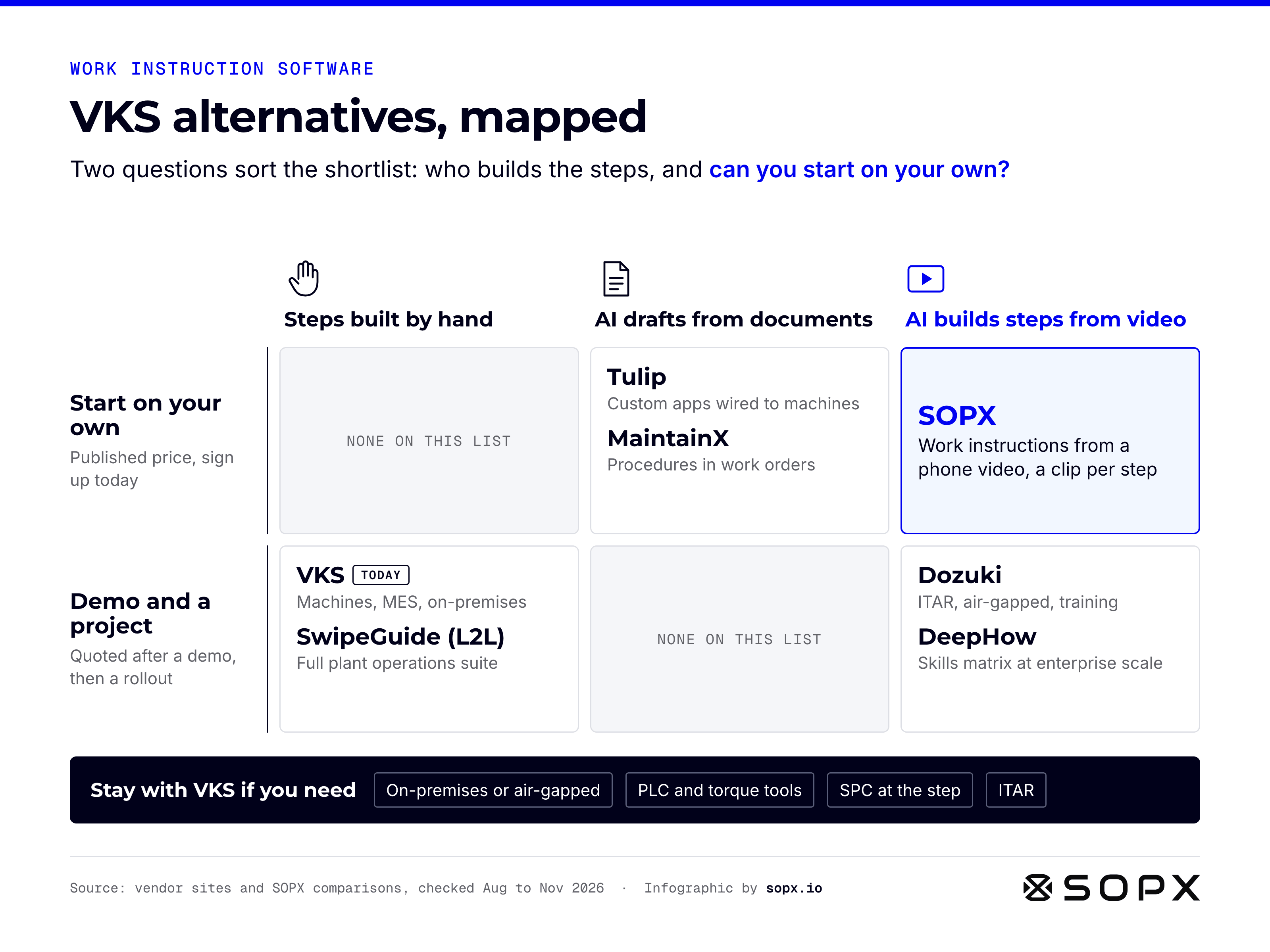
Teams look for a VKS alternative when the instructions themselves are the bottleneck. VKS gives you a strong visual editor, but an author still builds every step by hand, and the platform now sells MES, IIoT and edge hardware around it. The alternatives split three ways: AI tools that write the steps from a video, enterprise platforms that match VKS on hosting and compliance, and adjacent tools that cover part of the job. If you need instructions written this month at a published price, SOPX writes them from a phone video. If you need PLC and torque tool integration, on-premises hosting or SPC, stay with VKS.
Last verified 20 November 2026. Competitor facts below carry the date we checked them. Vendors change features and prices, so confirm anything that decides your shortlist.
- VKS publishes no prices on vksapp.com. Capterra, GetApp and Software Advice list a starting price of $350 per month (third-party estimate, unclear if per user).
- VKS Lite advertises AI-powered authoring and Google and DeepL translation into 30+ languages. The pictures, videos and annotations on each step are still added by an author.
- Two of the six tools here write steps from a video of the job: SOPX and DeepHow. Dozuki’s CreatorPro AI also converts narrated video into a guide.
- Only Dozuki comes close to VKS on on-premises or air-gapped hosting for ITAR work. If that is your gate, start there.
Why teams look for a VKS alternative
VKS is a mature product. Visual Knowledge Share was built inside a Quebec fabricator and has sold its software since about 2013, and it claims more than 500 companies in 40+ countries. On G2 it holds a 4.7 rating from 19 reviews (November 2026). Teams that look elsewhere usually do so for one of three reasons.
Every step is built by hand. VKS Lite markets “AI-Powered Authoring” that it says speeds up creation by 3x, plus AI translation and predictive text sizing. The authoring section of the same page still describes adding pictures, videos, droplets, lines and labels to each instruction. VKS also offers a service that converts existing instructions into guidebooks with AI. What it does not describe is filming a job and getting the steps back. For a plant with 300 unwritten instructions and two engineers, that is the gap that matters.
The price comes after a demo. There is no price on vksapp.com as of November 2026. Since January 2026 VKS offers a 30-day free trial, but you request it through a form that asks for your phone number, company and needs, and it comes with weekly sessions with their manufacturing experts. That is helpful support. It also means a VKS team is part of the evaluation from day one.
The scope keeps growing. Since September 2026 the VKS homepage leads with “Connected Worker Platform for the Modern Shop Floor”. The menu now sells human-centric MES, IIoT technology, data and intelligence, and VKS Edge hardware. The trial includes an integration plan for ERP and BI software. If you came for work instructions, you are now evaluating a platform project.
None of this makes VKS a weak choice. It makes it the right choice for a specific plant, and the wrong one for a plant that just needs the instructions written.
The 6 best VKS alternatives at a glance
Here is the whole shortlist in one table. VKS facts were checked in November 2026. Facts for the other tools come from our comparison pages, checked in August 2026 unless stated.
| Tool | Best for | Pricing | Time to first instruction | AI builds steps from video | On-premises |
|---|---|---|---|---|---|
| SOPX | AI work instructions from phone video | Published flat plans, 3 creators included, free trial | Same day | Yes, a clip per step | No, cloud only |
| Dozuki | ITAR, air-gapped hosting, training pathways | Not published. 2021 rate card: $17 per user per month, 50-user minimum | Average 120 days | Yes, CreatorPro AI from narrated video | Air-gapped hybrid |
| SwipeGuide (L2L) | Work instructions inside a plant suite | Not published. Capterra lists from EUR 649 per month | Weeks to months | No, video embedded in a step | Not documented |
| Tulip | Custom frontline apps and machine data | $100 to $250 per interface per month, 10-interface minimum | Weeks, plus app build | No, PDF only, video announced | Not documented |
| DeepHow | Enterprise video capture and skills | Not published, demo only | About three months | Yes, video-first | Not documented |
| MaintainX | Procedures inside maintenance work orders | Free tier, then $20 to $65 per user per month | Same day | No, prompt, documents, photos and voice | Not documented |
| VKS (reference) | Instructions wired to machines, MES, on-prem | Not published. Directories list from $350 per month | After an implementation | No, steps built by an author | Yes, and SaaS |
How we ranked these VKS alternatives
SOPX is our product, so it comes first, and we wrote this list for plants that want instructions on the floor this month. We signed up for SOPX and MaintainX ourselves. We did not try VKS, Dozuki, SwipeGuide, Tulip or DeepHow, because most of them start with a demo. For those, the picture comes from their own product pages and documentation, and rollout times are the vendor’s own figures. If you work at one of these companies and we got something wrong, email [email protected] and we will fix it.
We compared every tool on five points:
- AI authoring. Does AI build the steps from a video of the job, or does a person build the steps and add media?
- Pricing. What the vendor publishes, or the best third-party figure where it publishes nothing.
- Time to first instruction. From signup or contract to an instruction an operator can open at the machine.
- Hosting. Cloud only, or on-premises and air-gapped for ITAR and CMMC work.
- Machine integration. PLCs, torque tools, scanners and MES on the other end of the instruction.
No tool wins every point. Each entry below says which job it wins.
1. SOPX: best for AI work instructions from video without an implementation project
SOPX is a self-serve AI platform for creating video-based work instructions, and it is the most direct answer to “VKS has you build every step by hand”. Film the job on a phone at the machine and upload it. AI writes the instruction: a title, a description, and a list of steps where each step has its own trimmed video clip, a title and a written description. You review and edit the wording, then publish. A typical instruction takes under 10 minutes.
Existing instructions come across the same way. Upload a PDF procedure, or a guidebook you exported as PDF, and AI turns it into editable steps with descriptions and extracted images. On Premium and Enterprise, AI can combine several videos and PDFs about one job into a single instruction.
After the first draft, SOPX covers the work VKS Lite covers: annotations on photos and on video clips, version history, an approval flow with an optional four-eyes rule, multi-step approval chains on Premium and Enterprise, document IDs in your own numbering, and periodic review reminders for each procedure owner. Translation into 50+ languages runs on every plan, with a side-by-side editor to check each translated step. Operators open the instruction by link or QR code at the station. Run mode adds a per-step checklist with signatures, and training paths assign instructions to people with a sign-off. Read more on our work instruction software page.
Pricing: flat monthly plans with a set number of creators included, and viewers included on every plan. Every plan has a 14-day free trial with no credit card. Enterprise is a custom quote. See the pricing page for current prices.
Where SOPX loses to VKS, honestly. SOPX has no machine or PLC integration: no torque tools, pick-to-light, vision systems or label printers. It has no SPC, no productivity monitoring at the station, and no native ERP or MES connectors or public API. Custom integrations are scoped on the Enterprise plan as separate paid work. It runs in the cloud only, so there is no on-premises or air-gapped option for ITAR. There is no native mobile app and no offline mode, and no skills matrix with certification expiry.
Choose SOPX if the instructions are not written yet, the knowledge sits with a few senior machinists, and you want to test the tool on your own job today instead of after a demo.
2. Dozuki: best like-for-like swap for regulated and defense work
Dozuki is the closest match to VKS for a buyer whose shortlist is decided by compliance and hosting. Its security page documents an ITAR option, an air-gapped hybrid deployment for CUI data, SOC 2 Type II, ISO 27001 and FDA 21 CFR Part 11 validation. On top of the work instructions it adds learning pathways, quizzes, skills tracking, and native connections to MES, QMS and LMS systems.
Unlike VKS, Dozuki uses AI on the authoring side. Its CreatorPro AI converts narrated video and older files (PDF, Word, Excel, PowerPoint) into structured instructions, and since June 2026 it embeds motion clips from the source video into the guide. Native iOS and Android apps capture work order data offline.
Pricing (August 2026): not published, demo-gated, no free trial. Dozuki’s own 2021 pricing sheet started at $17 per user per month with a 50-user minimum, with onboarding and content conversion billed separately. See our Dozuki pricing breakdown.
The catch: Dozuki reports an average go-live of 120 days for 2025 customers. If the reason you are leaving VKS is rollout weight, this is a similar project.
Full SOPX vs Dozuki comparison
3. SwipeGuide, now L2L: best for work instructions inside a plant operations suite
SwipeGuide is now the work instructions module inside L2L’s manufacturing operations suite. Guides sit next to CMMS, MES, OEE analytics and dispatches in one platform, with a genuine skills matrix and certification expiry. Native iOS and Android apps download guides for offline use and offline sign-off. If you liked the VKS direction toward a connected worker platform but want maintenance and performance in the same system, this is the closest swap.
Authoring is an AI-assisted drag-and-drop builder. A process video is embedded in a step, so the steps are still built by an author, much like in VKS.
Pricing (July 2026): not published, demo-gated. Capterra lists a flat rate from EUR 649 per month. Neither figure is vendor-confirmed.
The catch: you trade one platform for a bigger one. It does not solve the “every step by hand” problem.
Full SOPX vs SwipeGuide comparison
4. Tulip: best for custom frontline apps wired to machines
Tulip is the alternative when the real need is a system to run the floor, and the work instructions are one part of it. It is a no-code frontline operations platform. You build custom apps, connect sensors, PLCs and edge devices, and get production analytics and OEE from the same apps operators use. Computer vision inspection and 21 CFR Part 11 eSignatures on the regulated tier round it out. On machine connectivity it is the closest match to VKS IO Connect on this list.
Tulip’s AI Composer reads a PDF and proposes an app from it. As of July 2026, Tulip’s documentation says AI Composer accepts PDFs only, and video is announced as coming soon.
Pricing (July 2026): Essentials at $100 and Professional at $250 per interface per month billed annually, both with a 10-interface minimum, roughly $12,000 a year at the floor.
The catch: Tulip gives you a platform to build on. Someone still has to design the apps and write the content.
5. DeepHow: best for enterprise video capture with skills management
DeepHow is the alternative for an enterprise that wants AI from video and a skills program in one system. It turns video of real work into step-by-step Smart Videos in 50+ languages, then wraps them in a skills matrix with quizzes, certifications and dated training records. Prebuilt connectors push training data into LMS, QMS, MES, HR and identity systems. Its Live SOP Verification, built with NVIDIA and deployed at Foxconn, compares live work against the approved procedure.
Pricing (July 2026): not published. There is no pricing page and no self-serve trial.
The catch: DeepHow frames its enterprise rollout as about three months, which is the same shape of project many VKS buyers are trying to avoid.
Full SOPX vs DeepHow comparison
6. MaintainX: best when the procedures belong inside maintenance work orders
MaintainX fits if most of the instructions you planned for VKS are maintenance procedures. It is a CMMS first: work orders, asset hierarchy, preventive maintenance, parts inventory and root cause analysis, with procedures run as checklists inside a work order. Native apps have an offline mode, and OT connectors such as Ignition and MQTT let machine data drive maintenance. Its AI Procedure Generator drafts a procedure from a prompt, a PDF, photos or a voice recording.
Pricing (July 2026): free Basic tier, Essential at $20 and Premium at $65 per user per month billed annually, Enterprise custom.
The catch: MaintainX is not built to capture how a production job is done. It has no video-to-procedure conversion and no step-by-step visual work instruction format for assembly or machine setup.
Full SOPX vs MaintainX comparison
Other tools. GembaDocs and REWO also build video work instructions for the shop floor and both offer on-premises hosting. See SOPX vs GembaDocs and SOPX vs REWO.
Stay with VKS if…
Stay with VKS when the instruction has to talk to the machines or live inside your own network. Nothing on this list matches all of these at once:
- On-premises or air-gapped hosting. VKS runs as SaaS or on-premises, and its FAQ covers ITAR. Only Dozuki comes close here.
- PLC and torque tool integration. IO Connect and VKS Edge tie steps to PLCs, torque tools, pick-to-light, vision systems, scanners and label printers. Tulip is the only other tool here that wires instructions to equipment.
- SPC and production data at the step. VKS Pro adds smart forms, signatures, a rule engine, productivity monitoring, work order quantities and statistical process control.
- Enterprise identity and audit. VKS Enterprise lists API access, SSO, Active Directory (LDAP) and an audit log.
If two or more of these are hard requirements, VKS is the honest recommendation, and the implementation project is what you are paying for.
How to move from VKS to another tool
No tool on this list imports VKS guidebooks in one click. Plan the move as work and start with the instructions people actually use.
- SOPX turns a PDF into editable steps with descriptions and extracted images. Export the guidebook or use the original source PDF. Then re-film the steps that were built from still photos, so each step gets its own short clip. See how to convert existing PDFs into digital SOPs.
- Dozuki converts PDFs, Word, Excel and PowerPoint files with CreatorPro AI, and also sells content conversion as a service.
- Tulip’s AI Composer reads PDFs into an app.
- MaintainX drafts procedures from a PDF or manual with its AI Procedure Generator.
A fresh three-minute phone video of a machine setup is often more accurate than a guidebook built years ago. Treat the move as a chance to re-record the jobs that changed. For a step-by-step method, see how to record work instructions.
How to pick in one pass
Pick by the requirement that would end the project:
- ITAR, air-gapped hosting or FDA validation is mandatory: stay with VKS, or look at Dozuki.
- Instructions must drive PLCs and torque tools: stay with VKS, or build it in Tulip.
- You want one suite for maintenance, OEE and instructions: SwipeGuide (L2L).
- You need a skills matrix and live AI verification at enterprise scale: DeepHow.
- The procedures are mostly maintenance: MaintainX.
- The instructions are not written yet, nobody has time to build them step by step, and you want to try it today: SOPX.
Full disclosure: SOPX is our product. We tried to describe the other tools the way their own buyers would, and to be specific about where SOPX loses.
Frequently asked questions
What is the best VKS alternative for AI work instructions?
SOPX, if you want AI to write the steps from a phone video of the job. Each step comes back with a title, a description and its own video clip, and you edit before publishing. DeepHow and Dozuki also build content from video, but both are sold through a demo and an implementation project.
Does VKS have AI?
Yes. As of November 2026, VKS Lite advertises AI-powered authoring, AI translation through Google and DeepL into 30+ languages, predictive text sizing, and a service that converts existing instructions into guidebooks with AI. The steps, pictures and annotations of a new instruction are still added by an author. VKS does not describe turning a video into steps.
How much does VKS cost compared to the alternatives?
VKS does not publish prices as of November 2026. Capterra, GetApp and Software Advice list a starting price of $350 per month (third-party estimate). SOPX starts at $199 per month billed yearly with 3 creators and viewers included. Tulip starts at roughly $12,000 a year, and MaintainX has a free tier. Dozuki, SwipeGuide and DeepHow are quoted after a demo.
Is there a VKS alternative with on-premises hosting?
Yes, but few. Dozuki offers an air-gapped hybrid deployment and an ITAR option. GembaDocs and REWO offer on-premises hosting. SOPX is cloud only, and we found no on-premises option documented for Tulip, DeepHow or MaintainX. If you need ITAR or air-gapped hosting, filter on that first.
Can I try VKS without talking to sales?
Not fully. Since January 2026 VKS offers a 30-day free trial, but you request it through a form that asks for your phone number, company and needs. The trial includes one work instruction built for you and weekly sessions with their experts. SOPX, MaintainX and Tulip let you sign up and start on your own.
Is SOPX a real VKS alternative or just a simpler tool?
SOPX replaces VKS for the authoring job: writing, translating, approving, versioning and publishing work instructions, with per-step checklists and training sign-off. It does not replace VKS for machine integration, SPC, on-premises hosting or MES features. For a plant that needs instructions written, that trade usually fits. For a wired, regulated floor, it does not.