ISO 7010 Safety Symbols in SOPs and Work Instructions


ISO 7010 safety symbols in SOPs: what warning, PPE, prohibition, and emergency signs mean, the 40+ codes SOPX supports, and how AI adds them to the right steps.
TL;DR
ISO 7010 is the international standard for safety sign symbols: yellow warning triangles, blue mandatory circles, red prohibition signs, and green emergency signs. SOPX now supports 40+ of the most used ISO 7010 symbols in SOPs and work instructions. When AI creates a procedure from a video or PDF, it adds the relevant symbols to the top of each step and builds a safety symbols table in the procedure details. You can add or remove icons in the editor, guide the AI with your own instructions, and every icon carries through to PDF, Word, PowerPoint, Markdown, and SCORM exports. Available on every plan.
- AI places the icons. Each step gets the hazard and PPE symbols that apply to it, and nothing on steps with no real hazard.
- A summary table at the top. The procedure details list every symbol used in the SOP, with its meaning, before the first step.
- You stay in control. Add a missing icon from the toolbar, delete a wrong one, or tell the AI how to use icons before it generates.
- The same signs everywhere. Icons show in the editor, on shared links, in Run mode, and in every export format.
- More icons on request. Need a sign that is not on the list yet? Tell us and we will add it.
What is ISO 7010?
ISO 7010 is an international standard for the graphical symbols used on safety signs. It was first published in 2003. The current edition is ISO 7010:2019, which has been extended through amendments since then. In Europe it is adopted as EN ISO 7010, and it is the reference most sites use for signs at work.
The goal of ISO 7010 is simple: give safety information that people understand without reading words. A worker who does not speak the language of the SOP still knows what a blue glove sign means. That makes the signs a natural fit for work instructions for foreign-language workers. That is why the same symbols appear on machines, doors, and chemical stores around the world.
Every ISO 7010 sign has a stable code, like M009 for “Wear protective gloves”. The letter tells you the category:
| Code | Category | Shape and color | Meaning |
|---|---|---|---|
| W | Warning | Yellow triangle, black border | A hazard is present |
| M | Mandatory | Blue circle | You must do this, usually wear PPE |
| P | Prohibition | Red circle with a slash | You must not do this |
| E | Safe condition | Green square | Where to find first aid, eyewash, exits |
| F | Fire equipment | Red square | Where to find fire equipment |
The colors and shapes come from ISO 3864-1, the companion standard for safety colors and sign design.
In the EU, Directive 92/58/EEC sets the minimum rules for safety signs at work. Machine builders also have to describe residual risks in their instructions for use, as covered in our EU Machinery Regulation 2023/1230 checklist. Clear signs in the procedure make those warnings easier to follow.
Why put safety symbols in SOPs and work instructions?
Most paper SOPs already have them. The PPE box at the top of a cleaning procedure, the hot surface triangle next to the oven step. Digital SOP tools often lost this. Authors typed “WARNING” in bold or used an emoji, which looks different on every phone and is not a recognized safety sign.
Symbols in a procedure help in three ways:
- They are fast to read. An operator scanning a step sees the glove and face shield signs before reading a single word.
- They work across languages. On sites with workers from many countries, a sign carries the message even when the text does not.
- They match the floor. When the SOP uses the same signs as the machine and the chemical store, workers connect the instruction to the real hazard.
A symbol in an SOP does not replace the physical sign at the machine. It repeats the message at the moment the worker reads the instruction. For more on where safety procedures should live, see safety SOP software.
How AI adds ISO 7010 icons to your SOP
When you create an SOP from a video or a PDF, the AI reads each step and adds the symbols that apply. It places them at the top of the step description, side by side, before the instructions.
Here is a lockout/tagout step from a sanitation procedure. The AI added two icons: Disconnect before maintenance (M021) and General warning (W001).
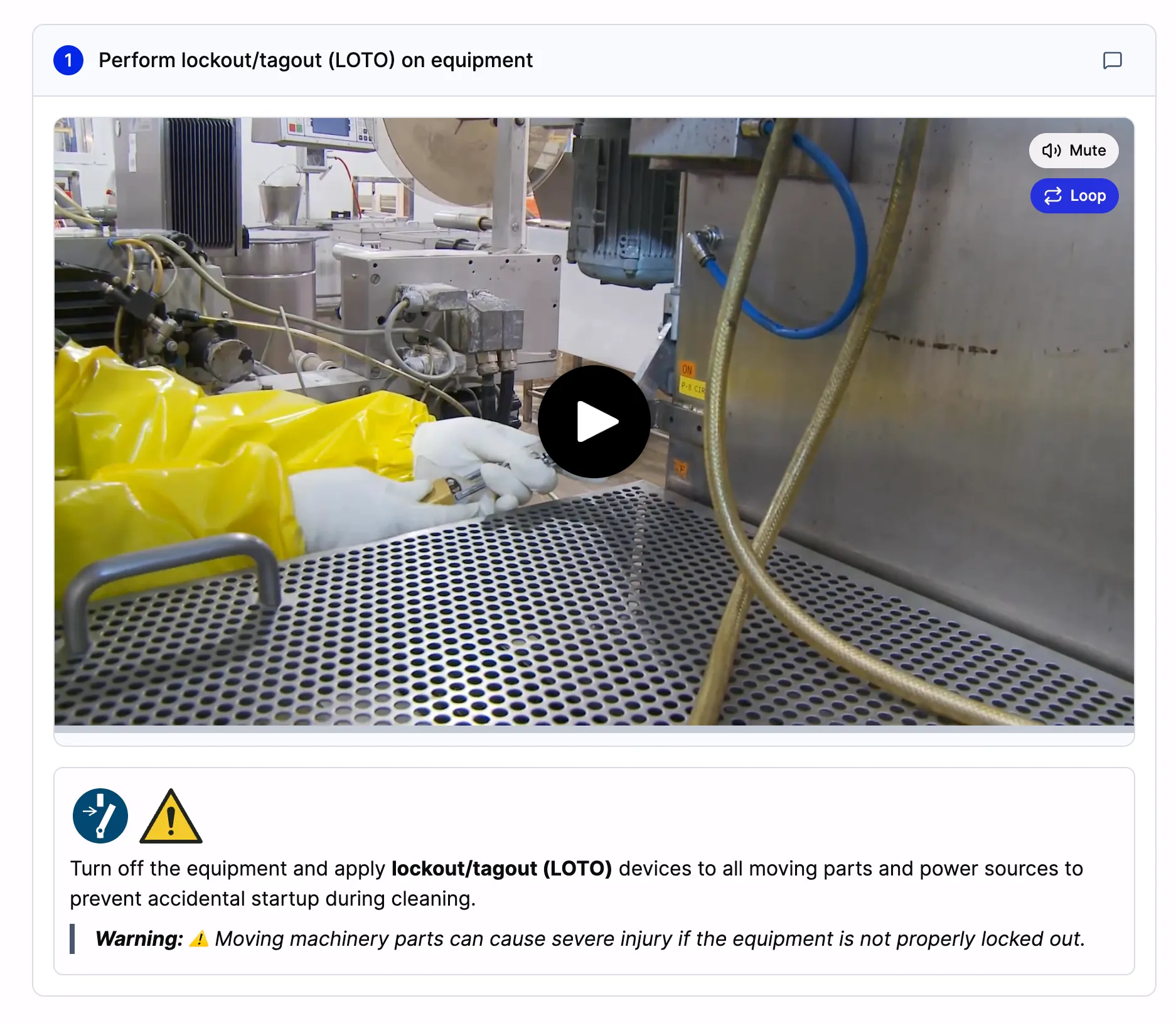
The AI added the M021 “Disconnect before maintenance” and W001 “General warning” signs to the lockout/tagout step. The written warning below them gives the detail the signs cannot carry.
The AI follows a few rules:
- Only real hazards and required PPE. No decorative icons, and no icons on steps without a hazard.
- As many as the step needs. Handling a corrosive cleaner may need gloves, a face shield, and the corrosive warning. A step that only checks a label needs none.
- Physical work only. Software and screen recording procedures almost never get safety icons.
- Text where it helps. When the sign cannot say enough, like which gloves or which temperature, the step text adds the detail.
The safety symbols table in procedure details
Before the first step, a worker should know everything they need to wear and watch out for. So the AI also adds a Safety Symbols table to the procedure details at the top of the SOP. It lists every icon used anywhere in the procedure, with its meaning.
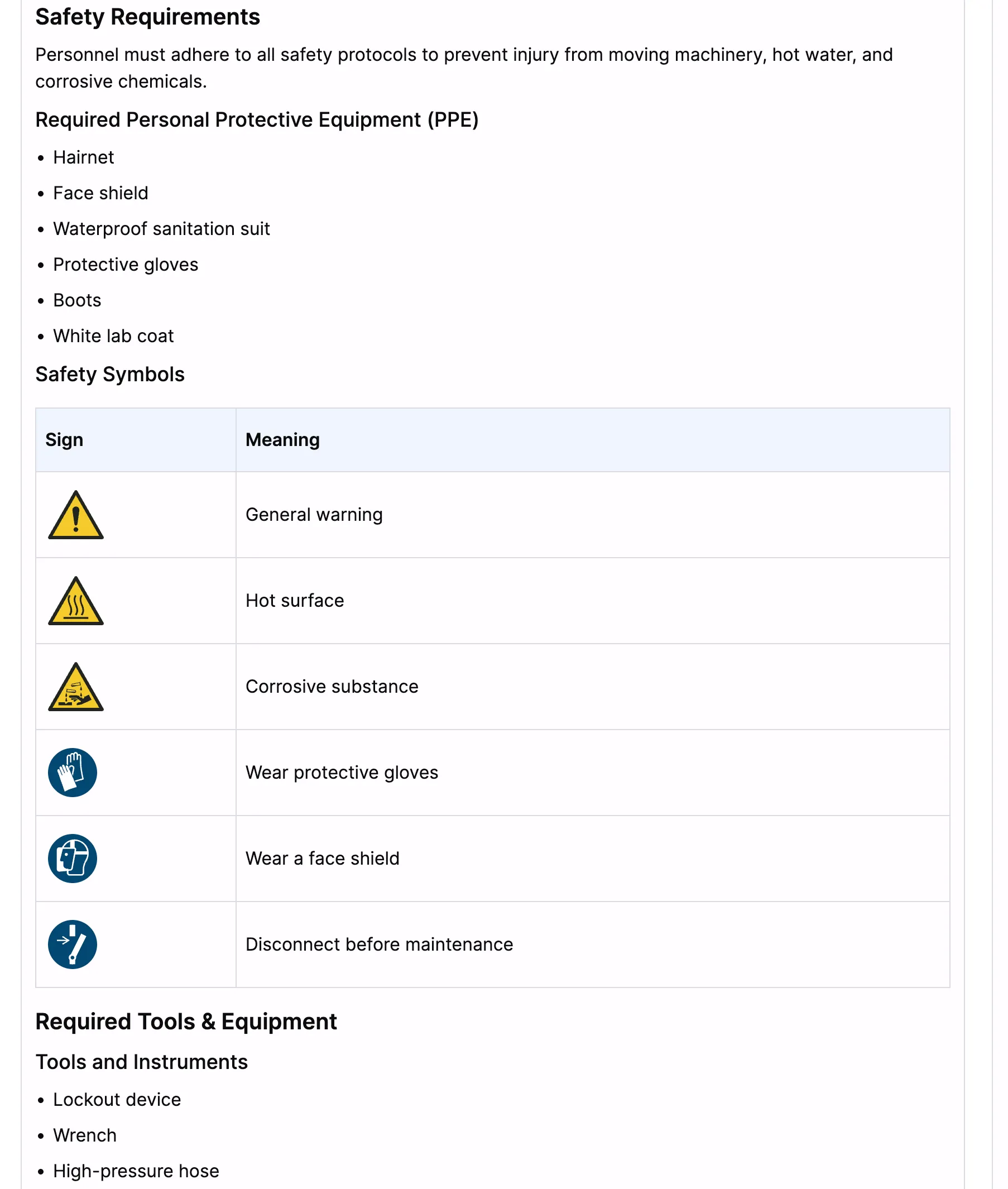
The procedure details for a sanitation SOP. The Safety Symbols table lists all six signs used in the steps, so a worker sees the full picture before starting.
The table is the one place where every sign is explained. That keeps the steps short: a row of icons on a step is enough, because the meaning is already at the top.
If you use SOP templates with Procedure Details, the table goes into your template’s safety section. The AI fills it from the same video or PDF that produced the steps.
Add or remove icons in the editor
AI gets most icons right, but you know your site. In edit mode, open any step description or the procedure details and click the shield icon in the toolbar. A searchable list of safety icons opens, grouped by category.
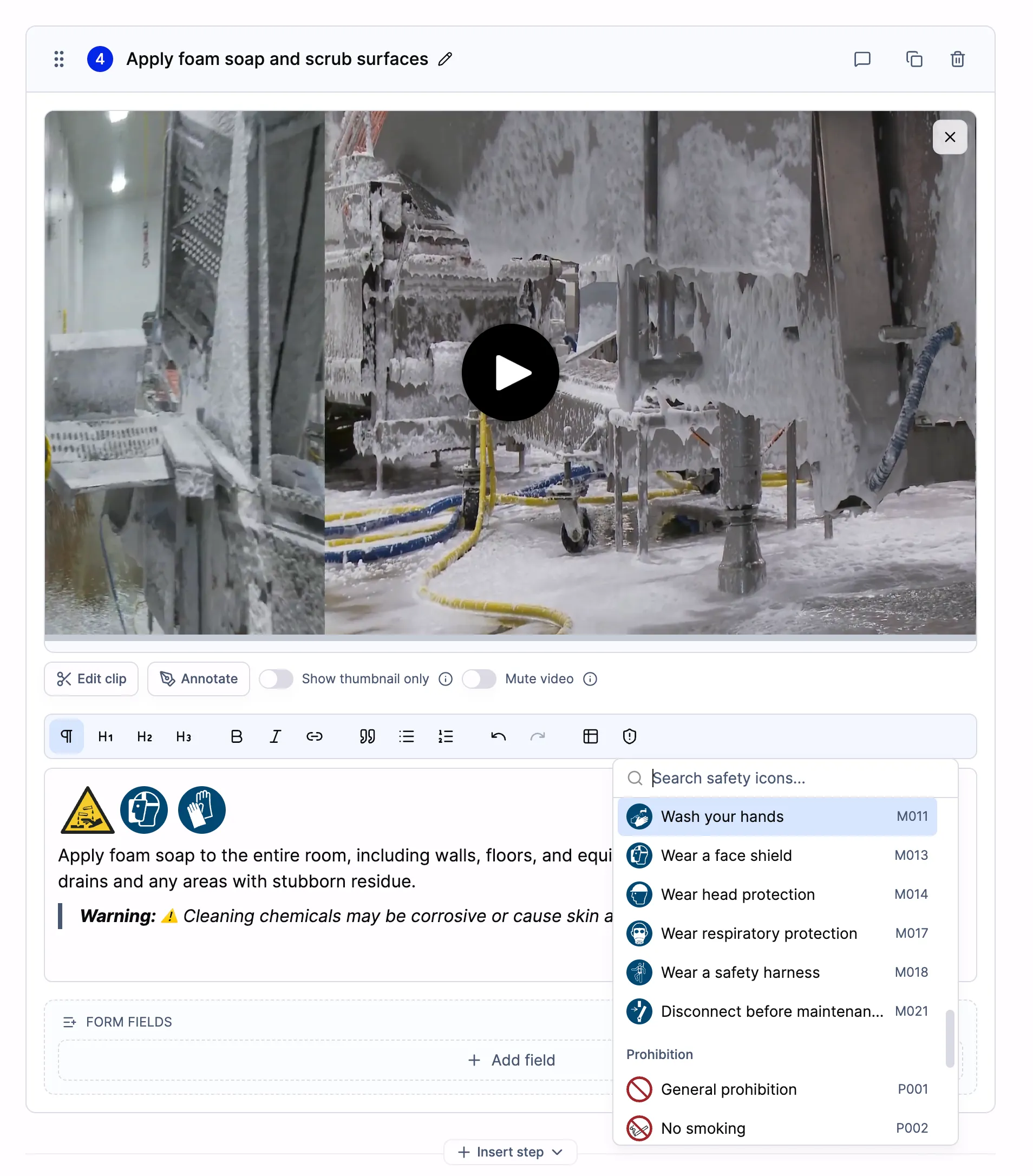
Click the shield icon in the toolbar to search the safety icons. Each one shows its name and ISO 7010 code, such as M011 for “Wash your hands”.
- Search by name or code. Type “gloves” or “M009”.
- Click to insert the icon where your cursor is.
- Delete a wrong icon like any other character in the text.
Icons work anywhere you write rich text: step descriptions, lists, tables, and procedure details. To point at the exact pinch point or hot part on the video frame, combine the icon with an annotation.
Guide the AI with your own instructions
Every site has its own rules. When you generate a procedure, you can add AI instructions to shape how icons are used. For example:
- “Add the hearing protection sign to every step in the press area.”
- “Always show the safety footwear sign in the procedure details.”
- “Do not add safety icons. This is an office procedure.”
- “Use the corrosive warning on every step that handles the CIP detergent.”
The AI follows your instructions and still picks only from the supported list.
Safety icons in every export
A safety sign that disappears from a printed SOP is worse than no sign at all. So the icons are part of every export format:
- PDF and Word, inline next to the text, sized to stay readable on paper.
- PowerPoint, as a row of icons at the top of each slide’s text.
- Markdown, with each icon as a separate image file.
- SCORM 1.2, so the icons show in your LMS course too.
They also show on shared links and QR codes, in Run mode, and in full screen mode. See how to export an SOP to PowerPoint or Markdown for the export options.
The full list of ISO 7010 symbols in SOPX
SOPX supports 40+ ISO 7010 signs. These are the ones that come up most often in manufacturing, food production, laboratories, warehouses, and maintenance work.
Warning signs (W)
| Code | Name | Use it for |
|---|---|---|
| W001 | General warning | A hazard without a specific sign |
| W002 | Explosive material | Explosive substances or atmospheres |
| W007 | Floor-level obstacle | Trip hazards, cables, raised edges |
| W008 | Drop (fall) | Working at height, open edges |
| W009 | Biological hazard | Blood, bodily fluids, biological agents |
| W010 | Low temperature | Freezers, cryogenic liquids |
| W011 | Slippery surface | Wet or oily floors |
| W012 | Electricity | Live parts, electrical panels |
| W014 | Forklift trucks | Areas with moving industrial vehicles |
| W015 | Overhead load | Cranes, hoists, suspended loads |
| W016 | Toxic material | Poisonous substances |
| W017 | Hot surface | Ovens, heaters, hot machine parts |
| W018 | Automatic start-up | Machines that can start remotely |
| W019 | Crushing | Presses, closing parts, pinch points |
| W021 | Flammable material | Flammable liquids, gases, solids |
| W022 | Sharp element | Blades, knives, sharp edges |
| W023 | Corrosive substance | Acids, bases, strong cleaning agents |
| W024 | Crushing of hands | Hand pinch points, rollers |
| W028 | Oxidizing substance | Oxidizers that feed a fire |
Mandatory signs (M), including PPE symbols
| Code | Name | Use it for |
|---|---|---|
| M001 | General mandatory action | A required action without a specific sign |
| M002 | Refer to instruction manual | Read the equipment manual before use |
| M003 | Wear ear protection | Noise exposure |
| M004 | Wear eye protection | Splashes, particles, chemicals |
| M008 | Wear safety footwear | Heavy objects, sharp debris |
| M009 | Wear protective gloves | Chemicals, sharp or hot parts |
| M010 | Wear protective clothing | Chemical or contamination risk |
| M011 | Wash your hands | Hygiene, food handling, after chemicals |
| M013 | Wear a face shield | Grinding, splashes to the face |
| M014 | Wear head protection | Overhead hazards, construction |
| M015 | Wear high-visibility clothing | Traffic, vehicle areas |
| M017 | Wear respiratory protection | Dust, fumes, vapors |
| M018 | Wear a safety harness | Working at height |
| M021 | Disconnect before maintenance | Lockout before repair or cleaning |
Prohibition signs (P)
| Code | Name | Use it for |
|---|---|---|
| P001 | General prohibition | Something forbidden without a specific sign |
| P002 | No smoking | Smoking forbidden |
| P003 | No open flame | Flammable areas |
| P010 | Do not touch | Parts that must not be touched |
| P011 | Do not extinguish with water | Electrical or reactive fires |
| P015 | No reaching in | Moving machinery openings |
Emergency and fire signs (E and F)
| Code | Name | Use it for |
|---|---|---|
| E003 | First aid | Location of first aid |
| E011 | Eyewash station | Location of eyewash |
| E012 | Safety shower | Location of safety shower |
| F001 | Fire extinguisher | Location of extinguisher |
Missing a sign you use? ISO 7010 has hundreds of symbols, and we started with the ones teams need most. Email [email protected] with the code you need and we will add it.
A concrete example
A food plant records its end-of-shift sanitation procedure on a phone and uploads the video to SOPX.
- Procedure details. The AI fills the safety section with the PPE list and a Safety Symbols table: general warning, hot surface, corrosive substance, gloves, face shield, and disconnect before maintenance.
- Step 1, lockout/tagout. The step opens with the M021 and W001 icons, then the instruction to lock out every power source.
- Step 4, foam and scrub. The step opens with the corrosive warning, face shield, and gloves icons. A written warning adds that the cleaner can burn skin.
- Review. The sanitation lead adds the “Wash your hands” sign to the final step and removes one icon the step does not need.
- Publish. Operators see the icons on the tablet at the line. The QA manager exports a PDF for the HACCP binder, and the icons are there too.
Good to know
- Plan. Safety icons are available on every plan, including the free trial. See pricing.
- Icons are built in. They are standard ISO 7010 artwork stored in SOPX, so they look the same on every device and in every export.
- Custom icons are not supported yet. If you need a site-specific sign, let us know what it is.
- Existing SOPs. AI adds icons when it generates a procedure. For SOPs you already have, add icons by hand in the editor.
Getting started
- Pick a procedure with a real hazard: cleaning, maintenance, chemical handling, or a machine changeover.
- Upload the video or PDF. Add an AI instruction if your site has special rules for signs.
- Check the icons on each step and the Safety Symbols table. Add or remove what you need, then publish.
Start a free trial and see which safety signs the AI picks for your first procedure.