What to Include in an SOP: The Sections Every Procedure Needs

A list of steps is a work instruction, not an SOP. Here are the sections a complete SOP needs (purpose, scope, responsibilities, safety) and how to generate them from a video.
TL;DR
A complete SOP needs a governance header on top of its steps: Purpose, Scope, Responsibilities, Prerequisites, Safety Requirements, Required Tools and Equipment, Regulatory References, and Definitions, followed by the step-by-step procedure. Steps alone are a work instruction, not an SOP.
- A bare list of steps is a work instruction; adding a header that states why a procedure exists, where it applies, and who is responsible makes it an SOP.
- The sections most SOPs need are Purpose, Scope, Responsibilities, Prerequisites, Safety Requirements, Required Tools and Equipment, Regulatory References, and Definitions, then the procedure itself.
- Not every procedure needs every section: simple low-risk tasks can use three, while hazardous work needs a safety-focused set.
- The header is the part most tools skip and most teams avoid writing, yet auditors read it first.
- SOPX fills the header automatically: define the sections once as a template, and the AI completes each one from the same phone video or PDF used to draft the steps.
What an SOP actually includes
Most people picture an SOP as a numbered list of steps. That is half of it. The steps tell an operator how to do the task. The rest of the document tells everyone else what the task is, why it exists, where it applies, and who owns it.
That second half has a name. Call it the procedure header, the front matter, or the Procedure Details. Whatever you call it, it is the difference between a work instruction and a full SOP. We cover the wider family of terms in SOP vs work instruction vs SOI vs SWI, but the short version is simple. Steps alone are an execution document, and steps plus a governance header are an SOP.
Here is what belongs in that header.
The sections every SOP should consider
Purpose
One or two sentences on why the procedure exists and what it protects against. Not “how to clean the machine,” but “prevent chip buildup that causes tolerance drift on the next shift.” A good purpose statement tells a reader whether they are even looking at the right document.
What good looks like: a clear outcome, not a restatement of the title.
Scope
What the SOP covers, where its boundaries are, and who it applies to. Scope stops two SOPs from overlapping and tells an auditor exactly which lines, shifts, or product families the procedure governs.
What good looks like: “All operators on Line A during production runs. Does not cover changeover, which is SOP-014.”
Responsibilities
Who performs the work, who supervises it, and who approves it. Naming roles (not people) keeps the document current when staff change and makes accountability obvious during a review.
What good looks like: a short list by role. Operator performs, shift supervisor verifies, quality lead approves.
Prerequisites
The qualifications, training, certifications, or prior steps required before someone starts. This is where you stop an untrained worker from running a task they should not touch yet.
What good looks like: “Completed lockout/tagout training. Production order approved and available.”
Safety Requirements
Required PPE, hazards, precautions, and emergency procedures. For high-risk work this is the most important section in the document, which is why it deserves its own template (more on that below).
What good looks like: specific PPE, the real hazards, and what to do when something goes wrong.
Required Tools and Equipment
Every material, tool, instrument, and piece of equipment needed to complete the task. Listing it up front means an operator gathers everything before starting instead of stopping halfway.
What good looks like: a checklist, including part numbers and quantities where they matter.
Regulatory References
The standards, regulations, and supporting documents the procedure answers to. ISO 9001, HACCP, GMP, an internal policy, or a linked work instruction. This is the section auditors trace.
What good looks like: named standards and clause numbers, plus links to the documents the SOP depends on.
Definitions
Key terms and abbreviations used in the SOP. A short glossary removes ambiguity for new hires and for workers reading a translated version.
What good looks like: only the terms a reader might genuinely misread, defined in plain language.
The procedure itself
After the header comes the part operators follow on the floor. That is the ordered steps, each ideally with a short video clip or photo and a clear description. For physical work, visuals carry the load that text alone cannot. If you want an acceptance criterion on each step, a one-line “done looks like this,” ask for it when you generate the SOP and the AI will add one. See how to record work instructions for the capture side.
A complete SOP example
SOP: CNC End-of-Shift Cleaning
- Purpose: Prevent chip buildup that causes tolerance drift on the next shift.
- Scope: All operators on the CNC cell, end of every shift. Excludes deep maintenance (SOP-022).
- Responsibilities: Operator performs. Shift supervisor verifies the log. Maintenance lead approves the SOP.
- Prerequisites: Machine powered down. Completed end-of-shift safety training.
- Safety Requirements: Cut-resistant gloves, safety glasses. Spindle fully stopped before reaching into the work area.
- Required Tools and Equipment: Shop vacuum, non-residue solvent, lint-free cloths, coolant test strips.
- Regulatory References: ISO 9001 clause 8.5.1. Internal maintenance policy MP-03.
- Definitions: Ways (the linear guide surfaces the carriage rides on).
- Procedure: 9 steps, each with a short video clip.
Drop the header and you have a work instruction. It is useful on the floor and useless in an audit. Keep the header and you have an SOP a trainer, an operator, and an auditor can all use.
You do not need every section
Matching depth to risk matters more than filling in every field. Over-documenting a trivial task is how SOP libraries become unreadable, which is the real reason workers ignore them. A practical way to think about it is three tiers:
- Minimal: Scope, Prerequisites, Required Tools and Equipment, then the steps. Right for simple, low-risk procedures.
- Standard: the full set above. Right for most procedures in most operations.
- Safety-Focused: lead with Hazard Assessment, PPE Requirements, Emergency Procedures, and Safety Precautions, then scope and prerequisites. Right for hazardous or high-consequence work.
The goal is not a longer document. It is the right document for the risk in front of you.
If you want a ready-made starting point you can fill in by hand and print or export to Word, use our free SOP template generator. It builds a formatted template with these sections in seconds, no signup required.
How SOPX builds the header from a video or PDF
Writing the header is the part teams put off, because it feels like paperwork on top of the real work. An AI SOP generator like SOPX removes that step.
When you create an SOP in SOPX, the AI already turns your recording into structured steps. Now it fills the Procedure Details header too, using a template you control.
Here is how it works:
- Define a template once. An owner or admin opens Settings, Procedure Details, and sets up the sections each SOP should carry. Each section has a Title (the heading readers see in the final SOP) and a description that guides the AI on what to extract. You can build up to 20 sections per template.
- Guide the AI, or pin fixed text. The section description does two jobs. It tells the AI what to look for, for example “describe the boundaries of this procedure and who it applies to.” It can also carry text that must appear in every SOP. The AI uses that text word for word instead of guessing it from the recording.
- Generate from the same source. Upload a phone video or import an existing PDF. The AI drafts the steps and fills each header section from the same source. If the source does not contain what a section needs, SOPX does not invent it. It leaves a short placeholder marking that section for manual completion, so the gaps are obvious before you publish. You review and publish.
- Set an organization default. Pick the template new SOPs start from, so every procedure across the company shares the same structure. Only owners and admins can edit templates, which keeps your key formats safe from accidental changes.
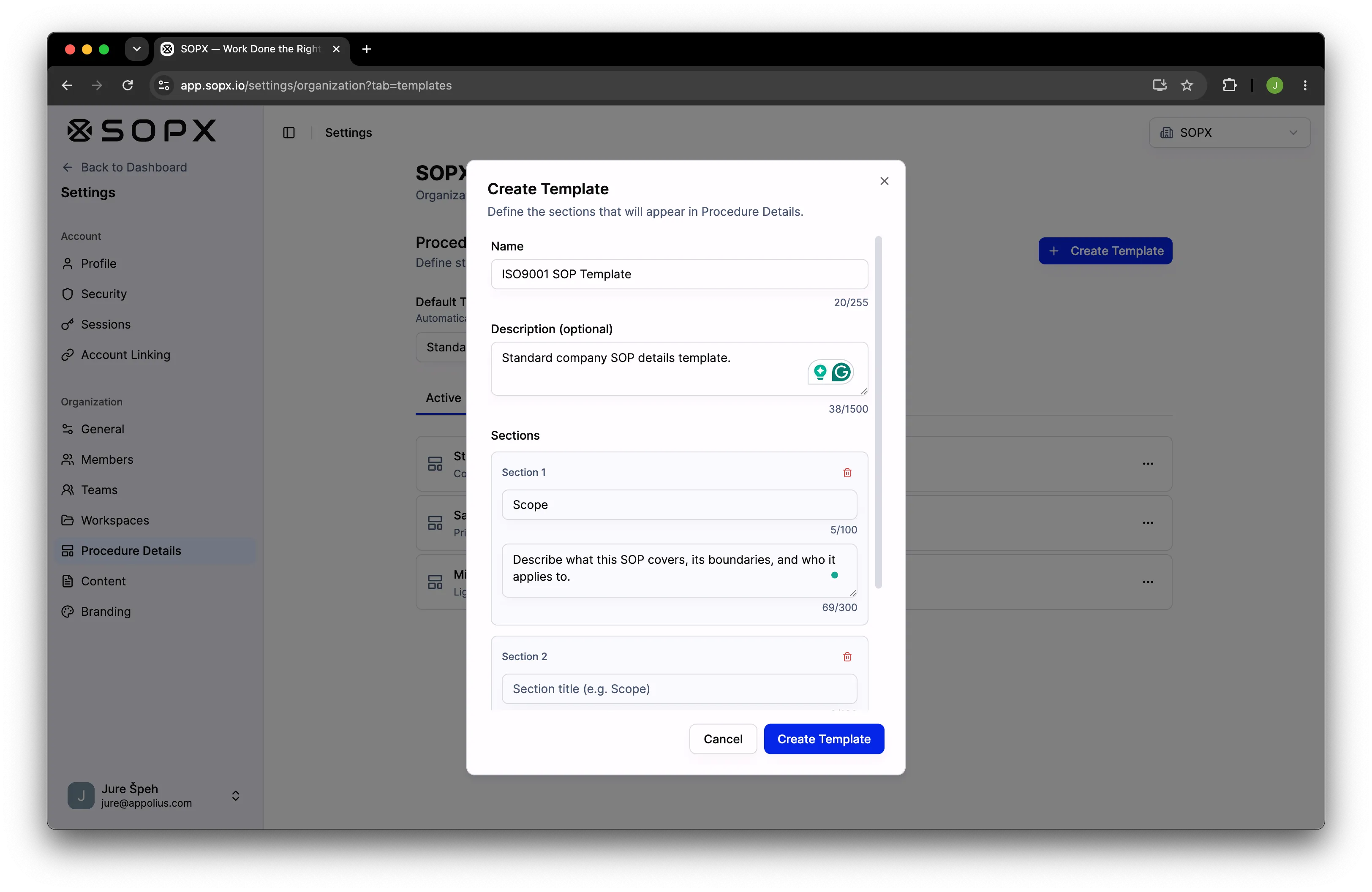
SOPX ships with three templates out of the box. Standard SOP is the full universal set, Safety-Focused is for high-risk environments, and Minimal covers the essentials only. Duplicate any of them, edit the sections, or build your own from scratch.
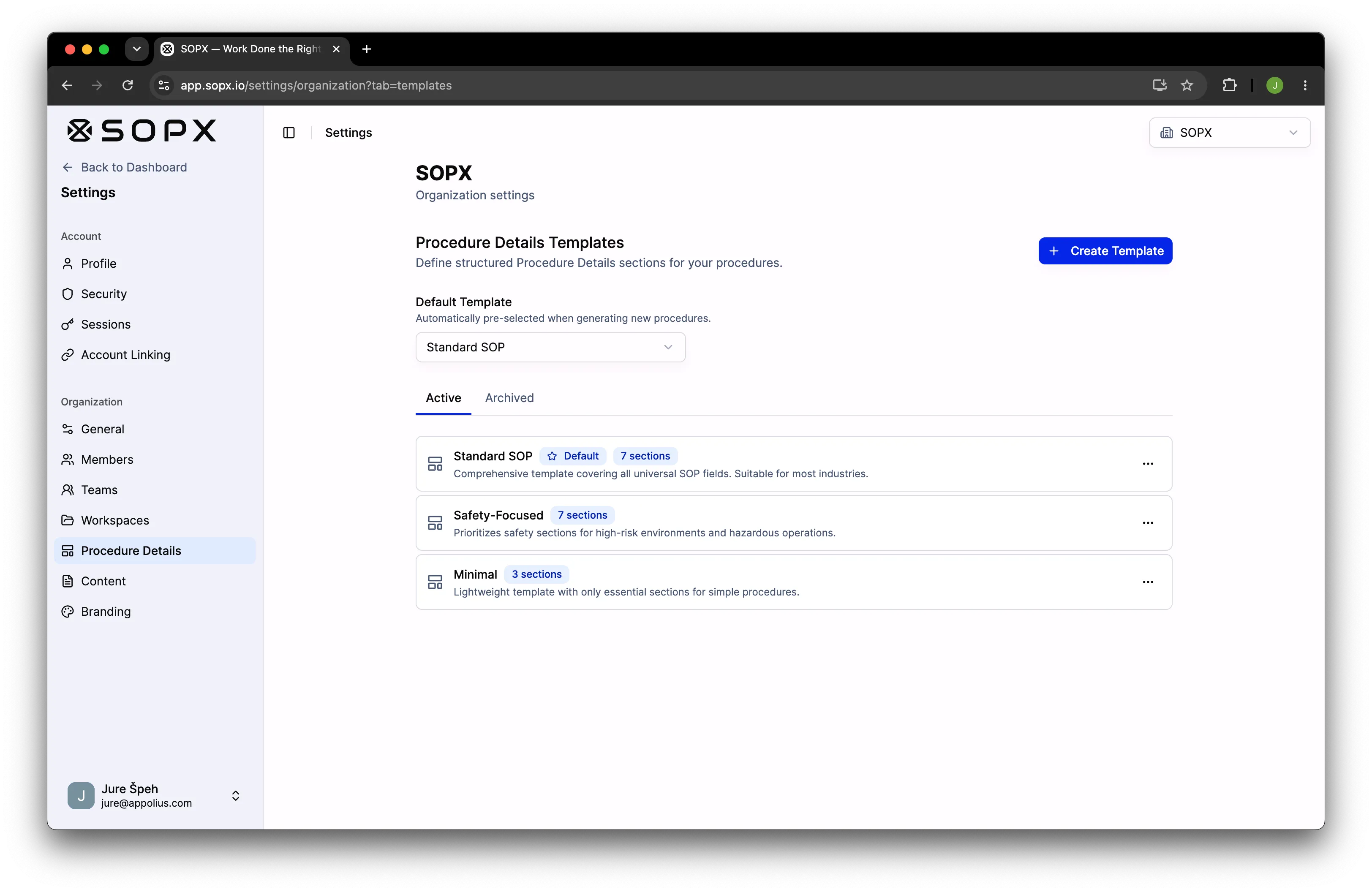
The header travels with the document. It sits at the top of the published SOP, above the step-by-step procedure, and it is included when you export to PDF or Word. The same recording that gives you the steps now gives you the whole SOP.
Frequently asked questions
What is the difference between an SOP and a template?
A template defines the structure, which is the sections an SOP should contain and the guidance for filling each one. An SOP is a filled-in document built from that structure for one specific procedure. In SOPX, you define templates once and generate many SOPs from them.
How many sections should an SOP have?
As many as the risk requires and no more. Simple tasks run fine on three or four. Most procedures use seven or eight. SOPX allows up to 20 per template, but more sections is not better. A document people actually read beats a complete one nobody opens.
Can AI really write the purpose and scope?
Yes, with your guidance. You tell each section what to capture, and the AI drafts it from the video or PDF. You stay in control. Review every section before publishing, and pin any text that must appear word for word. When the recording does not contain what a section needs, SOPX flags it with a placeholder instead of guessing, so you know exactly what to fill in by hand. The AI removes the blank page, it does not replace your judgment.
Is the header included in the export?
Yes. The Procedure Details header is part of the SOP. It appears at the top of the published document and is included in both PDF and Word exports.
Who can create or edit templates?
Only owners and admins, from Settings, Procedure Details. This is deliberate. It prevents other members from accidentally changing the formats your whole library depends on. Everyone can still create SOPs from those templates.
Start free
Steps tell your team how. The header tells them why, where, and who. A real SOP needs both, and the header is exactly the part that never gets written.
SOPX writes it for you. Film a process or import a PDF, pick a template, and get a complete SOP, header and steps, that you can translate, version, and share by link or QR code.
Try SOPX free. 5 AI-generated SOPs, no credit card required.