Plan SOP Creation with Tasks: Who Documents What, by When

Deciding which SOPs get written, and by whom, usually lives in a spreadsheet nobody opens. Tasks move that plan into SOPX: assign a job, set a due date, and link the finished procedure to the task.
TL;DR
Tasks put the documentation plan inside SOPX. Create a task for an SOP that does not exist yet, assign it to the person who knows the job, give it a due date, and track it to done. Available on every plan, including the free trial.
- Create a task with a title, a description, an assignee, and a due date.
- The assignee gets an email and an in-app notification when something lands on them.
- Statuses move from not started to in progress to completed.
- When the procedure exists, link it to the task, so the plan and the result stay connected.
- It works in reverse too: link an existing SOP to a task and assign it, and completing the task is that person confirming they have read it.
- The person who created the task gets an email and a notification the moment it is completed.
- My tasks shows what you owe. All tasks shows the whole team’s plan, filtered by status, assignee, who assigned it, or overdue only.
Writing SOPs is a project, and projects need owners
The hard part of building an SOP library is almost never the recording. It is the twenty jobs you agreed to document in a meeting in March, spread across four people who each thought someone else had it.
Most teams track that in a spreadsheet, or in a project tool sitting next to the SOP tool. Both drift within weeks. The spreadsheet says “Gluer machine setup, Marko, end of month” and the SOP tool has no idea. Nobody can answer the two questions that matter. What is still missing, and who is holding it?
Tasks close that gap by keeping the plan in the same place as the procedures.
What a task holds
A task is deliberately small. It is not a project management system, and it is not trying to be.
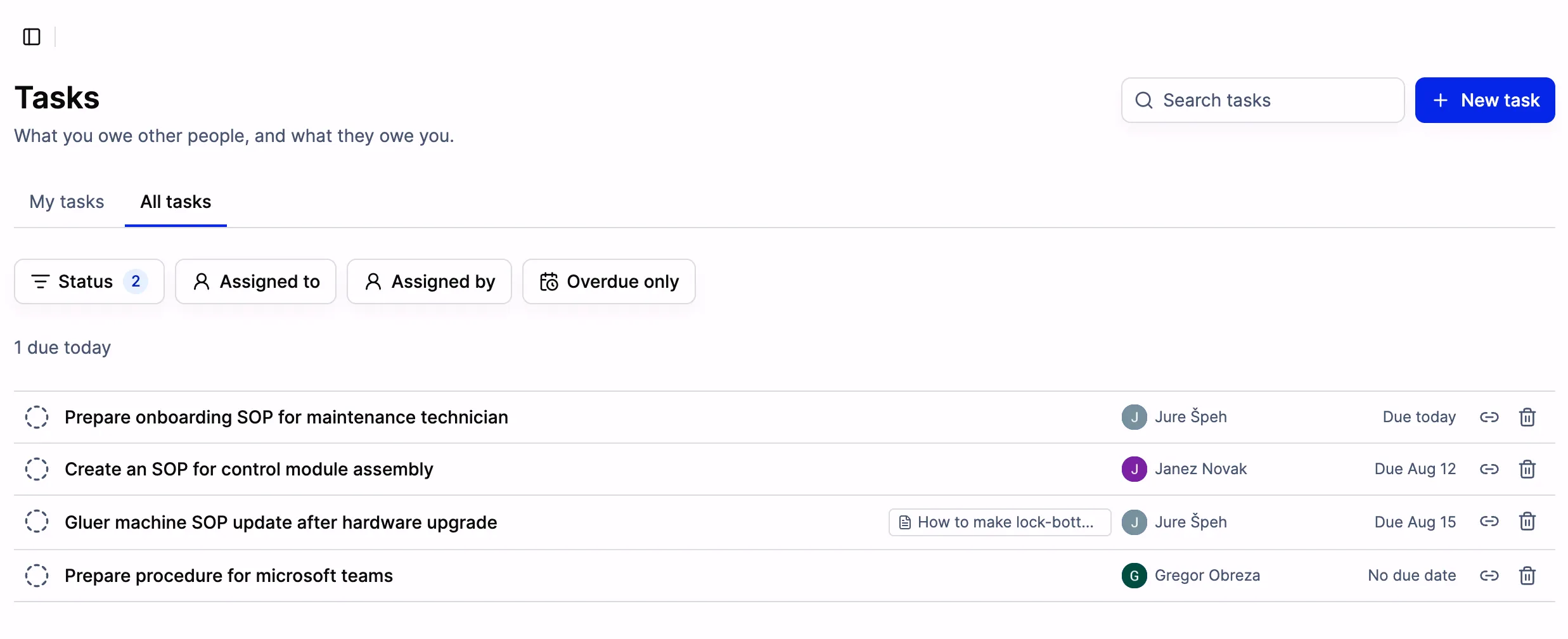
All tasks, with one due today. The chip on the third row is the procedure that task is linked to.
Open one and you get the fields you actually need to hand work to somebody:
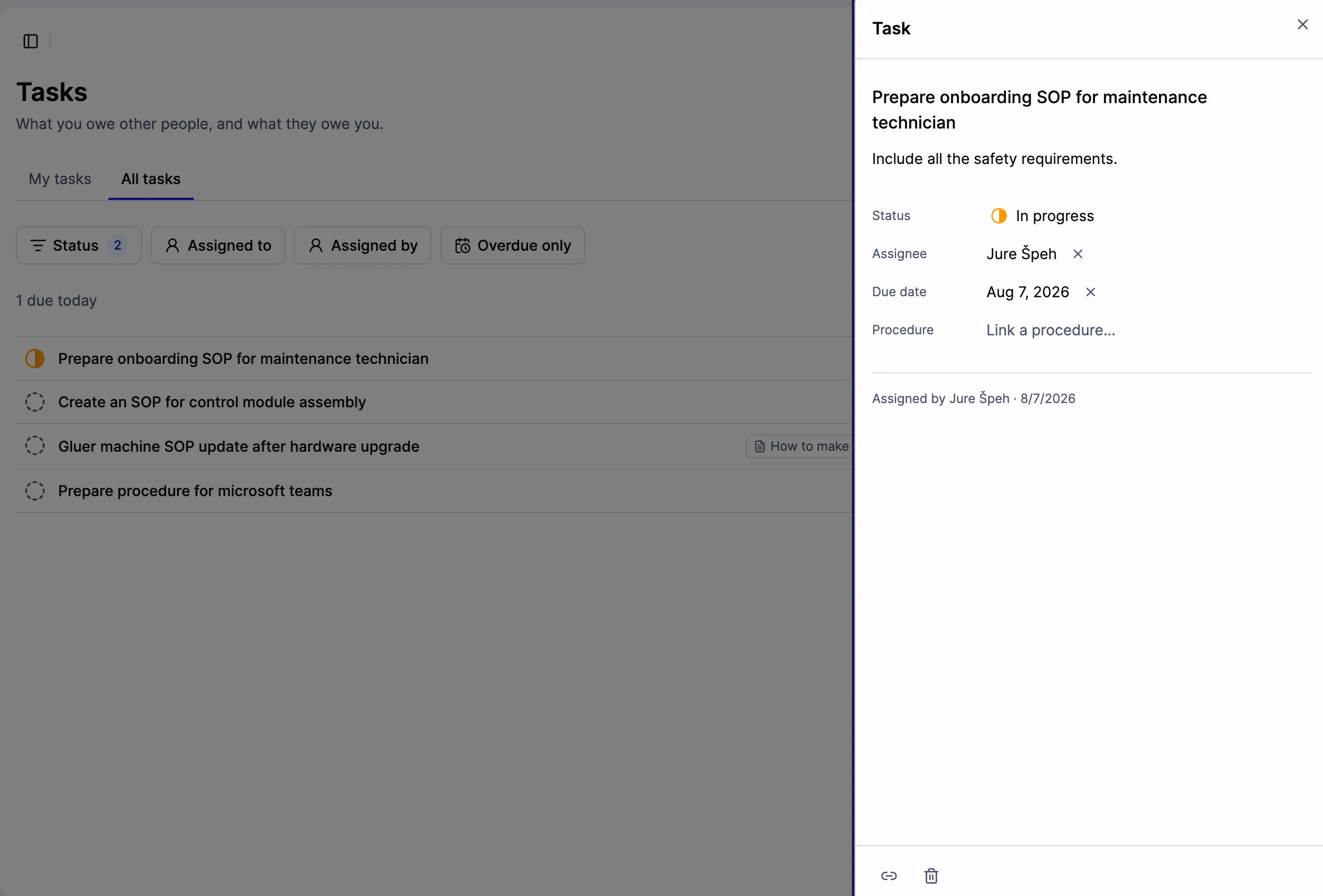
The panel records who assigned the task and when, so there is no argument about it later.
- Title. What needs documenting, in the words the team uses. “Gluer machine SOP update after hardware upgrade.”
- Description. The context that would otherwise be lost in a chat message. “Include all the safety requirements.”
- Assignee. One person. Shared ownership is how things stall.
- Due date. Optional, but the tasks with a date are the ones that get done.
- Status. Not started, in progress, completed.
- Procedure. The SOP this task is about, whether the one it produced or the one somebody needs to read.
Nobody has to remember to check
Assignment and completion are the two moments where documentation plans usually break, so both send a notification.
When you assign a task, the assignee gets an email and an in-app notification. They did not have to be in SOPX when you planned the work.
When they complete it, the person who created the task gets an email and a notification. That matters more than it sounds. The reason SOP backlogs feel stuck is often that half of them are finished and nobody told the person tracking the list. Closing the loop automatically means the plan reflects reality without a weekly status meeting.
Linking the procedure to the task
A task can be created before the SOP exists, which is the normal case. You know the job needs documenting, and the recording has not happened yet.
Once the procedure is generated, link it to the task with Link a procedure. Now the task is not just a line item that got ticked. It points at the thing that was produced, which is useful months later when someone asks whether the gluer machine SOP was ever updated after the hardware change. You open the task, and there it is.
Two views, because there are two questions
My tasks answers “what do I owe?” It is the view an operator or a line lead opens. Short, personal, and specific.
All tasks answers “where is the library?” Filter by status to see everything still open, by assignee to see whether one person is carrying eight of the twelve, by who assigned it, or by overdue only when you want the uncomfortable list. Tasks group under headings like “1 due today”, so the near-term work surfaces without hunting.
How to use it without inventing bureaucracy
A few patterns that keep the plan honest:
- Start from the risk, not the org chart. List the jobs where exactly one person knows the procedure. Those become your first tasks, assigned to that person, before they take their holiday.
- One task per procedure. Not per department, not per project phase. A task that says “document the packaging line” will sit open for a year. Five tasks naming five machines will close.
- Give the expert the task, not the writer. The person who does the job records it. The AI writes the first draft from the recording, and an editor cleans up the wording afterwards. Assigning the recording to the person who owns the knowledge is the whole point.
- Use tasks for updates, not just new SOPs. A hardware change, a supplier switch, or a failed audit finding is a task against an existing procedure. Link the SOP, and the history of why it changed is visible.
- After a revision, task the people who run that line. Link the updated procedure, assign it to each of them, and their completed task is the record that they saw it.
- Review the overdue filter once a week, for five minutes. Not a meeting. Just a filter.
Confirming somebody has read a procedure
Tasks were built for producing documentation, but they work in the other direction too, and this turns out to be one of the more useful things you can do with them.
Link an existing procedure to a task, assign it to the person who needs to read it, and give it a due date. “Read the updated gluer machine SOP before Monday’s shift.” They get the email and the in-app notification, open the linked procedure straight from the task, and mark it completed. You get notified the moment they do, and the All tasks view shows you who is still outstanding.
That covers the common case after a procedure changes. A revision goes out, and you need to know the six people running that line have actually seen it. Filter by status to see who has not closed it yet, and by overdue only to see who is late.
Two things to be clear about. This is a confirmation that a person marked the task done, not a measured read receipt: SOPX does not track that someone scrolled a procedure to the end. And if you need proof that each step was actually carried out, rather than read, that is Run mode, where the worker confirms step by step and signs off.
What it is not
There are no subtasks, dependencies, or recurring schedules. If you need a full project tool, keep using one. Tasks exist so the ninety percent case, deciding who documents or reviews which procedure by when, does not need one.
FAQ
Which plans include Tasks?
Every plan, including the free trial.
Can I see who assigned a task?
Yes. The task panel records who assigned it and on what date, alongside the assignee and the due date.
Does the assignee get notified?
Yes, by email and by an in-app notification. When they complete the task, the creator is notified the same way.
Can I create a task for an SOP that does not exist yet?
That is the main use case. Create the task first, then link the procedure to it once it has been generated.
Can I use a task to confirm someone has read an SOP?
Yes. Link the procedure to the task, assign it to the person, and set a due date. They open the SOP from the task and mark it completed, which notifies you. It records that they marked it done rather than measuring that they read it, and for proof that each step was executed you want Run mode instead.
Can a task be linked to more than one procedure?
One task links to one procedure. If a job produces three SOPs, create three tasks. They close faster that way.
Do tasks replace comments?
No. Comments are feedback on a procedure that exists, on a specific step or on the whole document. A task is a request to create or update a procedure. Teams tend to use both. A comment flags that a step is wrong, and a task assigns the fix.